Why we analyzed the real estate voice agent market in 2026
Lexogrine builds software for real estate teams, including a group real estate investment platform for OurBrix. After shipping and supporting that kind of work, we analyzed how the voice agent market for real estate looks in 2026, with a focus on real buyer conversations and real operational needs.
What this article covers:
- What we mean by a voice agent in real estate
- The workflows where voice agents help most
- 5 popular, highly rated solutions in 2026, with pricing styles, strengths, and trade-offs
- A fast “build vs buy” guide, plus a simple pilot path
- An evaluation checklist you can run with sales, ops, and engineering
- How Lexogrine can build a custom voice agent that matches your process
Data note: Vendor pricing, packaging, and review counts change over time. We verified the links and figures referenced in this article in March 2026. Some prices vary by region, call type, usage, and add-ons.
Real estate lives on speed. A Harvard Business Review study that audited 2,241 U.S. companies found the average response time, among firms that responded within 30 days, was 42 hours, and 23% never responded at all. That gap shows up even more when agents spend the day in showings.
We also see rising comfort with AI in day-to-day real estate work. In the 2025 REALTORS® Technology Survey, the National Association of REALTORS® reports that 41% of REALTORS® are currently using AI or generative AI, and 20% say they use AI daily.
Before we start, here is the direct answer most teams want.
If you want a ready-to-run “missed call recovery” agent attached to marketing call tracking, start with CallRail Voice Assist. If you want a receptionist-style experience with a human fallback option, look at Smith.ai AI Receptionist. If you run a high-volume call center, Five9, Genesys Cloud CX, and Amazon Connect show up often in reviews and offer controls commonly used in contact centers, but they need more setup.
Disclosure: We are not affiliated with the vendors listed in this article, unless explicitly stated.
Data and accuracy note (as of March 2026): This article is for general informational purposes and does not constitute legal, tax, or procurement advice. Vendor pricing, packaging, and review counts change over time. We verified the links and figures referenced here in March 2026. Some prices vary by region, channel, usage, and add-ons, so confirm current terms on vendor sites before you decide.
Commercial note: This article includes a “Partner with Lexogrine” section describing Lexogrine services. The product shortlist and evaluation guidance are editorial and based on publicly available vendor documentation and third-party review platforms.
Next steps.
What counts as a voice AI agent in real estate
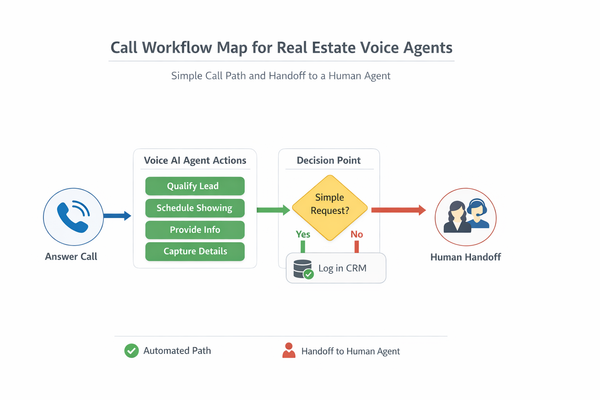
A voice AI agent for real estate is software that answers or places phone calls, understands the caller’s intent, gathers structured details, and takes actions like scheduling a showing, routing to an agent, or logging the interaction. It should also know when to hand the call to a human and how to record what happened.
This article is not legal advice, and it does not promise compliance for any vendor. Voice rules can change by region, by state, and by your exact use case. Recording consent, outreach rules (such as TCPA in the U.S.), and privacy requirements (such as GDPR in the EU) depend on your jurisdiction and use case. Get legal review before rollout.
Fits well
- Inbound listing and rental inquiries, especially after hours
- Missed-call text back, call-backs, and warm lead follow-up
- Simple qualification and routing to the right team or agent
- Scheduling and rescheduling, with calendar checks
- Property management intake that focuses on intake logistics, not decisioning
Does not fit
- Anything that needs legal judgment or regulated advice
- High-stakes decisions made only by automation (tenant approval or denial, pricing advice presented as a guarantee, or anything that could create discrimination risk)
- Calls where you cannot reliably disclose recording and consent requirements
- Scenarios where the agent would need broad access to sensitive data with no guardrails
Let’s break it down.
Where voice agents help most in real estate
Voice agents work best when you treat them like a front desk and dispatcher, not like a closer. They handle repetitive paths fast, then route to a person when the call becomes more complex.
Below are common workflows. For each one, we list what the agent does, what it connects to, where a person should step in, and what to measure.
Inbound call answering for listings and rentals
- What the agent does: Answers, confirms which listing or address the caller means, captures contact details, asks a few questions (timing, budget range, move-in date), then routes or books.
- Systems it connects to: Phone system, CRM, listing data source, calendar, team routing rules.
- Where a person steps in: When the caller asks detailed neighborhood questions, negotiates, requests an exception, or wants to speak with a named agent.
- What to measure: Appointment set rate, contact capture rate, average time to first response, drop-off rate during the first minute.
After-hours coverage and missed-call recovery
- What the agent does: Answers after hours, captures the reason for the call, offers a call-back slot or a link by text, and tags urgency.
- Systems it connects to: Phone system, calendar, CRM, messaging.
- Where a person steps in: Urgent seller calls, hot buyer ready to tour today, or any complaint about a transaction in progress.
- What to measure: Leads recovered from missed calls, bookings created outside business hours, percent of calls that reach a human.
Lead qualification and agent routing
- What the agent does: Asks a short set of questions, then routes by geography, price band, language, or team specialty.
- Systems it connects to: CRM, round-robin assignment, agent availability, call transfer rules.
- Where a person steps in: When the caller fails identity checks, asks complex finance questions, or wants negotiation talk.
- What to measure: Speed to first live contact for qualified leads, transfer success rate, caller satisfaction proxy (repeat calls, escalations).
Scheduling showings, open houses, and callbacks
- What the agent does: Offers time slots, confirms location, checks conflicts, and sends confirmations by text or email.
- Systems it connects to: Calendar, CRM, messaging, sometimes showing scheduler tools.
- Where a person steps in: When a showing needs special access, lockbox rules, or multi-party coordination.
- What to measure: Booking completion rate, no-show rate, reschedule rate, time spent by staff on booking.
For outbound calls or texts, make consent and opt-out handling a hard requirement in your design and tooling.
Follow-up and nurture calls for warm leads
- What the agent does: Calls leads who asked for info, confirms interest, answers common questions, and books next steps.
- Systems it connects to: CRM, dialer, notes and task queue, messaging.
- Where a person steps in: When the lead signals ready-to-buy or ready-to-list, or when they ask for agent advice.
- What to measure: Contact rate, conversation-to-appointment rate, pipeline movement within 7 days.
Listing inquiries: seller intake and pre-qualification
- What the agent does: Captures address, timeline, current mortgage, reason for selling, and preferred contact method.
- Systems it connects to: CRM, task routing, appointment calendar.
- Where a person steps in: Any pricing conversation that could be taken as a promise, or when the seller wants a strategy talk.
- What to measure: Completed intakes, appointment set rate, drop-offs during the intake script.
Rental inquiries: simple screening intake (logistics only)
- What the agent does: Captures move-in date, occupants, pets, preferred tour times, and sends the application link.
- Systems it connects to: Property management system, calendar, ticketing or inbox, messaging.
- Where a person steps in: Any fair housing sensitive questions, disputes, or requests for accommodation. Keep the agent away from protected-class data. Limit it to scheduling, routing, and application logistics.
- What to measure: Completed applications started, tour bookings, time saved for the leasing team.
Property management maintenance and tenant intake (logistics only)
- What the agent does: Logs the issue, checks urgency, captures photos link by text, and routes to the right queue.
- Systems it connects to: Ticketing, property management system, vendor dispatch queue, messaging.
- Where a person steps in: Emergency situations, safety risks, anything that changes access permissions.
- What to measure: Time to ticket created, first response time, percent routed to correct queue.
Open house follow-up
- What the agent does: Calls attendees, asks if they want a private tour, and logs the result.
- Systems it connects to: CRM, call list, calendar, messaging.
- Where a person steps in: When the buyer asks for negotiation, lender referrals, or wants an offer plan.
- What to measure: Contact rate after open house, booked tours, qualified buyer rate.
Where humans stay in the loop
Keep people in the loop when:
- The caller asks for pricing advice, legal guidance, or fair housing sensitive topics
- The agent needs to access or repeat personal data like IDs, banking data, or detailed lease files
- The call turns into a complaint, dispute, or escalation
- The system cannot confirm identity or match records with confidence
How to pick in 30 minutes
If you only have half an hour, do this:
- Pick one high-volume workflow (missed calls or scheduling).
- List the systems the agent must connect to (CRM, calendar, listings, messaging).
- Decide your hard boundaries (what data it must never read aloud, what it must never do).
- Decide your handoff rules (exact triggers and who receives the handoff).
- Choose between:
- A ready-made agent that you can configure in a day, or
- A platform that needs engineering but gives deeper control.
- Run a test call script with 10 real scenarios and rate it.
Now to the 2026 picks.
The 5 top solutions in 2026 (review-led selection)
We chose the five solutions below by triangulating review platforms (G2, Capterra, Trustpilot) with vendor pages on pricing, packaging, and controls. We also looked for products that match real estate workflows like inbound listing calls, lead qualification, and scheduling. We did not guess ratings, pricing, or security claims.
Security and privacy notes in this article reflect publicly stated signals and documentation. They are not a guarantee of compliance for your organization.
CallRail Voice Assist
Overview
CallRail Voice Assist is an add-on to CallRail’s call tracking product. It answers inbound calls, captures lead details, and can route or send follow-up steps like scheduling links. Teams that buy leads or run paid listings often like it because it ties call answering to attribution.
Best-fit use cases
- Inbound listing and rental inquiries
- After-hours coverage
- Missed-call recovery
- Simple qualification and routing
- Open house follow-up when you already run call tracking
Strengths
- Designed for “marketing phone” numbers and lead attribution, not just a general phone line
- Clear pricing style for the agent add-on: a monthly fee with included calls, then per-call usage
- Built to capture structured details and write them into call logs
- Good fit when you run paid campaigns and want fewer lost calls
Trade-offs
- You still need a clear script and routing rules, or you will capture messy data
- Works best for repeatable paths. Edge cases still need a person fast.
- If your team needs deep custom logic across many systems, you may outgrow the default setup
Pricing and plans (as published)
- Voice Assist costs $95 per month and includes 50 Voice Assist calls. After that, it bills $1 per additional call, and only calls longer than 15 seconds count toward usage.
- CallRail’s pricing page notes that Voice Assist sits on top of CallRail plans and that Call Tracking starts at an additional monthly cost.
Review signals (what review sites show)
- G2: 4.5/5 from 1,658 reviews. (G2 ratings and review counts typically reflect CallRail (the core call tracking product). Voice Assist is an add-on within the CallRail platform, so treat those reviews as a signal for the broader product experience).
- Common praise centers on call tracking, searchable call logs, and attribution.
- Common complaints mention cost as usage grows and setup effort across many numbers.
Security and privacy signals (only what sources show)
- CallRail’s Voice Assist materials and help articles describe redaction options in certain configurations, including handling sensitive health information.
Notes on consent and retention controls
- Add a recording disclosure at the start of calls when your jurisdiction requires it.
- Treat consent, opt-outs, and retention as part of the flow design, not an afterthought. Rules vary by region, so confirm requirements with counsel.
Smith.ai AI Receptionist
Overview
Smith.ai AI Receptionist is a receptionist-style answering service that uses an automated agent and can route to humans when needed. It fits teams that need coverage all day and want consistent intake without hiring a front desk staff member for every office.
Best-fit use cases
- Inbound lead answering for listings and rentals
- Lead qualification and routing
- Appointment scheduling and call-back booking
- After-hours coverage and overflow coverage
- Follow-up calls for warm leads, when you need a consistent script
Strengths
- Hybrid model: automation for routine calls, and a human can step in for exceptions
- Strong fit for teams that want front desk consistency across multiple agents
- Lots of review data across multiple platforms, which makes it easier to validate patterns
- Clear packaged tiers with included call volume, then per-call overage
Trade-offs
- Any scripted agent can mis-hear names, addresses, or emails. You need review and correction steps.
- Some callers dislike talking to an automated receptionist. Your handoff design matters.
- You must align the agent’s script with your brand voice and your routing rules.
Pricing and plans (as published)
Smith.ai publishes tiered monthly plans with included calls plus overage:
- Starter: $95/month for 50 calls (overage per call)
- 150-call tier: $270/month for 150 calls (overage per call)
- Pro: $800/month for 500 calls (overage per call)
- Enterprise: quote-based
Review signals (what review sites show)
- G2: 4.7/5 (21 reviews) for Smith.ai AI Receptionist.
- Capterra: 4.8/5 (29 reviews) for Smith.ai. (Capterra may list Smith.ai under broader product pages while still showing pricing for AI Receptionist. Use the vendor pricing page as the source of truth for plan details.)
- Trustpilot: 4.3/5 (331 reviews) for Smith.ai.
Recurring praise mentions responsiveness, support, and the mix of automation with human backup. Recurring complaints mention occasional transcription mistakes, caller preference for a human, and voice options.
Security and privacy signals (only what sources show)
- Smith.ai publishes call recording guidance and describes access to recordings and call summaries within the product.
Notes on consent and retention controls
- If you record calls, confirm your recording disclosure language and consent flow for each region you serve.
- Treat TCPA consent and opt-outs as a system requirement if you run follow-up calls or texts. This article is not legal advice.
Five9 (with Intelligent Virtual Agent)
Overview
Five9 is a cloud contact center product that can run voice and digital channels. Its Intelligent Virtual Agent (IVA) adds automated self-service and triage across channels, plus handoff to live agents. Real estate teams use products in this category when they run a central call desk for many offices, property managers, or high inbound volumes.
Best-fit use cases
- High-volume inbound lead answering
- Agent routing and queueing across many teams
- After-hours coverage with consistent triage
- Follow-up calls and outbound campaigns from a central call desk
- Property management intake routed into ticket queues
Strengths
- Mature call center controls: queues, routing, reporting, and recordings
- IVA supports voice and other channels, so you can reuse intents and scripts
- Vendor publishes pricing tiers by seat for entry plans, plus quote-based higher tiers
- Published data retention policies and a published data processing addendum
Trade-offs
- Contact center suites take real setup work. Budget time for admin training and scripting.
- Most teams need engineering support for deeper connections to CRM and property systems.
- You may pay for features you do not need if your workflow is only “answer and book”.
Pricing and plans (as published)
Five9 publishes entry pricing by seat:
- Digital-only tier: $119 per seat per month
- Tier that includes voice plus digital: $159 per seat per month
- Higher tiers: quote-based
Review signals (what review sites show)
- G2: 4.1/5 from 594 reviews.
Review themes often mention routing and feature breadth as positives, with setup burden and support experience as recurring friction points.
Security and privacy signals (only what sources show)
- Five9 publishes security and privacy pages.
- Five9’s data processing addendum references maintaining ISO/IEC 27001 and a SOC 2 Type 2 report.
- Five9 publishes data retention policies and documentation describing default retention windows for certain data types.
- Five9 documentation states a default retention period for call recordings and notes how to extend it.
Notes on consent and retention controls
- Use recording controls and retention settings that match your policy, then test them.
- For outbound follow-up calls and texts, confirm consent and opt-out handling under TCPA and related rules. This article is not legal advice.
Genesys Cloud CX (with voicebots and virtual agents)
Overview
Genesys Cloud CX is a cloud contact center product with built-in bot flows, virtual agents, and voicebot options. It suits brokerages or property managers that run many inbound calls and want one system for routing, call handling, recordings, and agent support.
Best-fit use cases
- Centralized inbound line for many teams
- Multi-queue routing for listing inquiries, rentals, and property management
- Scheduling and call-back booking through self-service flows
- Open house follow-up through a dialer plus scripts
- Escalation workflows with clear handoff points
Strengths
- Published pricing for multiple editions
- Documentation for bot flows and virtual agents
- Strong review footprint on G2, which makes trade-offs easier to validate
- Vendor materials describe security and privacy options
Trade-offs
- You need admin skill to build and maintain flows, especially once you add many paths
- Custom workflows can grow fast. Keep a tight change process.
- If you only need a simple receptionist agent, a full contact center suite may be more than you need
Pricing and plans (as published)
Genesys lists per-user monthly pricing billed annually for multiple editions, including:
- Genesys Cloud CX 2: $115 per user/month
- Genesys Cloud CX 3: $155 per user/month
- Genesys Cloud CX 4: $240 per user/month
Genesys also notes that some advanced AI capabilities use tokens and that usage-based charges may apply.
Review signals (what review sites show)
- G2: 4.4/5 from 1,522 reviews.
Common praise mentions having many channels and tools in one place. Recurring complaints mention the learning curve and setup effort for advanced routing and reporting.
Security and privacy signals (only what sources show)
- Ask Genesys for its security packet (certifications, DPA, retention controls) during procurement, and map it to your policy.
Notes on consent and retention controls
- Treat recording disclosure as a first step in the flow for regions that require it.
- If you operate in the EU, align call recording and storage with GDPR requirements around personal data.
Amazon Connect (often paired with Amazon Lex)
Overview
Amazon Connect is a cloud contact center service from AWS. Teams often pair it with Amazon Lex for conversational bots inside contact flows. In day-to-day use, it acts like a buildable call center and voice agent stack. It suits teams with engineering capacity that want pay-as-you-go voice plus deep control.
Best-fit use cases
- Custom inbound call flows for listings, rentals, and property management
- Automated triage before routing to teams
- Scheduling and call-back flows with deep system connections
- Post-call logging into CRM and analytics pipelines
- Consent, retention, and audit needs when you want AWS-native controls
Strengths
- Clear pay-as-you-go pricing for voice and related features, plus optional pricing modes for some AI features
- Flexibility: you can build flows, call bots, and tool calls with AWS services
- Mature documentation for flow blocks, voice settings, and connecting Lex bots
- AWS publishes guidance on retention policies for contact recordings stored in S3
Trade-offs
- You need engineering time. A non-technical team can get stuck.
- Your team owns more moving parts, so you also own more monitoring work.
- Budget for telephony charges, storage, analytics, and bot usage, not just minutes.
Pricing and plans (as published)
- AWS pricing pages and third-party pricing summaries list voice usage at $0.018 per minute (rates vary by region and number type), plus separate charges for add-ons such as cases. The $0.018/min figure refers to Amazon Connect service usage. Telephony charges for inbound and outbound calling, phone numbers, and carrier rates are billed separately and vary by country and number type.
Review signals (what review sites show)
- G2: 4.5/5 (73 reviews).
- Capterra: 4.5/5 (89 reviews), with provider data verified and a recent page update date.
Reviews often praise flexibility and the cost style, with setup burden as a recurring drawback.
Security and privacy signals (only what sources show)
- Amazon Connect documentation describes where recordings live and how retention can be controlled through S3 lifecycle policies.
- AWS documentation describes S3 Object Lock for immutable call recordings and includes guidance for retention design.
Notes on consent and retention controls
- Build a recording disclosure step into your flows when your region requires it.
- If you use follow-up calls or texts, confirm TCPA consent and opt-out handling with counsel.
Build vs buy for real estate voice agents
Most teams do not choose “vendor or custom” once. They often start with a vendor to prove the workflow, then move to custom when the call flow becomes a real part of revenue operations.
Use these decision factors:
- Connection depth: Do you need deep links to CRM, calendar, listings, ticketing, and reporting?
- Control: Do you need custom scripts per office, per language, per campaign?
- Cost shape: Do you want a flat subscription, per-seat, per-call, or per-minute?
- Time to first result: Do you need a pilot next week, or can you spend weeks on setup?
- Audit needs: Do you need approval gates, change history, and role-based access?
- Lock-in risk: How hard will it be to move your flows and data later?
- Consent handling: Do you need fine-grained control over recording prompts, opt-outs, and retention windows?
- Reporting: Do you need call outcomes and fields in your CRM in a strict format?
A pilot path that works for both
- Pick one workflow: after-hours lead capture or scheduling.
- Define your “done” outcome in one sentence.
- Write 10 call scripts from real situations, including messy ones.
- Decide handoff triggers and who gets the handoff.
- Run a 2-week pilot with a single phone number.
- Review call recordings daily for the first week.
- Ship changes on a fixed cadence, not ad hoc.
- Expand to more numbers and teams only after metrics stay stable.
A practical evaluation plan
Use this checklist as your plan. Run it with sales, ops, and engineering in the same room.
You do not need a perfect rating. Use a simple rubric:
- Low: The product cannot meet the need without major workarounds.
- Medium: The product meets the need with some limits you can accept.
- High: The product meets the need cleanly and you can run it with confidence.
Evaluation checklist
- Define the single workflow you will pilot first (missed calls, scheduling, or routing).
- List your data boundaries: what the agent may read, store, and say out loud.
- Decide recording policy: when to record, where to store, and who can access.
- Add a consent step at the start of every flow path where required.
- Define opt-out handling for follow-up calls and texts.
- Write the intake questions you want, in plain language.
- Define handoff triggers (caller asks for a person, low confidence, escalation).
- Decide routing rules (geo, price band, language, office, team).
- Decide what gets written into the CRM (fields, tags, and call outcomes).
- Test calendar booking rules: time zone, buffers, double-book prevention.
- Test failure paths: CRM down, calendar down, number unavailable, silence.
- Test identity checks for existing clients without exposing sensitive data.
- Review transcripts quality with real accents and noisy calls.
- Check admin controls: roles, permissions, audit trails, approvals.
- Check export paths: can you move recordings and logs to your own storage?
- Check vendor support path and response time expectations.
- Run a red team script: angry caller, prank caller, spam caller, agent name spoof.
- Track results weekly and decide “go / change / stop”.
Partner with Lexogrine
Lexogrine is an AI agent development company that builds custom voice agents for real estate teams. We build systems that match how your brokerage or property group actually works, not how a generic product wants you to work.
Here is what you gain with a custom voice agent for real estate:
- More flexibility in call flows, scripts, and routing logic. You can version flows per office, per campaign, and per language, with approval gates.
- Better fit with your existing stack. We connect your voice agent to your CRM, telephony, calendars, listing data, ticketing, and analytics, with clear data boundaries.
- Better cost control. You can model unit economics per call or per lead, choose your telephony and model providers, and reduce lock-in risk.
- Stronger governance. We can add audit logs, role-based access control, and change approvals so ops and engineering both sleep at night.
- Better control of PII handling, consent, and retention. You can decide what gets stored, for how long, where it lives, and who can retrieve it.
We deliver full-stack systems with React, React Native, Node.js, and cloud builds on AWS and GCP. We also build the operational layer: prompts, scripts, testing harnesses, monitoring, and safe human handoff.
Want to see what this looks like in your environment?
- Start with an audit of your current call flow and missed-call rate
- Or request a small pilot for one number and one workflow
Book a call with Lexogrine and bring one workflow. We will map the flow, define the guardrails, and propose a pilot you can run in weeks.