What is Always On Memory Agent
Editorial note: This article is an independent technical analysis of a public Google Cloud Platform sample repository. It is not affiliated with, endorsed by, or sponsored by Google. Product names such as Google, Gemini, Vertex AI, and ADK are referenced for identification and commentary purposes only.
Verification note: Repository structure, sample behavior, and referenced documentation were reviewed against the public materials available at the time of writing. Because sample repositories and platform documentation can change, readers should verify implementation details before relying on them in production.
Always On Memory Agent is a small open source agent sample from Google’s GoogleCloudPlatform/generative-ai repository. It runs as a background process that ingests new content, turns that content into structured memory records, stores them in SQLite, and later answers questions from that stored memory.
Plain English version, it is a working pattern for giving an agent memory across sessions without adding a vector database. Based on the repository structure, current commit history, and local-first implementation, this appears to be a demo and reference sample rather than a production-ready product out of the box.
Still, in the current sample flow, the instructions end by calling store_memory. There is no explicit threshold that says, “skip this, it is too trivial,” even though the model does assign an importance score. So the sample filters by structure, not by a hard write gate.
What does it not solve by itself? It does not give you tenant separation, business system connections, review flows, fine grained retention rules, audited access control, or a production memory policy. It gives you a concrete pattern you can inspect, test, and adapt.
Why memory matters in AI agent systems
Here is why. Real work rarely fits inside one chat window.
A support rep might talk to the same customer for days. A sales agent might need to remember buying signals from last week. An internal assistant might need to carry forward the team’s preferred format for standups, the owner of a release, and the blockers that came up yesterday.
Without memory, every one of those flows falls back to one bad habit. Ask again. Ask the user to repeat the context. Ask the user to restate preferences. Ask the user to upload the same document twice. That friction pushes agents out of useful work and back into novelty.
Here is the first distinction that matters. Chat history is not the same thing as usable memory.
Chat history is raw chronology. It tells you what happened in order. That can help inside one session, yet it grows fast and turns noisy. Long transcripts also become expensive to send back into the model on every turn.
Usable memory is selective. It keeps the parts that still matter later. A user prefers CSV exports. Their team uses Jira, not Asana. A customer has two open issues. A project changed owners on Friday. Those facts have a longer shelf life than the exact wording of every message.
Google’s own ADK docs draw a line between session state and long term memory. Session services keep the active conversation context. Memory services keep durable knowledge that can be recalled across sessions. That split is the right mental model for teams building real agents.
Long-term memory matters most when the agent needs continuity, not just conversation. That includes:
- personalization across sessions
- fewer repeated questions
- prior task context
- relationship context
- work history that carries forward
- memory of preferences and standing rules
This is why memory has become a real design question for assistants, copilots, internal tools, and customer-facing agents. Teams are no longer asking, “Can the model answer?” They are asking, “Can the system remember the right thing at the right time?”
What Google’s Always On Memory Agent project is
The project lives inside Google’s public generative-ai repository under gemini/agents/always-on-memory-agent. The folder appears in the public repository history on March 3, 2026, in a commit describing it as an always-on memory agent demo built with Gemini 3.1 Flash-Lite and ADK.
The README positions the sample around one clear idea. Keep a memory layer running all the time, let it ingest new inputs as they appear, consolidate what it has learned, and answer later questions from that stored memory. The supported inputs include plain text plus images, audio, video, and PDF files.
The stack is unusually simple:
- Google ADK for agent structure and tool calling
- Gemini 3.1 Flash-Lite Preview as the model
- SQLite as the persistent store
aiohttpfor the local HTTP API- Streamlit for a local dashboard
That stack matters because it tells you what the sample is trying to teach.
It is not demonstrating the managed Vertex AI Memory Bank service. Instead, it shows a local, code-first memory pattern where the model reads inputs, extracts structured records, writes them to a simple SQLite database, and later reads those records back to answer questions.
That choice also lines up with the README’s point that the sample does not use a vector database or embeddings. In this repo, memory is not “store everything as vectors and run nearest neighbor search.” Memory is “store structured summaries, entities, topics, importance scores, and later synthesizes from those records.”
One easy place to misread the sample is the dashboard. The UI uses the label “Memory Bank” for the local memory view, but in this sample, that screen is backed by the project’s own HTTP API and SQLite store, not the managed Vertex AI Memory Bank service.
This makes the project tightly tied to Google’s agent tooling and model family, yet only loosely tied to Google Cloud as hosted infrastructure. You can run it locally with a Google API credential. You do not need Vertex AI Memory Bank, Agent Engine, Cloud Run, or a managed database just to see the pattern work.
Architecture walkthrough
The architecture description below is based on the public repository contents and visible code paths at the time of writing. As with any active sample repository, implementation details may change over time.
Let’s break it down.
At a plain English level, the sample has six layers.
1. User interaction layer
The project accepts new information in three ways:
- a watched local folder named
./inbox - HTTP endpoints such as
/ingest,/query,/status,/memories,/delete, and/clear - a Streamlit dashboard that wraps those local endpoints
That gives the sample two modes. You can drop files into a folder and let the watcher pick them up, or you can drive the agent through the local API and dashboard.
2. Agent runtime and orchestration layer
The main runtime lives in agent.py. It builds one parent agent named memory_orchestrator and three sub agents:
ingest_agentconsolidate_agentquery_agent
The parent agent routes work to one of those sub agents based on the task. New information goes to ingestion. Memory cleanup and synthesis go to consolidation. User questions go to query.
This is a clean use of ADK as an orchestration shell around custom tool functions. The sample does not depend on ADK’s built-in long-term memory service. It uses ADK for agent structure, function calling, and runner control, while the actual memory layer sits in custom code.
3. Memory writing logic
The ingest agent handles the write path.
For text, the sample sends the content to Gemini and asks the model to do four things:
- write a one to two sentence summary
- extract named entities
- assign topic tags
- rate importance on a
0.0to1.0scale
It then stores the raw text plus that structured metadata in SQLite.
For images, audio, video, and PDFs, the sample sends file bytes inline to Gemini with the detected MIME type. The instructions tell the model to describe the content, summarize it, extract entities and topics, rate importance, and save the result as memory. PDF handling follows the same route, with the agent told to extract and summarize the document.
4. Storage layer
SQLite is the long term store. The code creates three tables:
memoriesconsolidationsprocessed_files
memories holds the raw text, summary, entities, topics, connections, importance score, source, timestamp, and a consolidated flag.
consolidations holds higher-level summaries and insights derived from groups of earlier memories, plus the source memory IDs that fed that consolidation.
processed_files keeps track of which files the watcher has already ingested, so the same file does not get processed again.
5. Retrieval layer
The retrieval path is simple and this is one of the biggest things to understand before you reuse the sample.
In the current public sample code, the query path does not run a vector search. It calls tool functions that read recent rows from SQLite. Based on the current public code, the agent reads up to the most recent 50 memories and up to the most recent 10 consolidations, then asks Gemini to answer the user’s question from that retrieved memory context.
That means retrieval is LLM synthesis over recent structured records, not semantic search over a large memory corpus. This works well for a small demo. It becomes a real design limit once your memory store grows.
6. Background loops and model inference
Two background loops keep the sample “always on.”
The file watcher scans the inbox every few seconds for new files. A consolidation loop wakes up every 30 minutes by default, reads unconsolidated memories, and if it finds at least two, asks Gemini to detect patterns and produce a synthesized summary plus one insight. Based on the current helper function, that consolidation pass looks at up to the 10 most recent unconsolidated memories.
The same model, Gemini 3.1 Flash-Lite Preview, handles ingestion, consolidation, and query time synthesis. This keeps the system simple. It also means model cost and memory quality are tied to every stage of the pipeline.
A simplified flow
You can think about the sample like this:
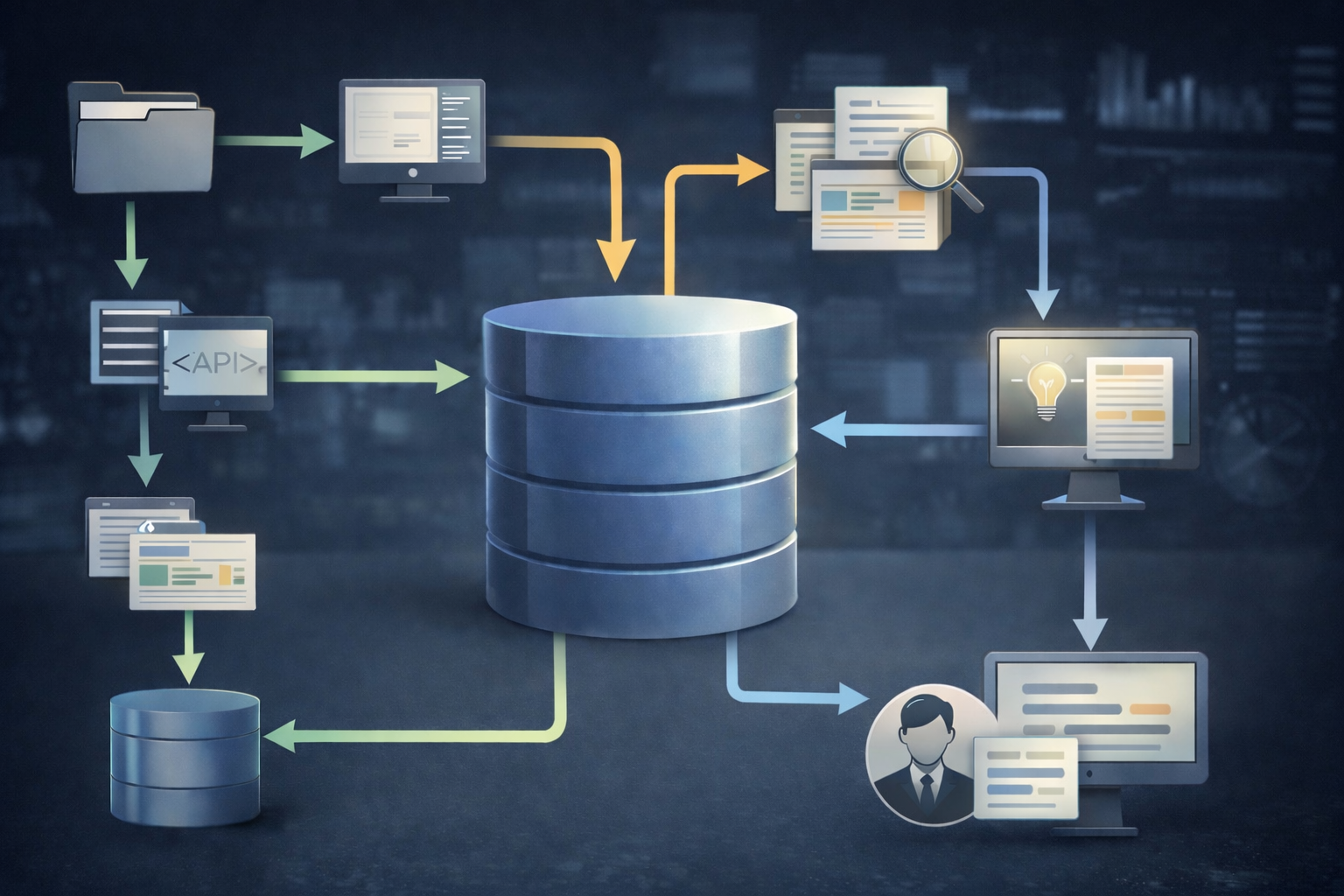
new input -> ingest agent -> summary + entities + topics + importance -> SQLite memory row -> periodic consolidation -> later query -> recent memories loaded -> Gemini writes answer
That is the full memory loop in one line.
How memory works in this project
Now let’s get concrete about what “memory” means in this repo.
A memory record is not just a transcript chunk. It is a structured entry with fields such as:
- source
- raw text
- short summary
- entity list
- topic list
- importance score
- timestamp
- connection links added during consolidation
That matters because the repo chooses a selective structure over raw recall.
When are memories created?
A new memory is created whenever the ingest path runs successfully. That can happen from pasted text, uploaded files through the dashboard, POST requests to /ingest, or files discovered by the watcher in the inbox directory.
What kinds of memories are stored?
Based on the code, the store mixes raw source text with extracted metadata. It also stores second-order memories in the consolidations table. Those consolidation records capture a grouped summary and one insight produced from multiple earlier memories.
How are memories retrieved?
The query path reads recent memory rows and recent consolidation rows from SQLite, then asks Gemini to answer from those rows alone. One small but telling detail, the query helper returns summaries and metadata for recent memories, not the stored raw_text field. So recall already happens over compressed memory, not full source content.
What is the memory scope?
This is one of the most useful findings in the whole repo. The SQLite schema does not include user ID, tenant ID, account ID, or workspace ID fields on the memory rows. The ADK runner also uses InMemorySessionService, which does not persist session state across restarts. In the session creation path, the user ID is fixed as "agent".
In its current form, the sample behaves like a single shared memory store for one local agent instance rather than a user scoped memory system out of the box.
That is a big difference from Google’s managed Vertex AI Memory Bank, which scopes memories by identity and supports isolated memory scopes plus retrieval by scope. If you plan to move from a demo to a real product, this is one of the first gaps you will need to close.
That distinction matters commercially and legally: a local sample repository should not be described as providing the same isolation, retention, access control, or retrieval guarantees as a managed Google Cloud service unless those controls are actually implemented.
Does the system store everything blindly?
Not quite, yet not fully selectively either.
The sample does ask Gemini to classify each input and create a summary before saving it. That reduces raw noise and gives later queries cleaner material to work with. The consolidation step also rolls multiple memories into higher level summaries and links.
Still, the current instructions always end by calling store_memory. There is no explicit threshold that says, “skip this, it is too trivial,” even though the model does assign an importance score. So the sample filters by structure, not by a hard write gate.
This is a sensible choice for a demo. In a product, many teams would add write rules such as:
- only save facts with user value beyond the current session
- never save secrets or payment data
- ask for consent before storing preference data
- expire time sensitive memories
- require human review for memories that could affect account actions
Setup, dependencies, and deployment model
Here is the setup path as it exists today.
The README asks you to install the Python dependencies, set GOOGLE_API_KEY, and run python agent.py. If you want the dashboard, you run streamlit run dashboard.py in a second process.
The repo exposes a few settings through environment variables and flags:
GOOGLE_API_KEYfor model accessMODEL, with a default ofgemini-3.1-flash-lite-previewMEMORY_DB, with a default ofmemory.db- CLI flags for the watch folder, API port, and consolidation interval
The local API defaults to port 8888. The Streamlit dashboard defaults to port 8501. The dashboard expects the API at http://localhost:8888 and writes uploads into ./inbox.
These defaults describe the sample’s local development setup, not a recommended production deployment model.
So what does a team need to run it?
- Python
- a Google API credential
- outbound access to Gemini
- local disk for SQLite and inbox files
Teams should also verify the current Gemini API terms, regional availability, billing model, and service restrictions for their intended deployment, especially for customer facing applications.
This makes the sample easy to test on one machine. It also exposes the limits right away.
What is easy
- local setup is short
- the codebase is small
- the storage model is easy to inspect
- there is no separate vector store to run
- multimodal ingest works from one pipeline
What would typically need additional product and engineering work before customer-facing use
- the public sample does not show an application level authentication layer around the local API
- memory is stored in one local SQLite file
- there is no tenant partitioning
- ADK session state is in memory and disappears on restart
- the watched folder assumes a local filesystem
- media ingest has a 20 MB inline file limit in code
- text file ingest only reads the first 10,000 characters
- retrieval only scans recent rows, not a large corpus
- the repo ships no Docker files, infra config, or managed service setup
This is why the sample feels strongest as a starter and reference pattern. It teaches the moving parts. It does not remove the product, security, governance, and delivery work around them.
Where Always On Memory Agent fits in real products
The sample is small, yet the memory pattern maps to many business cases.
Internal knowledge assistant
Say a team lead drops weekly notes, design docs, meeting summaries, and support escalations into the agent. The system extracts short summaries, entities, and topics, then later answers questions like “What blockers came up around the release train last month?”
What memory adds here is continuity across many small inputs. The limit is trust. Unless you keep source links and a human review path, teams will still want to verify answers against the original docs.
Customer support agent
A support agent can remember preferred contact channel, prior issue history, product tier, recent bug workarounds, and promised follow ups. That reduces repeated questions and shortens the first reply.
The limit is scope and privacy. A production support flow needs account-level memory, deletion controls, retention rules, agent review screens, and very clear boundaries on what can be remembered.
Sales assistant
A sales assistant can store a prospect’s budget range, preferred timeline, objections raised on the first call, and who else joined the buying committee. On the next interaction, the system can start from that context instead of asking the same discovery questions again.
The limit is truth and freshness. Sales memory can go stale fast. Teams need a way to update or expire old facts so the agent does not pitch against last quarter’s reality.
Operations agent
Operations work often depends on what happened before. Shift handoffs, runbook changes, recurring incidents, and partial fixes all benefit from a memory layer. A memory loop can help the next operator see “what we already tried” without replaying the full incident thread.
The limit is authority. The memory store should not become the only source for risky actions. For actions that touch production systems, teams still need approved runbooks and clear source precedence.
Personal productivity assistant
A single user assistant is one of the best fits for the sample as written. It is close to the repo’s current shape: one agent instance, one memory store, one stream of notes, uploads, and questions over time.
The limit is device and app reach. A real assistant usually needs mobile access, push flows, calendar and mail connections, and synced user identity across web and phone.
Multi-session business workflows
This is the broad category behind all of the above. Whenever a workflow spans days, people, tasks, and channels, memory starts to matter more than one more clever prompt.
That is the real lesson in Google’s sample. The point is not “look, the agent can answer a question.” The point is “look, the system can keep building a memory base while nobody is talking to it.”
Benefits and tradeoffs
The upside of this pattern is easy to see.
First, it gives continuity across sessions. You do not need to resend the same facts each time.
Second, it turns memory into a visible data model. Because the repo stores summaries, topics, entities, importance, and consolidation rows in SQLite, you can inspect what the agent believes it knows.
Third, it keeps the stack small. If your use case is narrow and your memory volume is modest, a structured SQLite store can be easier to reason about than a full retrieval stack.
Fourth, it handles multimodal input in one loop. Text, images, PDFs, audio, and video all end up as memory rows with the same general shape.
Now the tradeoffs.
Retrieval quality can drift
In this pattern, the agent is only as good as the memories it saved and the memories it loaded back in. If the write path stores a weak summary, or if the relevant memory fell outside the recent rows loaded at query time, the answer can miss or distort the fact.
Memory can go stale
A stored preference may change. A project owner may change. A bug may be fixed. Long term memory is useful only if the system can revise or expire old knowledge.
Google’s managed Memory Bank leans into this with generated memories, consolidation, scopes, retrieval modes, and TTL settings. The sample repo gives you a taste of consolidation, but not the full managed memory policy layer.
Wrong memory can be worse than no memory
A stateless agent asks again. A memory enabled agent may answer with confidence from a bad stored fact. This is why teams need source visibility, correction flows, and rules about what memory can override.
Privacy work grows fast
Once an agent remembers people, it starts holding personal and business context. That creates decisions about consent, retention, deletion, access, and redaction. The sample does not solve those product questions for you.
Cost follows every stage
This pattern makes model calls when new content arrives, when memory consolidation runs, and when the user asks a question. If you ingest long documents, media files, or high volumes of updates, spend rises with each stage of the loop.
Maintenance does not disappear
A memory layer needs cleanup, revision rules, testing, and observability. Otherwise, you end up with a polite assistant that remembers the wrong things.
Security, privacy, and governance concerns
Let’s keep this plain.
Nothing in this sample should be read as a compliance framework, legal retention policy, or regulated data handling template. Teams deploying memory enabled agents still need their own legal, security, and governance review.
Memory is product design plus data policy, not just agent design.
The sample code makes that clear by omission. It shows how to write and recall memory. It does not add auth around the local API, does not partition memory by tenant, and does not show a review or audit surface for memory decisions.
That is fine for a demo. It is not enough for customer or employee data.
Here are the concerns teams should settle before they ship a memory enabled agent.
1. What data can be remembered
Do not treat every message as fair game. Decide what categories are allowed, blocked, or require consent. Preferences may be acceptable. Credentials, card data, or health data may need a full stop.
That review should be tied to the actual data categories in scope, applicable law, customer commitments, and the terms of the model and platform services being used.
2. How long memories live
Some memories should last for months. Some should expire in days. Some should never be stored. Google’s managed Memory Bank supports TTL settings and revision expiration. If you build your own layer, you need the same kind of policy in your schema and jobs.
3. How memory is scoped
One user, one account, one workspace, one device, one project, one ticket. You need to choose the right scope and enforce it in every read and write path. The sample repo does not do this today.
4. How users fix bad memory
If the agent stores a false fact, what happens next? Can a user delete it? Can an admin lock a memory? Can the system show the source and the last update time?
Without a correction loop, memory errors linger.
5. How you handle prompt injection and memory poisoning
Google’s Memory Bank docs call out prompt injection and memory poisoning as real risks. The danger is simple. Bad or misleading content gets written into memory, then later the agent acts on it as if it were true.
That risk exists in this sample too. If you let the watcher ingest arbitrary files and write memories from them, you need rules around source trust, red teaming, review paths, and safe action boundaries.
6. Who can access memory and why
A memory store becomes sensitive fast. Teams need access control, audit logs, and role rules around who can view, edit, export, or clear memories. A delete endpoint alone is not governance.
Should you use Google’s project as is, adapt it, or build your own
Here is the practical decision frame.
Use it mostly as is when
- you want to understand the memory loop fast
- you are building an internal demo
- one user or one team will use it
- the data is low risk
- you want a local sample that is easy to inspect
- your goal is learning and experimentation, not customer-facing launch
This is where the repo shines. It is small, concrete, and honest about the pattern.
Adapt it when
- you like the structure, yet need user-scoped memory
- you want a real database instead of local SQLite
- you need web app auth and admin controls
- you want source links, memory editing, and retention rules
- you need business system connections
- you plan to keep the “structured memory, no vector DB” approach for a bounded use case
At this stage, the repo becomes a starting point, not the product.
Build your own memory layer when
- you are serving many customers
- you need tenant isolation
- your product must connect with CRM, ticketing, or internal systems
- you need mobile apps and web apps around the agent
- you need review flows before actions
- you need observability, tracing, and evals
- your memory volume is too large for recent row recall
- you want mixed memory types such as profile facts, session summaries, event history, and retrieved knowledge from source systems
This is where a custom build usually wins. Not because the sample is weak, but because production memory is part backend, part policy, part admin tooling, part frontend, and part model behavior.
A 30 minute fit check
Ask these questions before you choose your route:
- Is memory single user, per account, or multi tenant?
- What facts should expire, and when?
- What facts need human review?
- Will users need to inspect and edit memory?
- Does memory need to sync with your source systems?
- Are answers allowed to rely on memory alone, or must they show source records?
- Is recent row retrieval enough, or do you need semantic recall at larger scale?
- What happens when memory is wrong?
- Who owns the deletion and retention policy?
- Do you need web and mobile delivery around the agent?
If you can answer those in under half an hour, you will know whether this repo is a test bed, a starter, or the wrong shape for your product.
Minimal example mental model
Here is a simple mental model that matches the repo’s pattern.
A user tells the agent: “I manage the Warsaw office rollout, and I prefer Friday status reports in CSV.”
The ingest path sends that text to Gemini. The model writes a short summary, extracts entities like “Warsaw office rollout,” tags it with topics such as reporting and operations, assigns an importance score, and stores it in SQLite.
A week later, the user starts a new session and asks: “How should you send the rollout update?”
The query path loads recent memories and consolidation summaries from SQLite. Gemini sees the stored memory about Friday CSV reports and answers: “You prefer Friday status reports in CSV, so I should prepare the update in that format.”
Nothing magical happened. The system did four very concrete things:
- noticed a memory-worthy fact
- stored it in a structured row
- recalled it in a later session
- used it to shape the answer
That is the whole value of a memory agent. Better continuity, with a memory layer you can inspect and control.
Brand and product note: Google, Gemini, Vertex AI, and ADK are trademarks or product names of Google or its affiliates. This article is an independent analysis based on public materials and does not imply endorsement, partnership, or product certification by Google.
Editorial separation note: The analysis above is editorial. Any section below describing Lexogrine services is commercial content and should be read separately from the technical analysis.
Partnering with Lexogrine
Lexogrine is an AI agent development company that builds custom agent systems from scratch, not just the agent logic. We can build the agent backend, the memory layer, the admin panel, and the full product around it across web and mobile with React, React Native, Node.js, and AWS. That means one team can ship the agent plus the business software around it, from customer portals and internal tools to mobile apps and review panels.