The state of mobile AI products in 2026
Many mobile AI products in 2026 increasingly combine on-device processing for text, voice, and vision with cloud models for heavier reasoning tasks. This shift can improve privacy, reduce latency, and enable selected offline workflows, especially when sensitive data can stay on the device.
Consumers expect applications to reply quickly, understand context, and handle personal data responsibly without draining the device battery or sending every photo, voice note, or document to an external server. The hardware market has shifted to support this demand. Hundreds of millions of GenAI-capable smartphones have shipped globally, creating a growing base of devices that can run selected AI workloads locally.
Apple and Android manufacturers have embedded specialized neural processing units into many flagship devices. This allows selected AI workloads to run directly on the device instead of always being sent to a remote server. Product teams no longer need to depend strictly on cloud infrastructure to deliver intelligent features.
This local processing power solves specific business problems. Running selected models directly on the phone can reduce recurring inference costs for tasks that do not require cloud processing. It allows applications to keep working in remote areas, construction sites, aircraft, warehouses, hospitals, or other environments where connectivity is weak or unavailable. Handling sensitive data locally can also make privacy compliance easier, especially when private audio, images, financial information, or health-related text do not need to leave the device.
Local computing does not replace massive cloud servers entirely. Small language models running on a phone still struggle with highly complex reasoning, very large context windows, constantly updated knowledge, and tasks that require cross-referencing huge datasets. A phone does not have the same memory, compute capacity, or operational flexibility as a cloud environment. Modern software teams recognize these limitations and build architectures that use the strengths of both environments.
Disclosure and trademarks: Lexogrine is not affiliated with the vendors, platforms, frameworks, or model providers mentioned in this article, unless explicitly stated. Product names, company names, frameworks, and model names may be trademarks of their respective owners. References are for identification and informational purposes only and do not imply endorsement, certification, or partnership.
Why local AI changes the business model
Paying for cloud APIs for every frequent, low-value interaction can quickly put pressure on product margins. When thousands of active users query an external model provider simultaneously, the server bill can grow unpredictably.
Running a model through a cloud API usually costs money every time a user sends a prompt or receives an output. Premium models designed for heavy reasoning charge higher rates for input and output volume. If a product serves tens of thousands of daily queries through a paid external provider, the company may spend heavily just to keep the application running.
Native operating system models and local models can reduce per-inference server costs to zero for supported on-device tasks, although teams still pay for engineering, testing, distribution, optimization, analytics, and fallback infrastructure. The user’s phone does the computing, which means the company does not pay an external provider for every supported local inference.
Offline functionality can also be more attractive to B2B and enterprise clients in industries where connectivity, privacy, or field work are major constraints. Construction crews need voice-to-text reporting tools while standing in concrete basements without reliable internet access. Healthcare workers may need dictation software that minimizes the transfer of sensitive recordings to third-party services. Field service teams may need diagnostic tools that work inside factories, underground facilities, or remote areas.
Small models running natively can support these workflows. Teams building specialized industry tools can position their software as more resilient, privacy-conscious, and usable in low-connectivity environments.
Local models also solve practical product problems related to user experience. Fast UI reactions keep people engaged. Typing a query and waiting several seconds for a remote response can make an application feel slow, especially for simple tasks. Local hardware can return results quickly for small classification, summarization, extraction, routing, formatting, or autocomplete tasks.
The cost structure of maintaining these systems also shifts. While local models do not create external inference fees for supported tasks, they require specialized engineering. Teams must choose the right model, compress or quantize it, test it across devices, optimize battery and memory usage, and design fallback paths when the device cannot handle the workload.
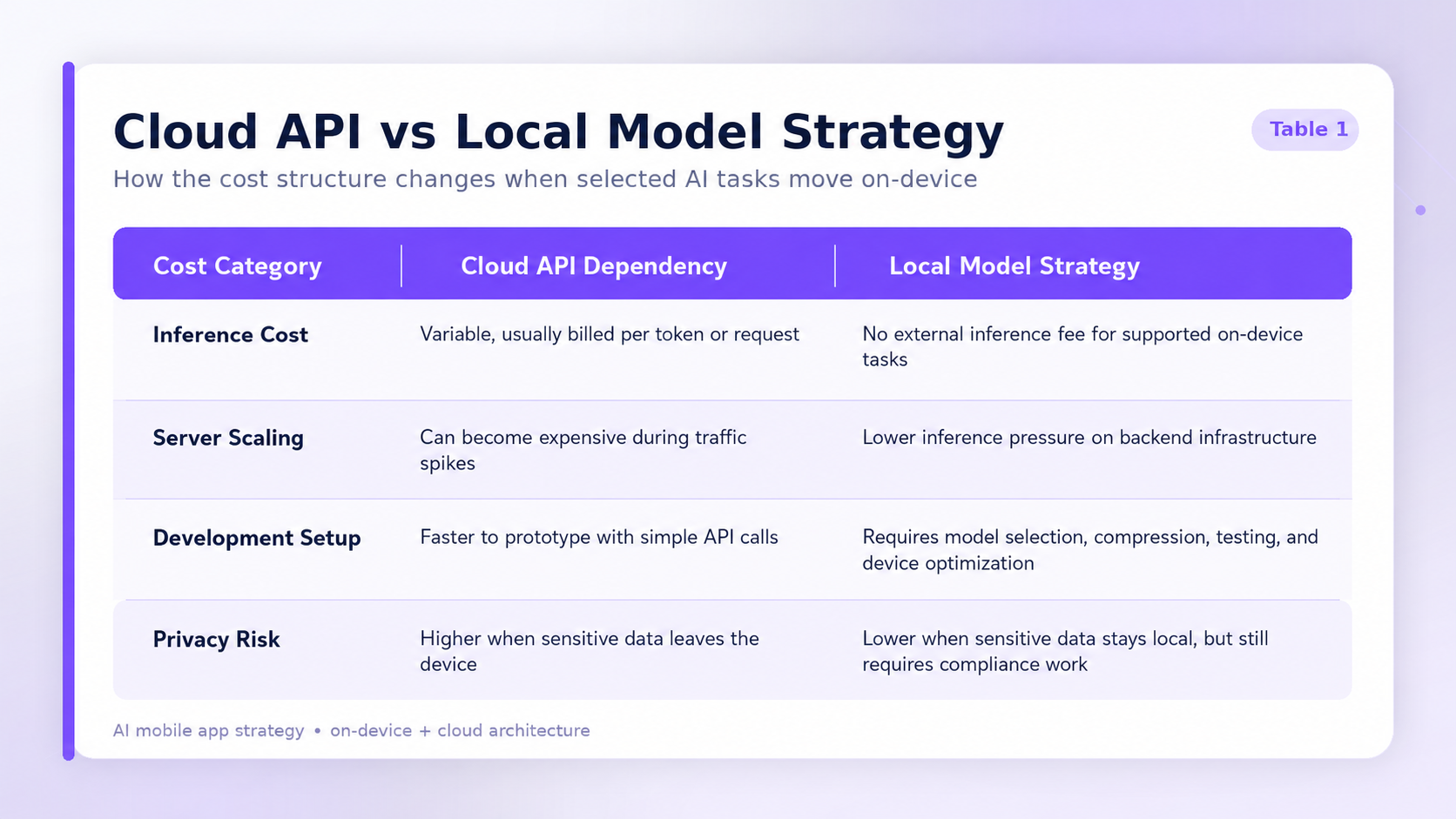
This economic reality forces founders to evaluate their feature sets carefully. A startup building a simple text summarizer, transaction classifier, or field-note assistant may not want to pay a premium cloud provider for every routine action. By shifting suitable workloads to the local device, the startup can reduce operating costs and extend its runway.
Apple and Google updates: what product owners must know
Apple and Google now give developers native tools to build intelligent features more directly into their operating systems. Product owners must understand these updates to avoid building expensive custom software when system-level tools already cover part of the experience.
Apple has introduced major changes to its ecosystem through Apple Intelligence and related developer frameworks. Through the Foundation Models framework, Apple gives developers access to the on-device language model behind Apple Intelligence for tasks such as summarization, extraction, text understanding, and refinement. This enables applications to use selected AI capabilities locally, privately, and without external inference fees.
Apple also provides system-level features such as Writing Tools, notification summaries, Image Playground, Genmoji, App Intents, and Shortcuts integrations. Product owners building for Apple platforms should check which features the operating system already handles before designing custom solutions. In some cases, the best product decision is not to build a separate AI workflow, but to integrate cleanly with native Apple capabilities.
Apple is also expected to continue expanding Siri and App Intents, but teams should avoid basing core roadmap decisions on unreleased iOS 27 features until official documentation is available. Unreleased platform features should be treated as a watchlist item, not as a dependency for near-term product delivery.
Google provides similar advantages for Android developers. For mobile teams, one of the most relevant updates is LiteRT, the evolution of TensorFlow Lite for on-device AI. LiteRT helps teams deploy optimized models across Android hardware with support for acceleration through GPU and NPU capabilities, depending on the device.
Google also provides an Agent Development Kit for building, evaluating, and deploying agentic systems. This is especially relevant for enterprise workflows where AI agents need to manage multi-step tasks, use tools, and maintain context across longer processes. For mobile product teams, this matters when the mobile app becomes the interface to a broader agentic workflow running across cloud systems, enterprise software, and user devices.
The baseline hardware reality requires careful attention. Not everyone owns a phone capable of running local generative models smoothly. Apple Intelligence requires newer iPhone models with advanced chips. IDC commonly defines GenAI-capable smartphones as devices with NPUs delivering at least 30 TOPS INT8, but real-world performance depends on the model, memory, runtime, thermal constraints, and device optimization.
Product owners must review their target user demographics. If the target audience primarily uses older or low-budget phones, forcing heavy local processing may cause the application to slow down, overheat, drain the battery, or fail. In these cases, the software must detect hardware limits and automatically fall back to a cloud server.
Understanding these platform updates determines the product roadmap. Teams that ignore native Apple and Google tools may waste capital building redundant features. Teams that adopt native frameworks thoughtfully can ship faster and provide a smoother experience that matches the natural design language of the operating system.
Smart products do not need to choose only one method. They can use hybrid architectures to balance operating budgets with advanced capabilities. A hybrid system decides whether to process a task on the user’s phone or send it to a remote server.
Here is how the logic works. A fast local model can act as a router. It receives the prompt from the user and evaluates the task. If the prompt is simple, such as formatting a date, categorizing a short list, extracting a name from a sentence, or summarizing a brief note, the phone may handle the work locally. If the prompt requires heavy reasoning, fresh data, cross-referencing large databases, or generating highly complex output, the application sends the request to a cloud API.
This split can save money while keeping the user experience strong. Using a small model such as Llama 3.2 on the phone creates no external inference fee for supported local tasks. For difficult tasks, the application can fall back to a paid cloud model such as Claude, GPT, Gemini, or another provider selected for the specific workload.
A hybrid system can route simple, repetitive tasks to local models and reserve cloud models for complex cases. In high-volume products, this can significantly reduce inference spend, but savings must be calculated from real usage data. The exact business impact depends on prompt length, output length, model pricing, cache strategy, user behavior, fallback frequency, and infrastructure design.
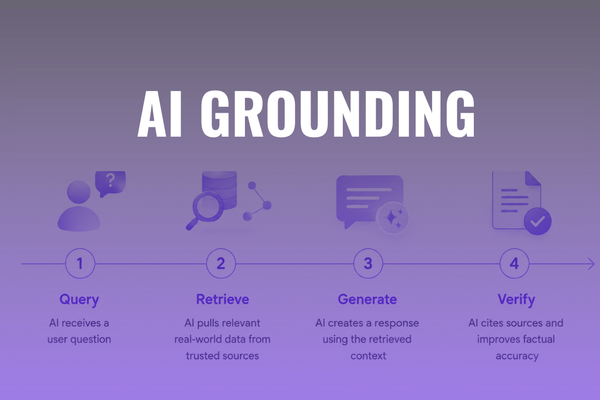
Cloud processing is also necessary when the answer depends on fresh or proprietary data. A local model can classify, summarize, or route a request, but a server-side retrieval-augmented generation layer is often needed to retrieve current manuals, product catalogs, user records, pricing, policies, CRM data, healthcare records, or enterprise knowledge.
Product teams can design these systems using a clear tiering strategy.
Tier 1: On-device
The application uses small models to handle offline requests, basic text completion, short summarization, classification, routing, extraction, or immediate UI updates. Latency can be very low when the model is small and the device is powerful, but performance must be tested across real user hardware.
Tier 2: Efficient cloud
The application sends moderate tasks to low-cost cloud models such as GPT-4.1 nano or current Gemini Flash-family models. Pricing is usually calculated separately for input and output tokens, so teams should model real prompt and response lengths instead of relying on a single headline price.
Tier 3: Premium cloud
Only the most complex requests reach premium reasoning models. These handle deep analysis, multi-step reasoning, complex coding, long documents, or difficult decision support, but they can cost many times more than efficient cloud models, especially when output tokens are long.
This architecture requires careful engineering. The software may need to evaluate internet connection quality, battery level, device temperature, model availability, user permissions, task sensitivity, and expected response quality before deciding where to route the task. If the phone is overheating, the system might temporarily push more tasks to the cloud. If the user is offline, the app might limit the feature to local-only responses and clearly communicate the limitation.
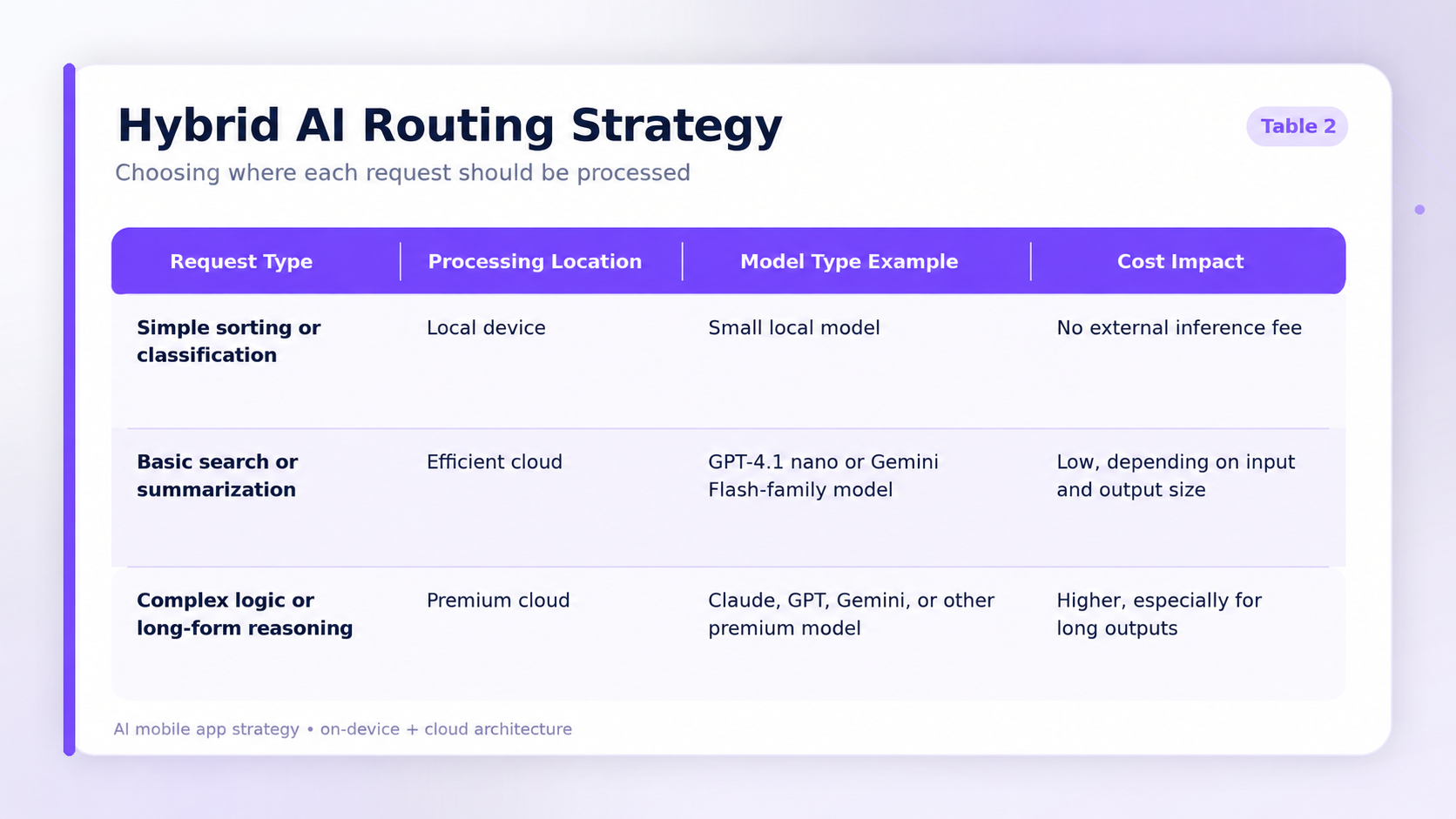
This balancing act is becoming one of the most important product strategy decisions for high-usage AI mobile apps in 2026. Without a clear routing strategy, applications with frequent AI interactions can burn through budget quickly. With the right architecture, teams can use local AI where it improves privacy, latency, and cost, while still using cloud models where deeper reasoning and fresh knowledge are required.
Data, accuracy and compliance note: This article reflects publicly available information and market observations as of May 2026. AI model pricing, platform capabilities, app store rules, hardware requirements, and vendor documentation may change over time. This article is for general informational purposes only and does not constitute legal, medical, regulatory, security, or procurement advice. For sensitive workflows involving PHI, PII, financial data, clinical information, or enterprise data, teams should verify current vendor terms, data flows, retention settings, security controls, and compliance obligations with their legal, privacy, and security teams before implementation.
Risks and limitations of on-device AI
On-device AI is not a universal replacement for cloud models. Product teams need to account for model size, memory limits, battery usage, thermal throttling, device fragmentation, and inconsistent performance across older phones. A feature that works smoothly on a flagship device may feel slow or unreliable on a budget Android phone.
Teams also need a model update strategy. Cloud models can be improved centrally, while local models may require app updates, runtime changes, staged rollouts, or compatibility testing across different devices. This creates additional QA work and makes monitoring more difficult because developers cannot inspect every local inference in the same way they can monitor server-side requests.
On-device AI also creates product constraints. Local models usually have smaller context windows, weaker reasoning ability, and limited access to fresh information. They may perform well on routine tasks but fail when the user expects accurate answers based on updated data, enterprise documents, regulations, or complex multi-step logic.
Security also needs attention. Keeping data on the device reduces third-party sharing risk, but it does not automatically make the system secure. Teams still need encryption, secure storage, permission handling, jailbreak or rooted-device considerations, audit logs where appropriate, and clear data retention rules.
For many products, the safest approach is not “local-first at all costs,” but adaptive AI routing. Use local models where they clearly improve privacy, latency, or offline access. Use cloud models when the task requires deeper reasoning, larger context windows, constantly updated knowledge, or integration with external systems.
Beyond chatbots: winning UX patterns
Many users are becoming tired of generic chat interfaces, especially when AI features feel disconnected from the main product workflow. Typing text into a blank box and waiting for a machine to reply is not always the best interaction model. Modern applications increasingly integrate intelligence directly into the UX, reducing the need for dedicated chat screens.
Top applications use proactive software design. The system suggests actions before the user asks for them. Take a travel app scenario where the system detects a canceled flight in the background. Instead of waiting for the user to ask for help, the software drafts a recovery plan and presents a button to book a new flight. The software identifies a likely user need and formulates a suggested action based on real-time data.
Invisible features work quietly in the background. These systems format messy data, correct spelling, classify expenses, clean up notes, extract action items, or organize documents without presenting a prompt box. The user simply notices that the software feels easier to use. This requires context-aware micro-interactions that anticipate the next useful step without overwhelming the interface.
Streaming responses in the UI can also improve perceived performance. Instead of showing a static loading spinner for several seconds, modern software displays text or structured results progressively as the model generates them. This reduces perceived waiting time and makes the application feel more responsive.
Agentic UX patterns provide different levels of control to the user. Because automated systems can take action on behalf of the user, the interface must build trust. Teams can design several control modes:
- Watch mode: the system performs a task while the user observes the steps on the screen.
- Assist mode: the system suggests the next best steps, but the user must tap to confirm and execute them.
- Autonomous mode: the system executes selected tasks in the background without requiring approval every time.
For high-risk actions, such as payments, medical recommendations, account changes, external messages, legal workflows, or irreversible data changes, the interface should require explicit user confirmation before execution. Autonomy should increase only after the system has earned trust through predictable, reversible, and well-explained actions.
Goal-first onboarding is also replacing traditional feature tutorials. Instead of showing five screens explaining where buttons live, the software asks the user what they want to achieve. The system can then configure the layout, recommended workflows, and default actions around that goal.
Voice-based navigation is another important pattern. Hardware advances and speech recognition improvements allow devices to transcribe speech accurately in real time. Voice input can reduce friction for mobile tasks, especially when users are driving, walking, cooking, working in the field, or using their hands for another task. However, engagement impact should be validated per product. Voice works best when it solves a real user constraint rather than being added as a novelty.
These design patterns separate useful AI products from abandoned experiments. Software that forces users to learn complex prompting syntax will struggle outside expert audiences. Software that predicts likely needs, keeps users in control, and does the heavy lifting inside the existing workflow is more likely to succeed.
Top product categories for AI integration
Specific industries can gain meaningful value from mobile intelligence when local processing and machine learning solve real business bottlenecks. Founders should focus on categories where AI reduces manual work, improves speed, protects sensitive data, or enables workflows that were previously difficult on mobile devices.
Secure healthcare and telehealth applications
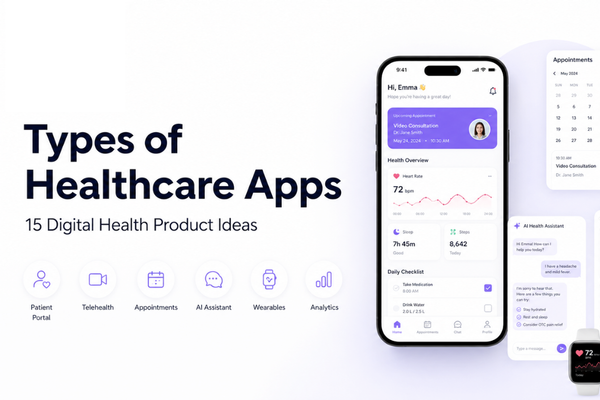
Healthcare providers handle highly sensitive information. In 2026, medical organizations increasingly use mobile software to support patient care and clinical workflows. Applications can transcribe doctor-patient conversations locally on the phone, reducing the need to send raw audio to external servers.
This can reduce the amount of sensitive audio transferred to third-party systems, which makes privacy and security reviews easier, but it does not remove healthcare compliance requirements. Teams still need consent flows, secure storage, access control, audit trails, EHR integration, retention policies, and careful review of medical device or clinical decision-support rules.
AI can also help structure clinical notes, extract action items, prepare documentation, and support administrative workflows. However, healthcare AI should be designed with clear human oversight, especially when outputs may influence diagnosis, treatment, or patient communication.
Offline field service, construction, and logistics tools
Field technicians rarely have perfect internet connections. Senior technicians rely on mental models built over decades to diagnose equipment failures. Modern software can help capture and distribute this knowledge.
A technician in a remote facility can point their phone camera at a machine component. A local vision model may identify the part or narrow down possible matches without requiring a constant video upload. The technician can speak into the phone, and local speech-to-text can convert the report into structured notes. If connectivity is available, the application can send a compact text request to a cloud system that retrieves the right manual, repair procedure, or escalation path.
This approach is valuable because it keeps the heaviest data, such as raw video or audio, closer to the device while still using cloud systems for knowledge retrieval and complex reasoning.
Personal finance and budget planners
Financial applications handle highly personal data. Local processing can keep selected bank balances, spending habits, and transaction descriptions away from unnecessary third-party processing. The application can categorize transactions, detect recurring payments, identify unusual spending patterns, or summarize financial behavior directly on the device where appropriate.
Financial institutions and fintech products can also use AI to support fraud monitoring, identity verification, and operational workflows. Advanced models can help detect suspicious patterns, flag potential deepfake attempts, and reduce some manual review work. However, these systems still require strong governance, human review for high-risk decisions, and careful compliance with financial regulations.
Mobile productivity and meeting summarizers
Professionals need tools that save time. Applications can record meetings, summarize discussions, extract action items, draft follow-up emails, and organize notes. For sensitive meetings, on-device processing can reduce the amount of raw audio shared with cloud providers.
A hybrid approach is often useful here. The phone can handle local transcription or first-pass summarization, while the cloud can process longer meetings, connect to company knowledge bases, or generate more structured outputs. Product teams should give users clear controls over what is stored, what is uploaded, and what is deleted.
Hyper-personalized e-commerce
Retail applications can use intelligence to adjust the user experience based on behavior, preferences, inventory, and context. Recommendation engines can respond to immediate browsing patterns, while server-side systems can incorporate stock availability, pricing, promotions, and customer history.
For example, if a user spends time looking at running shoes, the application can adapt the next recommendations toward athletic gear. Predictive personalization can improve retention and conversion when recommendations are relevant, transparent, and not intrusive. Smart recommendation engines may also increase average order value compared with static merchandising, but the impact depends on product category, data quality, pricing, and user trust.
For each of these categories, intelligence adds measurable business value only when it solves a real bottleneck. It can reduce customer service costs, speed up daily tasks, improve data entry, strengthen privacy controls, or make mobile workflows possible in difficult environments. It should not be added simply because AI is available.
App Store rules, privacy, and compliance
App store reviewers heavily scrutinize intelligent features. Releasing an AI product in 2026 requires strict adherence to Apple and Google guidelines regarding user safety, data privacy, content moderation, and sensitive use cases.
Apple App Store guidelines require filtering systems for applications that include user-generated content. Developers must provide methods to filter objectionable material, mechanisms for users to report offensive content, and the ability to block abusive users. Apple also prohibits apps from generating or distributing certain types of harmful content, including realistic portrayals of violence, encouragement of illegal weapon use, or pornographic material.
Privacy rules on Apple devices also dictate how data moves. Guideline 5.1.2(i) requires developers to clearly disclose if they share personal data with third-party services, including external AI providers. Developers must obtain explicit permission from the user before sending identifiable personal information off the device. If an application uploads user documents, transmits voice recordings, or shares behavioral patterns with an external server, it may trigger these disclosure and consent requirements.
Medical applications face even tighter review processes. Apple requires that software providing health data for diagnosis clearly disclose its methodology and data sources. Applications acting as calculators for drug dosages must derive their logic from approved medical entities, such as hospitals, insurance companies, universities, or drug manufacturers, or obtain appropriate approval. Applications that make unsupported medical claims or attempt to measure health indicators using only phone sensors may face rejection.
Google Play also enforces a strict AI-Generated Content policy. Applications must not generate offensive or harmful material. Developers need to prevent the generation of prohibited content rather than relying only on user complaints after harm occurs. The policy covers areas such as child exploitation, violence, deceptive content, false election-related materials, non-consensual sexual deepfakes, scam-enabling voice or video recordings, bullying, harassment, and malicious code. Developers must also include in-app reporting tools that allow users to flag problematic AI-generated content without leaving the application.
Handling sensitive data on-device can reduce third-party sharing risk, but it does not remove privacy, safety, medical, security, or app review obligations. If a user’s audio recording or text prompt never leaves local hardware, it may reduce certain third-party disclosure requirements, but the app still needs clear permissions, security controls, privacy documentation, and safe UX.
Local processing can be a strong compliance advantage because it reduces unnecessary data sharing. However, teams still need clear disclosures, permission flows, safety filters, reporting mechanisms, human oversight for sensitive decisions, and review-ready documentation.
Build vs. buy: strategy for founders
Founders must make structural decisions regarding their technology stack. Choosing between custom models, off-the-shelf APIs, native frameworks, and cross-platform development affects the entire company budget.
When to build custom models
Teams should train or fine-tune their own models when they possess highly proprietary data, face strict security requirements, or need behavior that cannot be achieved through existing commercial or open-source models. A custom model can create a strong competitive advantage, especially when it captures domain-specific expertise.
However, custom model development requires specialized engineering talent, compute resources, data preparation, evaluation, safety testing, deployment infrastructure, and ongoing maintenance. It can burn through capital quickly if the team does not have a strong business reason to own the model.
When to use off-the-shelf APIs
For fast validation and immediate market entry, founders often rely on cloud APIs from major providers. API-based development gets the product into the hands of real users in weeks rather than months. This is usually the fastest way to test whether users actually want the feature.
Once the product gains traction, the team can gradually replace expensive or repetitive API calls with local models, smaller cloud models, caching, fine-tuned models, or specialized infrastructure. This reduces cost without slowing down early validation.
Choosing the development framework
Choosing the correct development framework matters just as much as choosing the models. Teams must decide between native code, such as Swift for iOS and Kotlin for Android, and cross-platform frameworks such as React Native or Flutter.
React Native is often a strong choice for teams building products that rely heavily on APIs, business workflows, dashboards, authentication, backend integrations, and fast iteration. The JavaScript and TypeScript ecosystem contains mature libraries for connecting external services. For local processing, tools such as react-native-fast-tflite allow developers to load TensorFlow Lite models directly into the application, while react-native-executorch helps teams run selected machine learning features on-device.
Flutter can be a strong choice for visually demanding applications and highly custom interfaces. Its UI toolkit allows teams to build polished cross-platform experiences, and the Impeller rendering engine improves rendering performance and consistency across supported platforms.
Native development is usually worth considering when the software requires deep hardware integration, advanced AR, low-level audio or video processing, specialized security controls, health device integrations, Bluetooth workflows, automotive use cases, or the fastest possible access to new platform APIs.
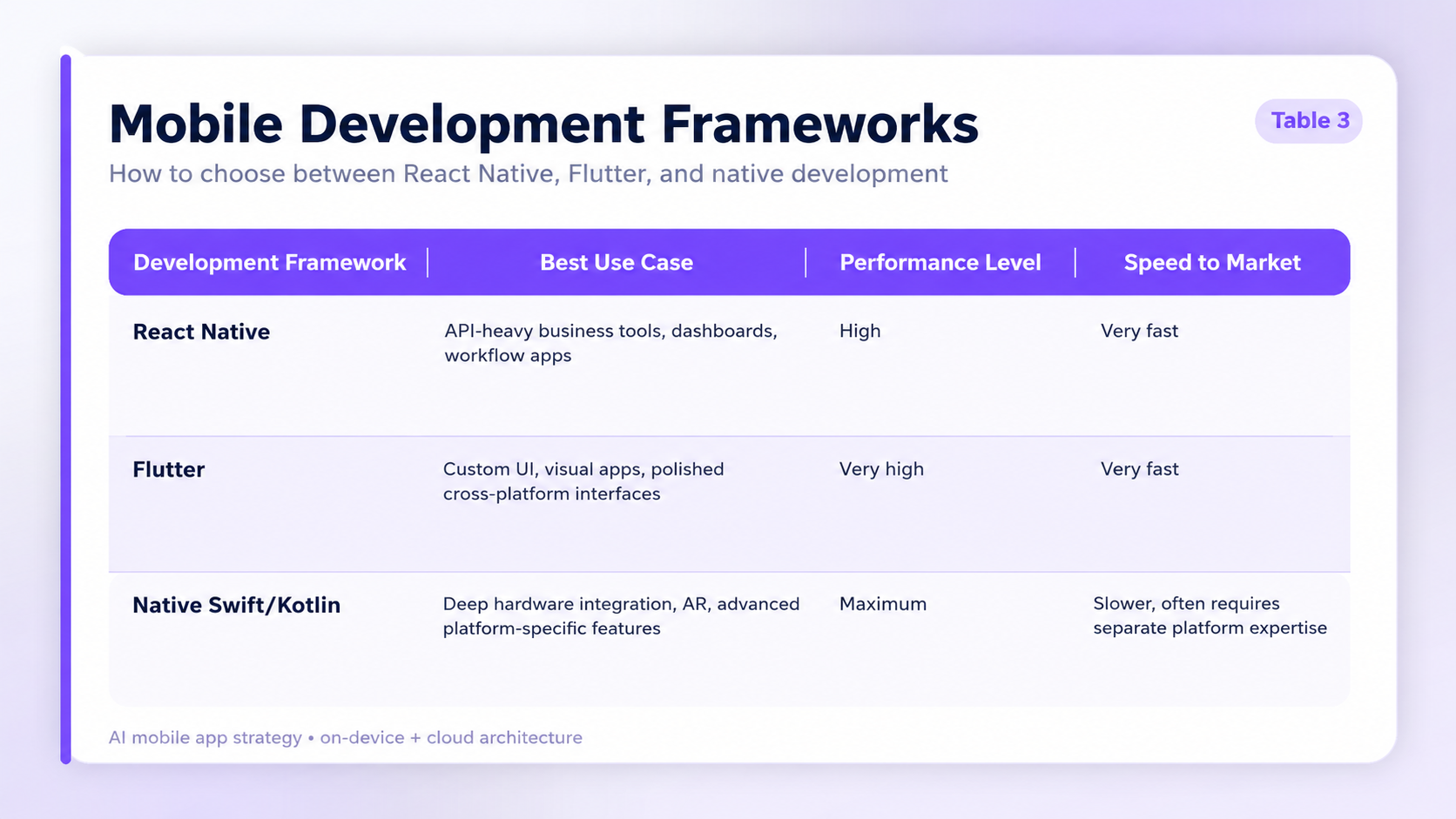
React Native and Flutter allow a single team to ship features to both operating systems simultaneously. This can reduce initial budget and simplify long-term maintenance. However, building cross-platform does not remove the need for platform-specific QA, native modules, App Store review preparation, Android device testing, and performance optimization.
App development costs vary widely based on these choices. The ranges below are directional agency-level estimates, not fixed market prices. Real costs depend on product scope, seniority of the team, design quality, backend complexity, security requirements, AI model integration, QA, compliance, and post-launch support.
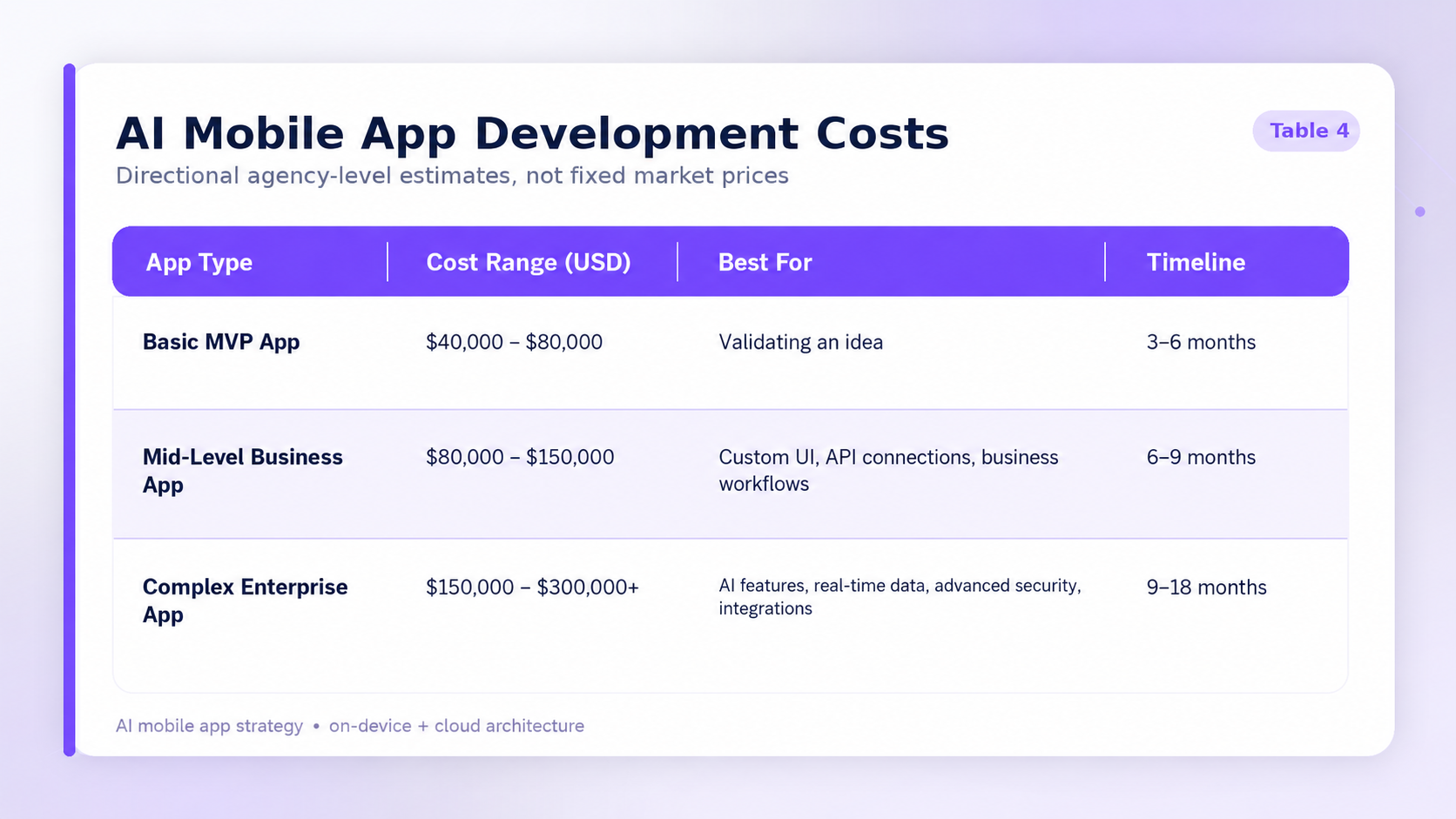
Annual maintenance budgets often consume 15 to 20 percent of the original build cost, but this also varies by product complexity. Planning these expenses properly helps teams survive the difficult post-launch period when the product needs monitoring, updates, user support, model improvements, and app store maintenance.
How to evaluate your AI app idea
A poor technical decision on day one can lead to wasted capital. Founders should evaluate their concepts thoroughly before writing a single line of code. Using modern tools, teams can pressure-test a business concept quickly, but they still need a structured process.
This process replaces guesswork with evidence. Teams must evaluate target users, hardware limits, AI model costs, data sensitivity, offline requirements, compliance risks, and business value.
Here is a practical decision framework for founders.
Evaluate target hardware
Determine what phones your users own. If the user base relies on older devices without modern neural processing units, heavy local models may fail. The software may need to rely on cloud APIs, smaller local models, or a hybrid fallback strategy.
Calculate the API budget
Estimate how many tokens an average user consumes per day. Multiply this by the cost of the chosen model, separating input and output tokens. If the monthly server bill exceeds expected subscription revenue or gross margin, the business model needs to change.
Question the real need for intelligence
Does the feature actually need an advanced model, or does traditional programming work? Standard logic runs faster, costs less, and is easier to test. Do not use expensive AI processing for simple sorting, filtering, formatting, or deterministic workflows.
Assess offline requirements
Decide whether the core value proposition requires the application to function without internet access. If yes, local models may be necessary, and the engineering budget must include model compression, device testing, offline UX, and sync logic.
Evaluate data sensitivity
Map what data the feature processes. Voice recordings, medical notes, financial records, personal documents, identity verification materials, and children’s data require stronger privacy, security, and compliance planning.
Test latency and battery impact
AI features should be tested on real target devices, not only flagship phones. Measure response time, memory usage, battery drain, thermal behavior, and crash rates before committing to a local-first architecture.
Define fallback behavior
The product should know what to do when the model fails, the device is too old, the user is offline, the server is unavailable, or the answer confidence is low. A graceful fallback can protect user trust.
Conceptual user journey
Understanding how these technologies blend together requires looking at a real-world scenario. A conceptual user journey shows how hybrid architectures can keep the software responsive while reducing unnecessary cloud usage.
Imagine a field technician using a diagnostic app to repair a commercial HVAC unit. The journey happens across six distinct stages.
1. Keyword foraging
The technician attempts to find the correct manual for the unit using a standard search engine. The results are not useful because the unit is twenty years old and the model number is hard to match. The technician opens a dedicated repair app.
2. Invisible touchpoint
The technician stands on the roof of a building. Cellular service is weak. The app detects poor connectivity and switches to a limited offline mode. This happens in the background, but the interface clearly communicates which features remain available.
3. Local vision processing
The technician points the phone camera at the HVAC control board. A small vision model running locally on the device identifies or narrows down the specific board model without sending a heavy video feed to a server.
4. Local audio transcription
The technician speaks into the phone: “The red fault light is blinking twice.” A local speech-to-text model transcribes the phrase, keeping the raw audio on the device.
5. Hybrid switching
The app takes the short text string, board identifier, and diagnostic context. If connectivity allows, it sends only this compact request to the cloud. Because the payload is small, the weak cellular connection can handle the transmission more easily than a raw video or audio upload.
6. Cloud reasoning and retrieval
A cloud model receives the structured request. It retrieves relevant repair manuals, compares the fault signal with known procedures, and returns a concise repair recommendation. The technician reads the answer, confirms the steps, and takes action.
In this journey, the app reduces cloud usage by processing heavy media locally and sending only a compact text request to the server. This can lower inference costs, improve responsiveness in poor connectivity, and reduce the amount of sensitive raw data transmitted to external infrastructure.
Partnering with Lexogrine
Lexogrine helps founders and product teams turn AI mobile app ideas into production-ready software. We support the full process: product discovery, AI feature validation, mobile architecture, React Native development, backend engineering, cloud integration, and app release.
Building an AI mobile app in 2026 is not only about choosing a model. Teams need to decide which features should run on-device, which should use efficient cloud models, which require premium reasoning, and which should not use AI at all. They also need to account for privacy, app store review, compliance, performance, battery usage, and long-term maintenance.
Lexogrine operates as a mobile app and software development company, delivering full end-to-end business software with React, React Native, Node.js, and cloud architectures. This includes mobile applications, administrative backends, AI-powered workflows, and scalable product infrastructure.
If you are deciding whether your product should use on-device AI, cloud models, or a hybrid architecture, Lexogrine can help you evaluate the business case, technical feasibility, and compliance risks before development starts.