
Types of Healthcare Apps: 15 Digital Health Product Ideas
Healthcare software now covers much more than electronic records, hospital systems, and large platforms used by enterprise care networks.
Many new healthcare products are smaller, more focused, and closer to the patient. They include healthcare mobile apps, web platforms, AI assistants, remote care tools, wellness apps, scheduling products, document explainers, patient engagement tools, and lightweight clinic workflow software.
Telehealth, smartphones, connected devices, remote monitoring, AI, and higher patient expectations have moved many healthcare products closer to everyday patient workflows.
For healthcare startup founders, clinic owners, CTOs, and digital health teams, the stronger starting point is a focused product that removes one clear source of friction: booking a visit, preparing for a consultation, understanding medical documents, tracking medication, monitoring patients remotely, or reducing repetitive admin work.
This guide focuses on modern healthcare apps and supporting digital health software. It does not cover full EHR/EMR systems, PACS, legacy hospital management software, or large hospital infrastructure.
Medical and regulatory note: This article provides general product and technology information, not medical, legal, or regulatory advice. Digital health requirements depend on the product’s intended use, functionality, data flows, users, and markets. A healthcare app should not be used to diagnose, treat, or replace professional medical care unless it has been designed, validated, and authorized for that purpose.
Digital Health Adoption: Verified Statistics
Digital health adoption is visible in how patients access care, how clinicians work, and how regulators respond to software, connected devices, and AI-enabled medical tools.
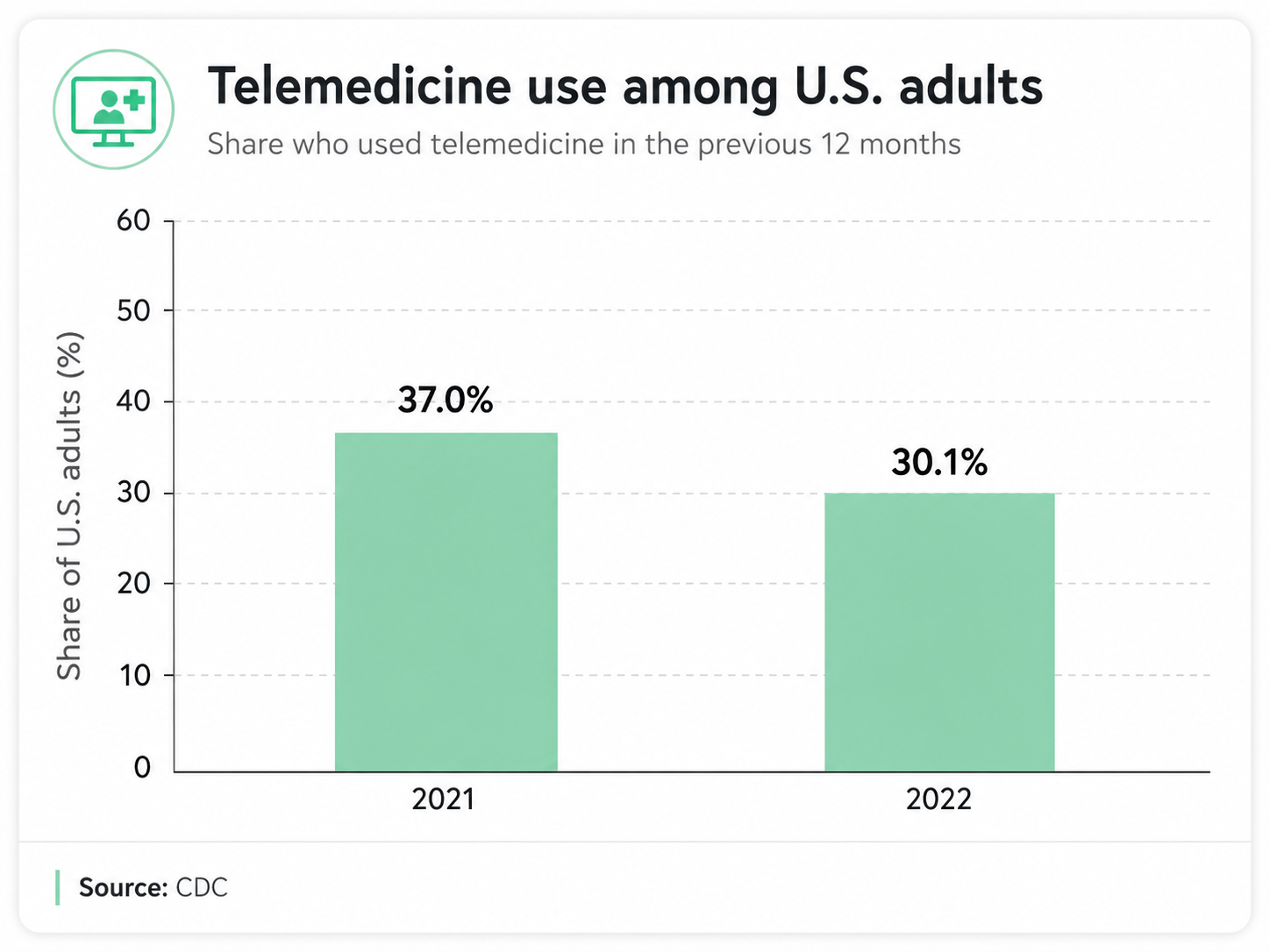
The CDC reported that 37.0% of U.S. adults used telemedicine in the previous 12 months in 2021, decreasing to 30.1% in 2022. That drop matters, but 30% still represents a large share of adults using remote care after the 2020 peak.
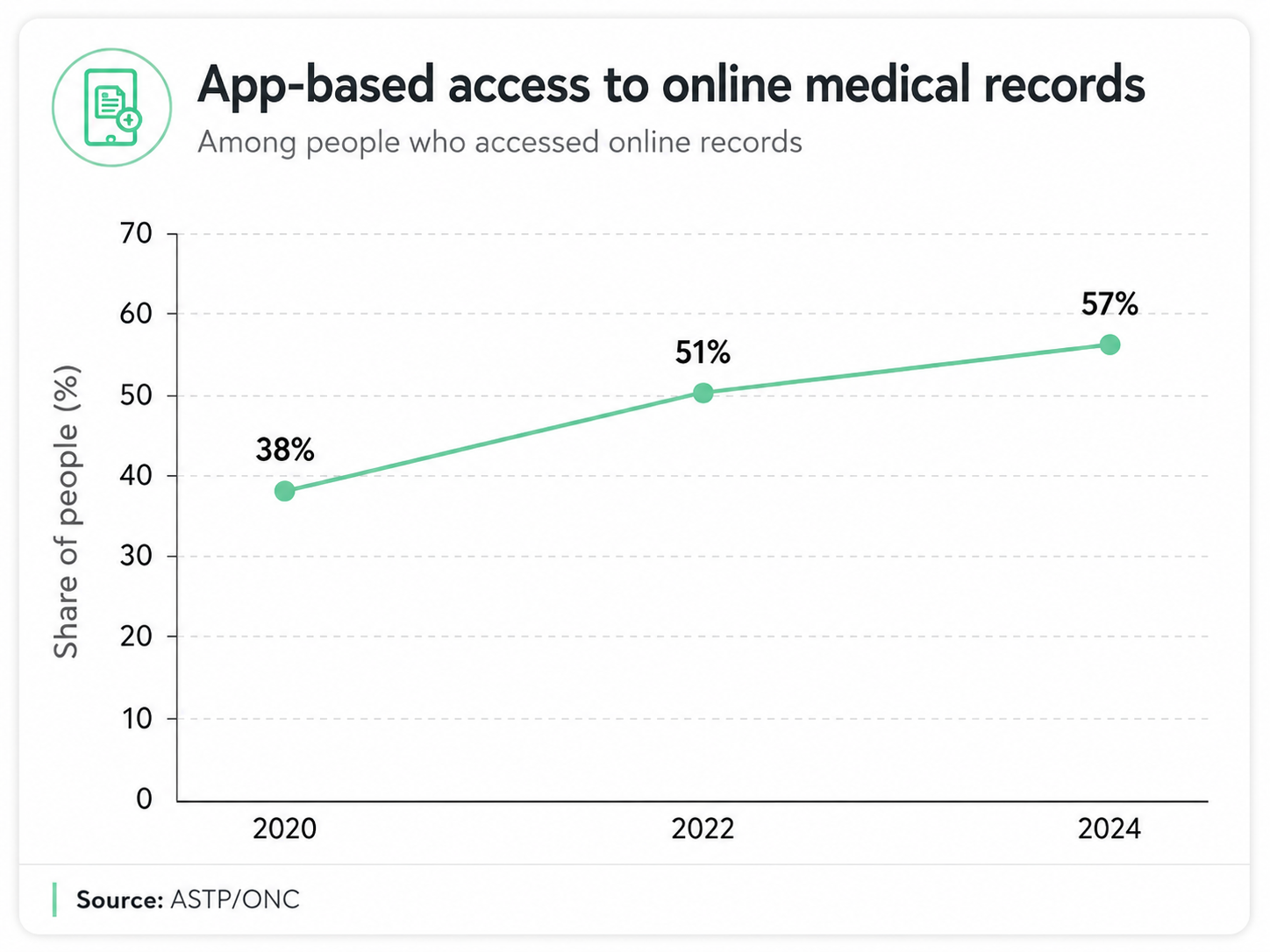
Patient portal and mobile record access are also moving toward app-based use. ASTP/ONC reported that in 2024, more than three in four individuals were offered online access to medical records by a healthcare provider or insurer, and nearly two-thirds accessed those records at least once in the past year. Among people who accessed online records, 57% used an app, up from 51% in 2022 and 38% in 2020.
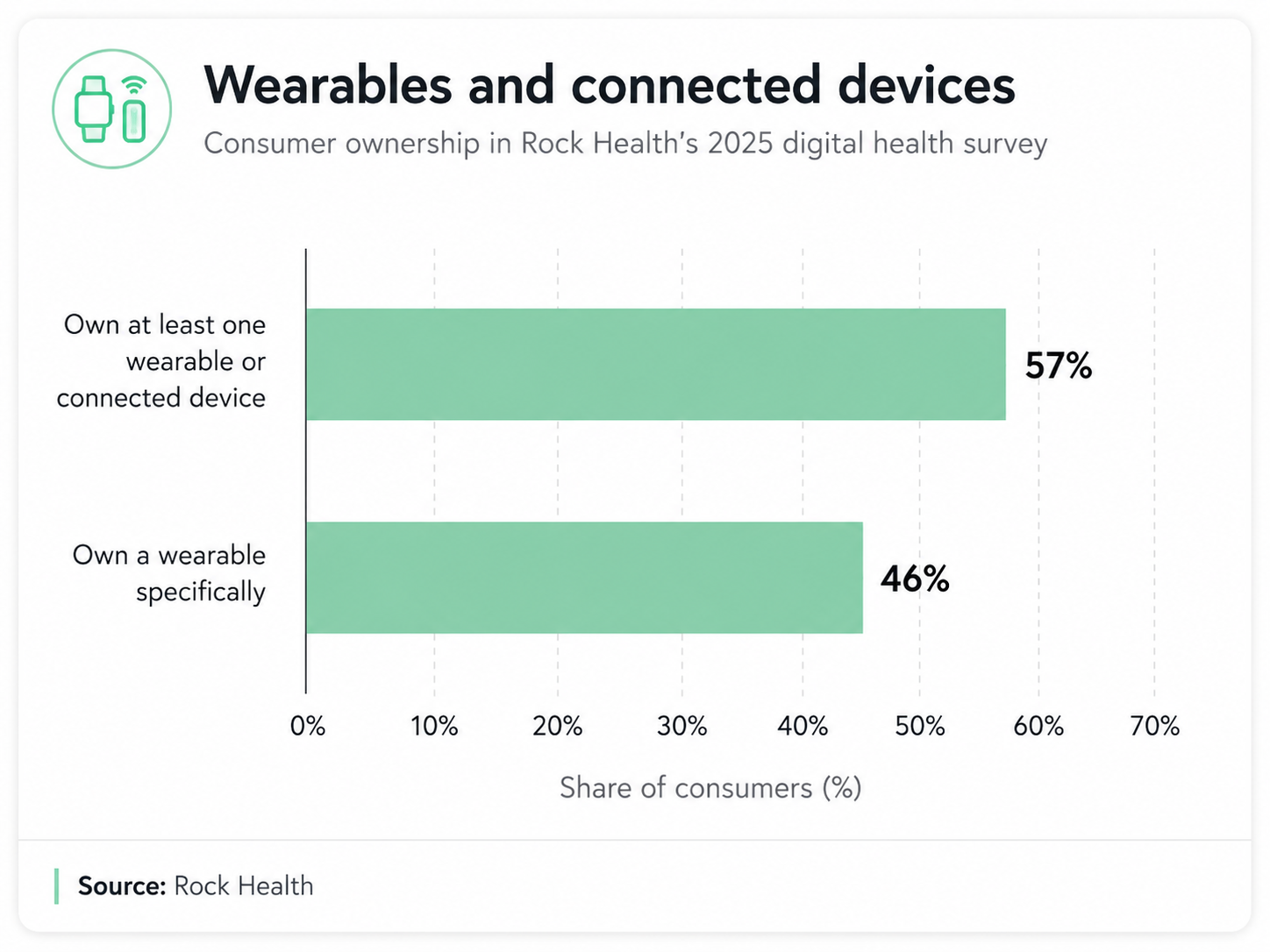
Wearables are now part of everyday health tracking for many consumers. Rock Health’s 2025 Consumer Adoption of Digital Health Survey, published in 2026 and based on 8,000 Census-matched U.S. adults, found that 57% reported owning at least one wearable or connected device, and 46% reported owning a wearable specifically.
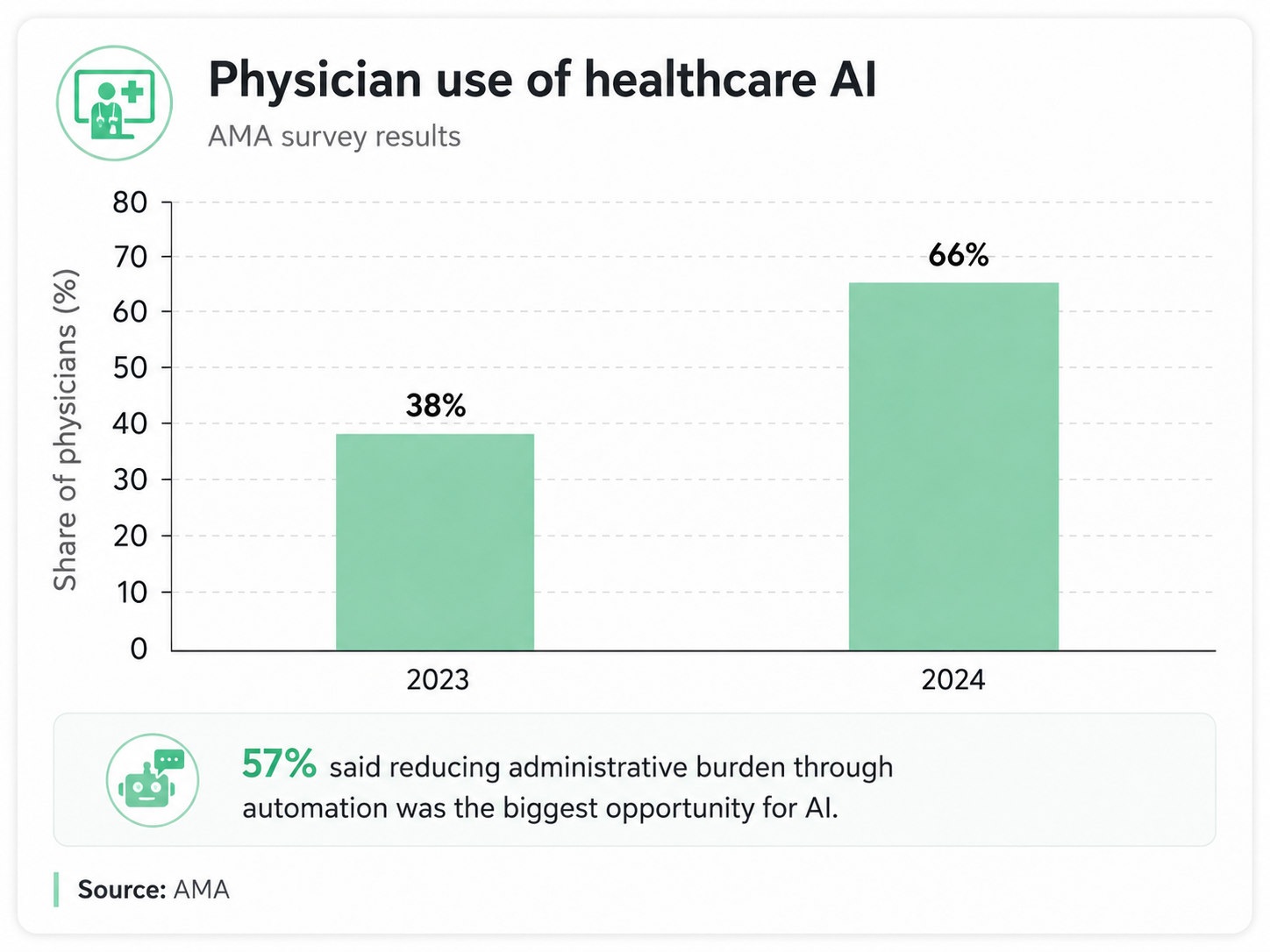
AI is moving into clinical and administrative work, but it still needs clear limits and review. An AMA survey reported that 66% of physicians surveyed used healthcare AI in 2024, up from 38% in 2023; 57% said reducing administrative burden through automation was the biggest opportunity for AI.
Regulators are also responding to AI healthcare software. In January 2025, the FDA said it had authorized more than 1,000 AI-enabled devices through established premarket pathways, while its public AI-enabled device list is intended to improve transparency for providers, patients, and developers.
15 Types of Modern Healthcare Apps and Supporting Software
The product ideas below should be treated as product patterns rather than templates to copy. Healthcare teams can adapt them to a specific audience, care model, market, and regulatory path.
1. Patient portal web and mobile apps
What it does: A patient portal gives patients access to health records, appointment details, lab results, forms, billing information, and secure communication with a clinic or healthcare provider.
Who uses it: Patients, caregivers, front-desk teams, nurses, physicians, and care coordinators.
Common features: Account creation, identity verification, record viewing, lab result notifications, secure messaging, appointment history, payment links, downloadable documents, caregiver access, and consent settings.
Typical technologies involved: Web and mobile front ends, FHIR APIs, SMART on FHIR, OAuth/OIDC authentication, role-based access, audit logs, secure document storage, push notifications, and PDF rendering.
When a custom version makes sense: Build a custom portal when patient experience is central to the business, data comes from multiple sources, caregiver access is important, or the clinic needs workflows that a standard portal cannot support.
2. Telehealth and virtual consultation apps
What it does: Telehealth apps let patients consult clinicians by video, phone, chat, or asynchronous messaging. They are often used for primary care, mental health, follow-ups, chronic care check-ins, and specialty screening.
Who uses it: Patients, clinicians, therapists, care coordinators, and support staff.
Common features: Provider profiles, online booking, pre-visit intake, video calls, chat, file sharing, visit summaries, payment, prescriptions or referral workflows where allowed, and post-visit follow-up.
Typical technologies involved: WebRTC, video APIs, secure chat, scheduling engines, calendar integrations, payment systems, e-prescription integrations where available, queue management, and encrypted file exchange.
When a custom version makes sense: Custom healthcare mobile app development makes sense when virtual care is part of a larger care model, such as triage plus video plus remote monitoring, or when the product needs specialty-specific intake forms and escalation paths.
3. Appointment scheduling and patient communication apps
What it does: Scheduling and communication apps help patients book care, reschedule visits, receive reminders, ask non-urgent questions, and stay informed before and after appointments.
Who uses it: Patients, front-desk teams, clinic managers, call centers, providers, and care coordinators.
Common features: Online booking, availability rules, waitlists, automated reminders, cancellation handling, two-way SMS, email notifications, chat, intake links, no-show reduction flows, and patient satisfaction surveys.
Typical technologies involved: Calendar APIs, SMS and email providers, rules engines, CRM systems, notification queues, chatbot or guided form logic, and analytics.
When a custom version makes sense: A custom product is useful when scheduling depends on provider type, location, insurance, visit reason, language, equipment availability, or clinical priority.
4. Medication reminder and adherence apps
What it does: Medication adherence apps help patients remember doses, track whether medication was taken, manage refills, and share adherence information with caregivers or care teams.
Who uses it: Patients, caregivers, pharmacists, nurses, chronic care teams, and sometimes family members.
Common features: Medication schedules, dose reminders, refill alerts, medication lists, adherence history, missed-dose prompts, caregiver notifications, side-effect notes, and simple reports.
Typical technologies involved: Local and push notifications, time-zone-aware scheduling, medication databases such as RxNorm, barcode scanning, pharmacy integrations, encrypted storage, and caregiver permission controls.
When a custom version makes sense: Build custom when the app supports a specific chronic condition, specialty clinic, medication program, remote care workflow, or caregiver model.
5. Symptom checker and triage support apps
What it does: Symptom checker apps collect user-reported symptoms and help route people to an appropriate next step, such as self-care information, a nurse line, urgent care, telehealth, or emergency services.
Who uses it: Patients, caregivers, call centers, nurses, care navigators, and digital front-door teams.
Common features: Guided questions, red-flag detection, urgency level suggestions, plain-language advice, location-based care options, emergency warnings, and a summary that can be shared with a clinician.
Typical technologies involved: Clinical decision trees, rules engines, medical content management, NLP for free-text input, risk scoring, analytics, and escalation workflows.
When a custom version makes sense: Custom development makes sense when triage needs to match a specific specialty, clinic capacity, geography, escalation process, or clinician review workflow.
Important safety note: Symptom checkers should support users and professionals, not replace clinicians. They need clear limits, human escalation, red-flag handling, audit trails, medical review, and regulatory assessment when the intended use moves toward diagnosis or treatment.
6. AI-powered patient education assistants
What it does: AI education assistants help users understand health-related information in plain language. They can explain terms, summarize educational content, prepare questions for a visit, and guide users to approved resources.
Who uses it: Patients, caregivers, health coaches, care teams, and digital health startups.
Common features: Chat interface, source-grounded answers, plain-language explanations, topic guides, content citations, safety disclaimers, escalation prompts, conversation history, and feedback.
Typical technologies involved: LLMs, retrieval-augmented generation (RAG), vector search, approved content libraries, prompt management, content moderation, evaluation datasets, analytics, and privacy controls.
When a custom version makes sense: Custom AI healthcare software makes sense when education content is proprietary, the user group has specific needs, medical reviewers must approve responses, or the product needs a controlled knowledge base rather than generic AI answers.
How this can work in practice: Mysti AI is a patient-facing healthcare AI app designed to help users better understand health-related information. We built it as a mobile and web product for both B2B and D2C use cases, combining custom AI models with leading LLMs to make health information clearer, more accessible, and easier to use.
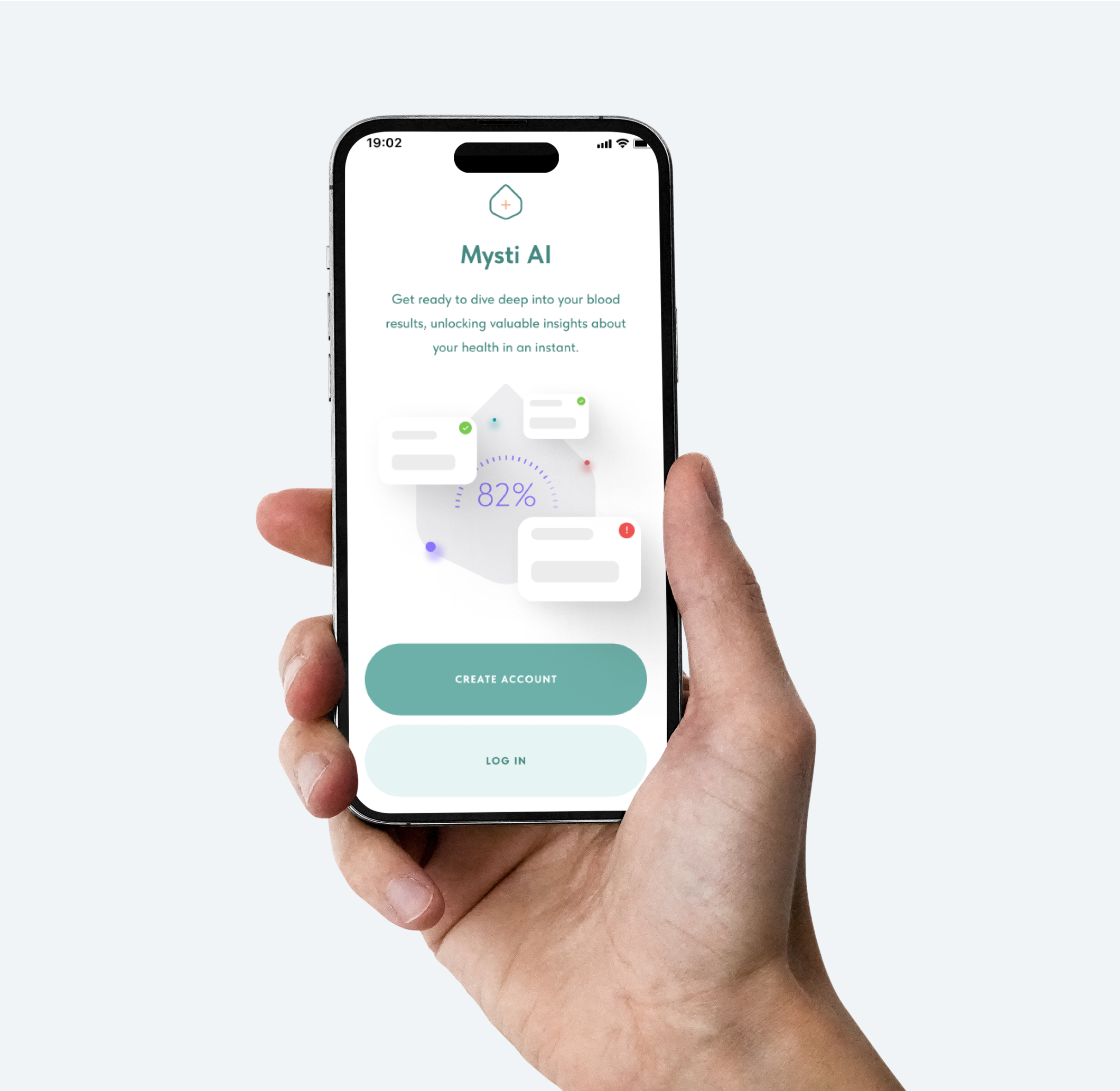
For teams building similar products, AI chat is only one interface. The harder work is designing safe upload flows, clear explanations, privacy-aware data handling, escalation guidance, and product copy that encourages users to speak with professionals when the topic requires care.
7. Mental health and wellbeing apps
What it does: Mental health and wellbeing apps support mood tracking, stress management, therapy access, journaling, mindfulness, coaching, and between-session support.
Who uses it: Consumers, patients, therapists, coaches, employers, universities, and care programs.
Common features: Mood logs, journaling, CBT-inspired exercises, mindfulness content, sleep tracking, therapist matching, chat, video sessions, crisis resources, and progress summaries.
Typical technologies involved: Mobile apps, content management systems, secure messaging, video APIs, notification systems, risk-detection rules, analytics, and privacy-first data storage.
When a custom version makes sense: Build custom when the app supports a specific care model, therapist workflow, population, language, employer program, or research protocol.
Important safety note: Mental health apps need clear crisis pathways, emergency resources, clinician escalation where relevant, and careful handling of sensitive user data.
8. Chronic disease management apps
What it does: Chronic disease apps help patients manage long-term conditions such as diabetes, hypertension, asthma, COPD, obesity, and heart disease.
Who uses it: Patients, caregivers, care coaches, nurses, physicians, pharmacists, and payer or employer health programs.
Common features: Symptom logs, medication tracking, vitals tracking, goal setting, care plans, education, reminders, coach messaging, alerts, and progress dashboards.
Typical technologies involved: Bluetooth device integrations, wearable APIs, glucometer or blood pressure monitor integrations, FHIR APIs, rules engines, trend charts, analytics, and secure messaging.
When a custom version makes sense: Custom development makes sense when the care program has its own protocol, coaching model, risk thresholds, reporting needs, reimbursement logic, or device mix.
9. Remote patient monitoring dashboards
What it does: Remote patient monitoring dashboards help care teams view patient data collected outside the clinic, such as blood pressure, blood glucose, oxygen saturation, weight, temperature, or heart rate.
Who uses it: Nurses, care coordinators, physicians, remote monitoring teams, home health teams, and chronic care programs.
Common features: Device enrollment, patient lists, threshold alerts, trend charts, task queues, escalation notes, care team comments, exception handling, and reporting.
Typical technologies involved: Device APIs, Bluetooth gateways, IoT ingestion, FHIR or HL7 integrations, alert engines, queue management, data validation, cloud databases, and role-based dashboards.
When a custom version makes sense: Build custom when the program uses specific devices, has its own alert thresholds, needs careful escalation logic, or wants to reduce alert fatigue with better filtering.
10. Wearable health data apps
What it does: Wearable health apps collect and interpret data from devices such as smartwatches, rings, fitness bands, smart scales, and heart rate monitors.
Who uses it: Consumers, patients, health coaches, fitness teams, chronic care programs, researchers, and sometimes clinicians.
Common features: Step tracking, heart rate trends, sleep trends, activity goals, recovery scores, symptom notes, wearable sync, data sharing, and longitudinal charts.
Typical technologies involved: Apple HealthKit, Google Health Connect, Fitbit APIs, Oura APIs, Garmin APIs, data normalization, consent management, analytics pipelines, and trend visualization.
When a custom version makes sense: Custom development makes sense when the product needs to combine data from multiple devices, create a proprietary insight layer, support coaching, or connect wearable data with patient-reported outcomes.
Important safety note: Wearable data is useful for trends and engagement, but many metrics should not be presented as diagnostic unless the product has the evidence and clearance required for that intended use.
11. Preventive care and habit tracking apps
What it does: Preventive care apps help users build health habits, complete screenings, track risk factors, and stay on top of age- or condition-based care reminders.
Who uses it: Consumers, patients, employers, wellness programs, primary care clinics, and insurers.
Common features: Habit tracking, screening reminders, vaccination reminders, risk questionnaires, nutrition logs, activity goals, educational content, coaching, and progress summaries.
Typical technologies involved: Mobile apps, notification engines, content management systems, wearable integrations, analytics, personalization rules, and A/B testing.
When a custom version makes sense: Build custom when the program is tied to a clinic, employer, insurer, community health initiative, or specific prevention protocol.
12. Healthcare CRM and patient engagement tools
What it does: Healthcare CRM and engagement software helps teams manage patient relationships, communication preferences, follow-ups, recalls, referrals, education campaigns, and care program participation.
Who uses it: Clinic owners, marketing teams, care coordinators, call centers, patient engagement teams, and startup growth teams.
Common features: Patient segmentation, consent tracking, message templates, campaign scheduling, recall lists, follow-up workflows, referral tracking, patient satisfaction surveys, and analytics.
Typical technologies involved: CRM systems, event tracking, SMS and email APIs, consent management, analytics, role-based access, data pipelines, and integrations with scheduling or billing tools.
When a custom version makes sense: Custom software makes sense when engagement is tied to a specific care pathway, retention model, population, language, clinic workflow, or patient support team.
13. Medical document upload and explanation tools
What it does: These tools let users upload health-related documents such as lab results, discharge summaries, referral letters, prescriptions, or insurance documents, then receive plain-language explanations and suggested questions to ask a professional.
Who uses it: Patients, caregivers, patient advocates, care coordinators, and digital health startups.
Common features: Secure upload, document categorization, OCR, lab value extraction, plain-language summaries, term explanations, document history, sharing, and clinician review options.
Typical technologies involved: OCR, document AI, PDF parsing, LLMs, RAG, structured data extraction, secure file storage, encryption, audit logs, and review workflows.
When a custom version makes sense: Build custom when document understanding is the main product, when users upload varied document formats, when multiple languages matter, or when the app needs strict control over how medical information is explained.
Important safety note: A document explainer should help users understand information and prepare for care, not diagnose conditions or replace a professional interpretation.
14. Healthcare analytics dashboards for clinics and startups
What it does: Healthcare analytics dashboards help teams understand product usage, patient engagement, clinic capacity, operational performance, care program activity, and business metrics.
Who uses it: Clinic owners, operations teams, product managers, CTOs, founders, care program leaders, and investors.
Common features: Patient cohorts, appointment trends, no-show rates, activation metrics, retention, referral sources, provider utilization, RPM alert volume, care team tasks, revenue indicators, and exports.
Typical technologies involved: ETL/ELT pipelines, data warehouses, SQL, dbt, BI tools, event tracking, role-based dashboards, de-identification, privacy controls, and data quality checks.
When a custom version makes sense: Custom dashboards are useful when the company needs metrics from several systems, has a specific care model, must show outcomes to customers, or wants analytics built directly into the product.
15. AI workflow automation tools for healthcare teams
What it does: AI workflow automation tools reduce repetitive administrative work. They can summarize intake forms, route patient messages, draft responses for review, organize documents, prepare visit notes, and help teams find internal knowledge.
Who uses it: Front-desk teams, nurses, care coordinators, admin staff, support teams, clinicians, and operations leaders.
Common features: Intake summaries, message classification, task routing, draft replies, document summarization, knowledge search, handoff notes, approval queues, and audit trails.
Typical technologies involved: LLMs, RAG, workflow engines, task queues, rules engines, integrations with ticketing or CRM systems, vector databases, prompt evaluation, monitoring, and human approval interfaces.
When a custom version makes sense: Build custom when operations are high-volume, team rules are specific, the organization uses internal policy documents, AI output requires review, or healthcare data cannot be sent to generic tools.
Important safety note: AI workflow tools should support staff, not make clinical decisions without the right evidence, governance, human oversight, and regulatory review.
Where AI Fits Into Healthcare Apps
AI is most useful in healthcare apps when it reduces friction, improves clarity, or helps teams process information faster. It should not be marketed as a replacement for clinicians unless the product has the intended use, evidence, validation, and regulatory clearance required for that claim.
Practical AI use cases include:
- summarizing medical information for patients or care teams
- helping patients understand health-related documents
- routing patient inquiries to the right team
- supporting intake forms with better follow-up questions
- identifying patterns in patient-reported data
- automating repetitive admin work
- generating plain-language explanations
- supporting clinician-facing knowledge retrieval from approved sources
Regulated AI use cases need a narrower product definition than generic AI assistants. The FDA applies a risk-based approach to device software functions, and the key question is what the software function does, what claim it makes, and what risk it creates. In the EU, the European Commission notes that AI-based software intended for medical purposes may fall under high-risk AI requirements, including risk mitigation, high-quality data, clear user information, and human oversight.
A safe AI healthcare software plan should define the intended use, data boundaries, approved content sources, human review points, escalation paths, evaluation method, audit logs, and post-launch monitoring before the model becomes part of the product.
What to Consider Before Building a Healthcare App
Before building, define the product in plain language. A clear product scope reduces risk, speeds up healthcare software development, and helps the team avoid adding features that do not support the main use case.
- Target users: Patients, caregivers, clinicians, coaches, admin staff, clinic owners, or a mix?
- Problem being solved: Access, education, communication, prevention, adherence, remote monitoring, analytics, or workflow support?
- Medical vs non-medical intended use: Is the app wellness, education, admin support, clinical decision support, diagnosis, treatment, or monitoring?
- Data sensitivity: Will the product handle PHI, mental health data, children’s data, location data, genetic data, payment data, or device data?
- AI scope: Will AI summarize, explain, retrieve, route, draft, recommend, or classify? Who reviews the output?
- Regulatory assumptions: Which markets are in scope, and which rules may apply: HIPAA, GDPR, FDA, EU MDR, EU AI Act, local telehealth rules, or medical device rules?
- Integrations: Does the app need FHIR, HL7, lab systems, pharmacy systems, calendars, CRM tools, payment providers, wearables, or RPM devices?
- MVP feature set: What is the smallest version that can prove the product solves a real problem?
- Security requirements: Authentication, MFA, encryption, access control, audit logs, backups, monitoring, vendor review, incident response, and data retention.
- Launch and maintenance plan: Clinical review, support process, analytics, user feedback, AI evaluation, bug fixing, content updates, and security updates.
The most important early decision is intended use. A meditation app, a medication reminder, a symptom checker, and an AI tool that recommends care may all be described as healthcare apps, but they carry very different product, safety, privacy, and regulatory requirements.
Choosing the Right Healthcare App Idea
Modern healthcare software is increasingly mobile-first, patient-facing, AI-assisted, and focused on access, education, prevention, communication, and workflow support.
Healthcare apps usually work best when they are specific. A focused product can help patients understand documents, make scheduling easier, support medication adherence, connect remote monitoring data to care teams, reduce admin work, or give founders the analytics they need to improve the product.
For healthcare startups and clinics, the right product idea should come from a clear problem, a defined user group, a careful intended-use statement, and a realistic MVP plan.
At Lexogrine, we help teams build custom healthcare web apps, mobile apps, and AI-powered digital health products from product discovery and MVP development to scalable software.