Why we analyzed the healthcare agent market in 2026
Lexogrine builds solutions for healthcare organizations, and we spend a lot of time inside real workflows like scheduling, call center operations, billing support, and internal service desks. Based on this work, we analyzed how the AI agent market for medical organizations looks in 2026, with a focus on tools that help clinical-adjacent and administrative teams move faster without turning an agent into a clinician.
Medical scope note: This article discusses clinical-adjacent and administrative automation. It does not provide medical advice, clinical guidance, or diagnostic recommendations. Any patient-facing use should be reviewed by your clinical governance, privacy, and compliance teams.
What this article covers:
- What we mean by “AI agent” in a healthcare setting
- The workflows where agents help most in provider, payer, and health-adjacent teams
- Five popular, highly rated solutions in 2026, chosen from review platforms and vendor documentation
- A build vs buy decision guide for healthcare agents
- A practical evaluation plan you can run in weeks, not quarters
A practical shortlist for 2026:
- Microsoft Copilot Studio: best starting point when your org runs Microsoft tools and you want an agent builder.
- Salesforce Agentforce: best starting point when your service workflows live in Salesforce and you want action-taking agents.
- ServiceNow Now Assist + Virtual Agent: best starting point for internal service desks (IT, employee services) on ServiceNow.
- Zendesk AI Agents: best starting point for patient or member support desks that run on Zendesk.
- Google Cloud Conversational Agents (Dialogflow): best starting point for chat and voice self-service with usage-based billing.
Here is why: most organizations do not need “magic AI.” They need a dependable agent that can answer common questions, pull the right context, take allowed actions, and leave a clean audit trail.
Disclosure: We are not affiliated with the vendors listed in this article, unless explicitly stated.
Trademarks and references: Product and company names may be trademarks of their respective owners. References are for identification only and do not imply endorsement.
Data and accuracy note (as of March 2026): This article is for general informational purposes only and does not constitute legal, medical, regulatory, security, or procurement advice. Vendor pricing, packaging, features, compliance statements, and review counts change over time. Figures referenced here were checked in March 2026 and should be verified on official vendor pages during evaluation. For PHI/PII workflows, confirm contract terms (including any BAA), product scope, retention settings, and security controls with your legal, privacy, and security teams before piloting.
Commercial note: This article includes a “Partner with Lexogrine” section describing Lexogrine services. The product shortlist and evaluation guidance are editorial and based on publicly available vendor documentation and third-party review platforms.
How we selected the 5 solutions
We started by analyzing volume and ratings on G2 and Capterra, then cross-checked vendor pages for packaging, pricing models, and security statements. We also analyzed Trustpilot feedback for recurring service and billing complaints that can show up during rollout and procurement. We preferred the most recently updated pages for pricing and compliance notes.
How to pick in 30 minutes
If you only have half an hour, do this:
- Pick your first workflow (one) and write it as a 10-step checklist from request to resolution.
- Mark which steps touch PHI or PII.
- Decide what the agent is allowed to do without a person approving it.
- Shortlist tools that match your “system gravity”:
- Microsoft stack: start with Microsoft Copilot Studio
- Salesforce stack: start with Agentforce
- ServiceNow stack: start with Now Assist + Virtual Agent
- Zendesk support stack: start with Zendesk AI Agents
- Google Cloud contact center stack: start with Conversational Agents (Dialogflow)
- Ask two pricing questions up front:
- What is the billing unit (agent seat, conversation, message, request, credit)?
- What happens to unit cost when volume doubles?
- Ask two risk questions up front:
- Can we restrict data access per role and per tool?
- Do we get audit logs that show what the agent saw and what it did?
Next steps: if a vendor cannot answer those questions clearly, do not start a pilot with PHI.
What counts as an AI agent in healthcare
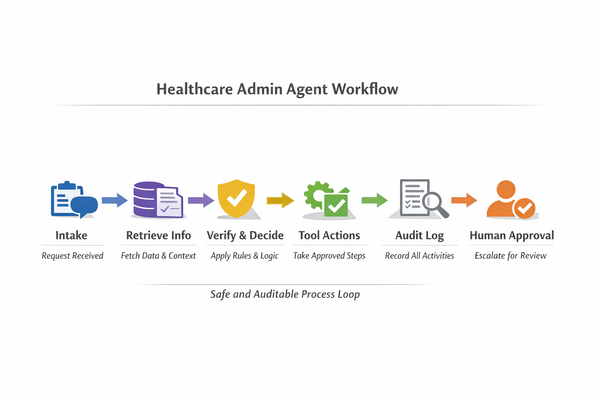
An AI agent, as used in this article, is a software worker that can interpret a request, fetch context from approved systems, follow a defined policy, take actions through approved tools, and hand off to a person when it hits a boundary.
It is not a medical diagnostician. It does not give medical advice. It supports operations around care.
Fits:
- Intake and triage for admin requests (scheduling, billing, coverage, “where is my referral?”)
- Call center and chat self-service with clean handoff to staff
- Prior authorization support as an admin workflow (status checks, missing info collection, document routing)
- Internal IT helpdesk and access requests
- Knowledge assistant for SOPs, policies, and internal how-to content
Does not fit:
- Diagnosis, treatment decisions, or clinical triage that changes care plans
- Any workflow where the agent “decides” medical urgency without a clinician-designed protocol
- Unbounded access to EHR data without role-based controls and audit trails
- Free-form patient counseling
Recent reporting on consumer-facing AI summaries shows how quickly a generative system can present incorrect health guidance to the public. That is why we keep healthcare agents in this article focused on operations around care, with strict escalation and clear boundaries.
Let’s break it down: if your workflow includes PHI, your first design step is not “prompting.” It is access control, audit, and human approval points.
Where AI agents help most in healthcare orgs
Below are the workflows that show the best results in 2026. Each one includes what the agent does, the systems it touches, where a person approves, and what to measure.
Call center triage and routing
What the agent does:
- Greets the caller or chat user
- Confirms identity at a first-pass level (based on your policy)
- Classifies intent (appointment, billing, records request, referral status, benefits)
- Routes to the right queue or triggers a self-service flow
Systems it touches:
- Contact center platform
- CRM or ticketing
- Knowledge base articles and scripts
Where a person approves:
- Before any change to demographics
- Before any payment plan or refund action
- Before any outbound clinical instruction
What to measure:
- Containment rate (requests resolved without a live agent)
- Average handle time for escalations
- Transfer rate between queues
- Repeat contact rate within 7 days
Scheduling, reminders, and intake support
What the agent does:
- Collects appointment request details
- Checks slot availability (read-only first)
- Sends reminders and collects pre-visit forms
- Flags missing intake items
Systems it touches:
- Scheduling system
- Patient portal or messaging
- Document store for forms
Where a person approves:
- Before booking for complex visits if your rules require it
- When the patient’s request conflicts with referral or authorization rules
What to measure:
- No-show rate change
- Form completion rate
- Time from request to confirmed slot
Billing questions and claims support
What the agent does:
- Answers common billing questions using policy content
- Pulls invoice or claim status (read-only)
- Explains next steps and required documents
- Creates a case for staff when it finds exceptions
Systems it touches:
- Billing system
- Claims portal tools (payer portals, clearinghouse tools)
- CRM or ticketing
Where a person approves:
- Any adjustment, write-off, or re-bill action
- Any disclosure of detailed claim line data without strong identity checks
What to measure:
- First-contact resolution for simple questions
- Case backlog growth or reduction
- Time to collect missing documents
Prior authorization support (admin workflow framing)
What the agent does:
- Checks status from your prior auth tracker
- Collects missing fields from ordering clinics or patients
- Prepares a packet for staff review
- Routes to the right payer-specific checklist
Systems it touches:
- Prior auth workflow tool
- Document store
- CRM or ticketing
Where a person approves:
- Submission of final prior auth packet
- Any clinical wording in medical necessity letters
What to measure:
- Time from order to complete packet
- Rework rate due to missing info
- Payer response time visibility
Internal IT helpdesk and access requests
What the agent does:
- Resets passwords or guides self-service
- Routes access requests to the right group
- Collects required approvals and context
- Summarizes incidents for faster triage
Systems it touches:
- ITSM platform
- Identity provider
- Knowledge base and runbooks
Where a person approves:
- Privileged access changes
- Exceptions to policy (after-hours access, break-glass style flows)
What to measure:
- Ticket deflection rate
- Mean time to first response
- Reopen rate
Knowledge assistant for policies and SOPs
What the agent does:
- Answers “how do we do X here?” based on approved content
- Links to the authoritative policy section
- Suggests the next action in the workflow
Systems it touches:
- Policy repository
- Knowledge base
- Intranet and document store
Where a person approves:
- When the agent proposes a policy change
- When the agent cannot cite an internal source, and the answer would affect compliance
What to measure:
- Search-to-answer time
- Helpdesk tickets avoided for policy questions
- Correction rate from subject owners
Patient support and care navigation (non-clinical)
What the agent does:
- Answers “where do I go, who do I call, what do I bring?”
- Helps patients find the right administrative pathway
- Sends links to official resources
Systems it touches:
- Website and help center
- CRM or patient engagement tool
- Contact center
Where a person approves:
- Any content that could be interpreted as clinical advice
- Escalation when the patient describes urgent symptoms (route to an emergency instruction script, not open-ended chat)
What to measure:
- Contact volume by category
- Time to route to the right team
- Patient drop-off rate in self-service flows
Internal support for engineering and product teams
What the agent does:
- Answers questions about internal APIs, runbooks, and release notes
- Creates tickets with full context
- Summarizes incidents and postmortems
Systems it touches:
- Ticketing and incident tools
- Docs and wikis
- Logs and dashboards (read-only)
Where a person approves:
- Any production change, deploy, or permission grant
- Any data export
What to measure:
- Time to create a complete ticket
- On-call interruptions reduced
- Repeat incident rate for known issues
The 5 top solutions in 2026 (review-led selection)
We selected these five based on review volume and ratings on G2 and Capterra, plus pricing and security statements available from vendors. We also checked Trustpilot for recurring concerns that show up after purchase, like support, billing disputes, and renewal friction.
The five solutions cover the most common “agent entry points” in healthcare: internal service desks, contact center and support, CRM-based service workflows, and agent builders for custom workflows.
Microsoft Copilot Studio
What it is

Microsoft Copilot Studio is a builder for chat and voice agents that sits inside the Microsoft ecosystem. Teams use it to create agents that answer questions, retrieve internal content, and trigger actions through approved connectors and workflows.
Best-fit healthcare workflows
- Internal IT helpdesk agent for access requests and common fixes
- Policy and SOP assistant for back-office teams
- Patient support chatbot for admin questions (scheduling, directions, forms), with strict boundaries
- Call center support agent for agents, like summarizing cases and suggesting next steps
Strengths
- Works well when you already run Microsoft identity and collaboration tools
- Supports low-code building for conversational flows, plus deeper build-out for engineering teams
- Review feedback often praises ease of setup for common scenarios
Trade-offs
- Complex workflows still need disciplined design and testing
- Message-based billing can surprise teams if they do not model volume early
- Review feedback also calls out a learning curve for advanced scenarios
Pricing and plans
- Public list pricing is shown as a tenant-based subscription that includes Copilot Credit capacity packs. The published starting point is $200 per pack per month and includes 25,000 Copilot Credits (credit consumption varies by action).
Review themes
- G2 lists Microsoft Copilot Studio at 4.4 out of 5 stars with 140 reviews. Review summaries and tags point to frequent praise around building agents inside Microsoft tools, plus complaints around the learning curve and advanced setup.
- Capterra lists Microsoft Copilot Studio at 4.4 out of 5 stars. Review counts and excerpts change over time, so verify the current listing details during evaluation. Review excerpts often praise usability and fast first builds, and they often flag limitations or extra work once teams move past simple flows.
Security and compliance signals
- Microsoft publishes compliance and audit information through Microsoft Service Trust resources.
- Microsoft also documents HIPAA support and BAA availability for covered Microsoft cloud services. Confirm product scope in procurement and get the BAA in place before you process PHI.
Salesforce Agentforce
What it is
Salesforce Agentforce is Salesforce’s agent layer that can answer questions, work cases, and take actions in Salesforce through defined tools and flows. In healthcare organizations that already run Salesforce for service and operations, it can become the “front door” for service requests.
Best-fit healthcare workflows
- Member or patient service agent for coverage, benefits, and case status questions (non-clinical)
- Contact center agent that creates cases, routes issues, and suggests next actions
- Billing support agent that checks invoice status and collects missing details (read-only first)
- Prior authorization support agent that tracks status, collects missing admin info, and queues staff review
Strengths
- Strong fit when your service workflow already lives in Salesforce
- Clear action model via Salesforce flows and permissions, which helps keep the agent inside guardrails
- Vendor messaging and packaging aims at action-taking agents, not only Q&A
Trade-offs
- You still need clean data, well-defined cases, and tight permissions, or the agent will answer with the wrong context
- Pricing can be confusing if you mix per-user licensing with consumption billing
- Many teams still need admin and developer time to tune flows and knowledge
Pricing and plans
Salesforce documents multiple pricing paths:
- A conversation-based price of $2 per conversation for Agentforce
- A credit-based model (Flex Credits) with published pricing, starting at $500 for 100,000 credits, where different agent actions consume different credit amounts
- Agentforce add-on licenses typically ranging from $50 to $125 per user per month, which grants platform access but still requires credits for actions
- “Agentforce 1” editions listed from $550 per user per month, with add-ons depending on edition
Review themes
- G2 lists Salesforce Agentforce at 4.4 out of 5 stars with 846 reviews. Review summaries emphasize access to Salesforce data and case workflows, with recurring complaints around setup effort and cost.
- As of March 2026, Trustpilot shows Salesforce at ~1.5/5 with a review count that changes over time. Use it as a procurement signal (support, billing, renewals), not a product benchmark.
Security and compliance signals
- Salesforce publishes a HIPAA compliance position and also publishes SOC report coverage for its services.
- Salesforce Health Cloud positioning also references HIPAA alignment and healthcare data exchange standards support. Validate scope for your exact products, confirm contract terms, and keep PHI access behind role-based controls.
ServiceNow Now Assist + Virtual Agent
What it is

ServiceNow’s Virtual Agent and Now Assist bring conversational support into ServiceNow workflows. You can use them to handle internal service requests, route tickets, and answer policy questions using approved knowledge articles, with the agent triggering actions through ServiceNow workflows.
Best-fit healthcare workflows
- Internal IT helpdesk agent (password reset guidance, ticket routing, access request intake)
- Employee services agent (HR requests, facilities requests, internal procurement requests)
- Knowledge assistant for IT and operations SOPs
- Service desk agent assist (summaries, suggested next steps) for high-volume support teams
Strengths
- Strong when your organization already runs ServiceNow for IT and internal services
- Action-taking fits well because ServiceNow already has workflow, approvals, and ticketing
- Review feedback often highlights centralized request handling and automation support
Trade-offs
- Total licensing cost can rise as you add modules and AI add-ons
- Setup can take time, and you need strong ownership of knowledge content
- Teams often need training for admins and service owners
Pricing and plans
- ServiceNow publishes package pages that route buyers to a custom quote.
- Most deals use a negotiated subscription tied to modules, user types, and optional AI add-ons.
Review themes
- G2 lists ServiceNow IT Service Management at 4.5 out of 5 stars with 1,219 reviews. Review summaries point to strong ticket handling and workflow control, plus recurring complaints about setup effort and licensing cost.
- Capterra lists ServiceNow at 4.5 out of 5 stars with 340 reviews. Review excerpts often praise breadth of modules and flexibility, and they often flag cost and admin overhead.
Security and compliance signals
- ServiceNow publishes a compliance page that references SOC 1 and SOC 2 reports.
- ServiceNow trust documentation also references ISO 27001 and ISO 27018 coverage, and it publishes a security controls document mapped to HIPAA requirements. Confirm contract terms for PHI, request audit reports in procurement, and enforce role-based access.
Zendesk AI Agents (Zendesk for Customer Service)
What it is

Zendesk is a support and ticketing platform that offers AI agents and agent-assist features across chat, email, voice, and help center. In healthcare, teams often use it for patient or member support, billing inquiries, and internal service desks.
Best-fit healthcare workflows
- Patient support agent for admin requests (forms, directions, portal help)
- Billing support agent for invoice questions and payment plan intake, with staff approval for any changes
- Call center deflection for common questions, with clean escalation to staff
- Internal helpdesk for non-clinical staff (IT and HR service requests)
Strengths
- Broad channel coverage (tickets, chat, help center, voice)
- Large review base, which usually signals stable day-to-day operation
- Public pricing for many plans and add-ons makes early cost modeling easier
- Independent software roundups still include Zendesk among widely used help desk tools
Trade-offs
- Costs can rise quickly as you add seats, channels, and AI add-ons
- Admin setup can feel heavy for smaller teams
- You need disciplined content ownership for the agent to stay accurate
Pricing and plans
Zendesk publishes list pricing and add-on pricing, including:
- A Copilot add-on listed at $50 per agent per month (billed annually)
- Capterra comparison pages list a starting price around $55 per month for Zendesk Suite (plan and billing terms depend on tier and region)
Review themes
- G2 lists Zendesk for Customer Service at 4.3 out of 5 stars with 6,698 reviews. Review summaries highlight ticket handling and channel consolidation, with recurring complaints about admin setup and rising cost as teams add advanced features.
- G2’s review filters also show a wide mix of buyer sizes, including 2,722 reviews from small organizations, 3,019 from mid-sized organizations, and 915 from large organizations. It also shows heavy usage by admins and end users, which matters for day-to-day ownership.
- Capterra lists Zendesk Suite at 4.4 out of 5 stars with 4,065 reviews, and a published “last updated” timestamp on its comparison pages.
- As of March 2026, Trustpilot shows Zendesk at ~1.5/5 with ~692 reviews (counts vary by country and change over time). Treat this as a vendor experience signal for procurement, not a product capability benchmark.
Security and compliance signals
- Zendesk’s Trust Center references SOC 2 and ISO coverage (including ISO 27001) and describes data hosting arrangements.
- Zendesk documents an “Advanced Compliance” add-on that supports signing a Business Associate Agreement (BAA) for HIPAA use cases, plus recommended security configuration options for safeguarding PHI.
Google Cloud Conversational Agents (Dialogflow)
What it is
Google Cloud Conversational Agents (which includes Dialogflow capabilities) lets teams build chat and voice agents that can answer questions, collect structured info, and route users to the right next step. It is a common starting point for contact center self-service and website chat.
Best-fit healthcare workflows
- Call center and web chat triage for admin intents (scheduling, records requests, billing status)
- Voice agents for IVR-style self-service, with escalation to staff
- Intake support that collects structured info before routing to a live team
- Staff-facing agent that helps answer common policy questions from a knowledge base
Strengths
- Usage-based pricing that maps directly to requests or audio seconds, which helps early cost modeling
- Review feedback often highlights natural language handling and a friendly UI for building flows
- Works for both chat and voice workloads
Trade-offs
- You need engineering work to connect the agent to your internal systems and to enforce access rules
- Costs can rise with high traffic if you do not design for containment and short turns
- Advanced scenarios can feel heavy if teams rely only on default templates
Pricing and plans
Google publishes usage pricing for Conversational Agents:
- Chat agents charge per request, with published per-request prices (flows and playbooks have different rates)
- Voice agents charge per second of audio, again with published rates
- The pricing page states you pay for aggregated usage, so the main cost factor is volume
Review themes
- G2 lists Google Cloud Dialogflow at 4.4 out of 5 stars with 136 reviews. Review summaries highlight ease of use and language understanding, with recurring complaints about cost growth at higher volumes and the learning curve for advanced features.
- Capterra lists Dialogflow at 4.4 out of 5 stars with 28 reviews, with frequent mentions of ease of use and limits around support or deeper setup.
Security and compliance signals
- While the main pricing and product pages focus on billing units and capabilities, Google Cloud offers a Business Associate Agreement (BAA) for covered services. HIPAA compliance depends on using covered services under a BAA and configuring required controls. Verify that your specific Dialogflow/Conversational Agents setup and connected services fall within the covered scope before processing PHI.
Healthcare proof signal
- Google Cloud publishes healthcare customer stories, including HCA Healthcare. Use these as a signal of vendor presence in healthcare, then validate your exact workload and data boundaries.
- Public case studies also describe a long-term Mayo Clinic partnership with Google focused on ethical reuse of clinical data, which shows how strongly healthcare organizations focus on privacy and governance.
Build vs buy for healthcare agents
Buying a vendor agent product makes sense when your workflow maps cleanly to what the product already does, and when you can accept the vendor’s constraints around data access, logging, and pricing units.
Building a custom healthcare agent makes sense when the workflow cuts across many internal systems, or when your governance, audit, and PHI boundaries demand tighter control than an off-the-shelf tool can offer.
Decision factors to weigh:
- Compliance scope and contract terms (BAA, audit reports, retention, redaction)
- Connection depth to your systems (EHR-adjacent services, CRM, contact center, ticketing, identity)
- Control over tool actions (what the agent can do, and when a person approves)
- Audit trail quality (what the agent saw, what it did, and why)
- Cost control as volume grows (billing units and unit cost drift)
- Vendor lock-in risk (policy portability, prompts, tool schemas, data movement)
A pilot path that works for both
- Choose one workflow with high volume and low clinical risk (billing status, scheduling FAQ, internal access requests).
- Start read-only. Let the agent retrieve information and draft responses before it takes actions.
- Add one tool action at a time, with explicit approvals (Example: “create a case” before “change a record”.)
- Run side-by-side with staff for two weeks, then expand the allowed actions.
- Treat audit logs as a first-class output. If you cannot audit it, do not automate it.
A practical evaluation plan
Use this checklist to evaluate any healthcare AI agent, vendor or custom. The goal is to leave the pilot with a clear view of capability, risk, and cost at your real volume.
Evaluation checklist (12 to 18 items)
- Define the workflow in steps and mark which steps touch PHI or PII
- Document what the agent can see (data sources) and what it can do (tool actions)
- Require role-based access controls tied to your identity provider
- Require audit logs that capture retrieval sources, actions taken, and user approvals
- Define data retention and deletion rules for conversations and logs
- Define redaction rules for PHI in prompts, logs, and analytics exports
- Define escalation rules and handoff UX (agent to human)
- Validate knowledge sources and ownership (who updates policy content)
- Test hallucination failure modes with “trap” questions
- Model unit cost at current volume, 2x volume, and peak season volume
- Validate message or conversation limits and overage behavior
- Validate fallback behavior when upstream systems are down
- Confirm how the tool handles attachments (forms, PDFs) and whether it stores them
- Define monitoring: error rate, fallback rate, escalation rate, containment rate
- Define a review process for agent changes (prompt, tools, content)
- Run a privacy review: consent, notice, and patient-facing disclaimers
- Run a security review: vendor reports, internal threat model, and access testing
- Create a rollback plan (disable actions first, then disable the agent)
Scoring rubric (no numbers)
Score each area as low, medium, or high readiness:
- Low: unclear data boundaries, weak audit, unclear pricing, or missing ownership
- Medium: controls exist, but you still need policy, tests, and monitoring maturity
- High: tight access rules, strong audit, clear unit cost, and stable ownership for content and tools
Next steps: only move from read-only to action-taking after you reach medium or high readiness on audit, access, and rollback.
Partner with Lexogrine
Partner with Lexogrine when you need a custom agent that fits your healthcare workflow, your data boundaries, and your governance requirements. We are an AI Agent development company that builds agent systems end-to-end, not just prompts.
What you get with a custom healthcare agent built by Lexogrine:
- More flexibility: you define the workflow, tools, and approvals, not a vendor package
- Better fit with existing infrastructure: connect your agent to the systems you already run across EHR-adjacent services, CRM, contact center, and ticketing
- Better cost control: model unit economics early, tune retrieval and tool calls, and avoid surprise pricing jumps as volume grows
- Stronger governance and audit: keep full audit trails, run approvals, and enforce change gates for prompts, tools, and knowledge sources
- Clear PHI and PII boundaries: enforce access control, redaction, retention, and “least access” by design
Our delivery model covers:
- Product discovery and workflow mapping
- Agent design: policies, tools, approvals, and audit events
- Full-stack engineering: React, React Native, Node.js
- Cloud delivery and operations: AWS and GCP
- Monitoring, logging, and operational runbooks
If you want a pilot that fits your real workflow and your real constraints, let's talk!