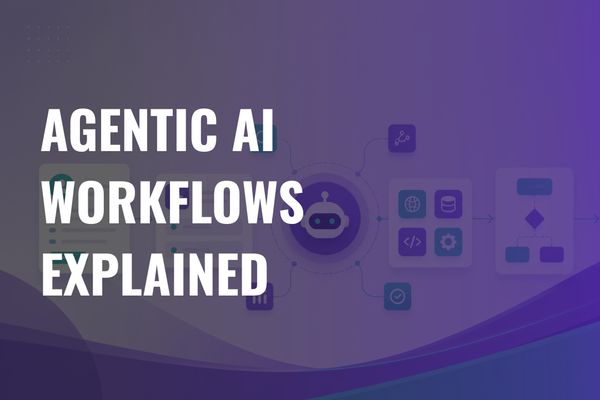
Agentic AI Workflows Explained: Architecture, Use Cases, and Implementation Steps
What are agentic AI workflows?
The short answer: an agentic AI workflow is a software process where an AI agent plans and completes a multi-step task by choosing approved tools, calling backend APIs, reading context, tracking state, and asking for human approval when the action is risky. It differs from a chatbot because it can move work through systems, not only answer with text.
What makes the workflow “agentic” is controlled autonomy. The system receives a goal, breaks it into steps, selects a path, uses tools, checks outputs, and keeps working until it reaches a final state or needs a person.
A chatbot answers. A scripted workflow follows a fixed path. RPA clicks through screens. A single AI prompt generates one response. An agentic AI workflow combines language understanding, rules, tool calls, retrieval, state, and approval checks inside one process.
Agentic workflows can draft replies, route tickets, check records, update fields, schedule tasks, collect missing information, and prepare work for review. They cannot guarantee truth, safely make high-risk decisions without controls, or replace medical, legal, financial, HR, or compliance review where a trained person is required.
This article is general technical and product guidance. It is not legal, medical, financial, compliance, or security advice. Before deploying agentic workflows in regulated settings, teams should review applicable laws, sector rules, vendor terms, and internal governance requirements with qualified counsel and compliance owners.
Why companies are moving from AI chatbots to agentic workflows
Chatbots often stop at advice. They explain a policy, summarize a document, or suggest a next step, but a human still has to open five tools and finish the work.
Business teams need systems that can take controlled actions. A support team does not only need a policy answer. It needs order lookup, refund eligibility, ticket update, draft response, escalation, and audit history. A sales team does not only need an account summary. It needs research, CRM field updates, next task creation, and follow-up drafts.
Agentic workflows matter when work has multiple steps and each step depends on context. Once the system can retrieve internal knowledge, call APIs, update records, ask for missing data, and pause for approval, it can carry work across the gap between “AI answer” and “task done.”
This raises the bar. The agent must have strict permissions, clean tool contracts, data boundaries, review checkpoints, logs, and rollback paths. Without those controls, a helpful assistant can become an unsafe actor inside business software.
The architecture of an agentic AI workflow
A working agentic workflow is not one prompt. It is a software architecture around the model.
Main parts:
- User or event trigger: form submission, ticket update, email, webhook, cron job, or app action.
- Task intake layer: classify the request, extract fields, check scope, and reject unsupported work.
- LLM reasoning layer: interpret intent, choose next steps, and write structured tool requests.
- Planner or controller: decide whether the model, code, or workflow graph controls the next step.
- Tool registry: approved tools, schemas, descriptions, limits, and return formats.
- API and backend connectors: CRM, ERP, ticketing, payments, email, calendar, catalog, database, or internal services.
- Retrieval layer: policies, help center content, contracts, product data, intake notes, or internal docs.
- Memory and state layer: task progress, selected facts, prior approvals, and long-running work.
- Workflow orchestration layer: routing, retries, timeouts, queues, scheduled steps, and handoffs.
- Human approval layer for sensitive actions.
- Policy and permission layer with roles, data rules, tool scopes, and per-action checks.
- Evaluation layer for test cases, scoring, regression checks, and monitored results.
- Logging and observability layer for traces, tool calls, decisions, errors, and audit events.
- Frontend layer: web app, mobile app, admin panel, customer portal, or internal tool.
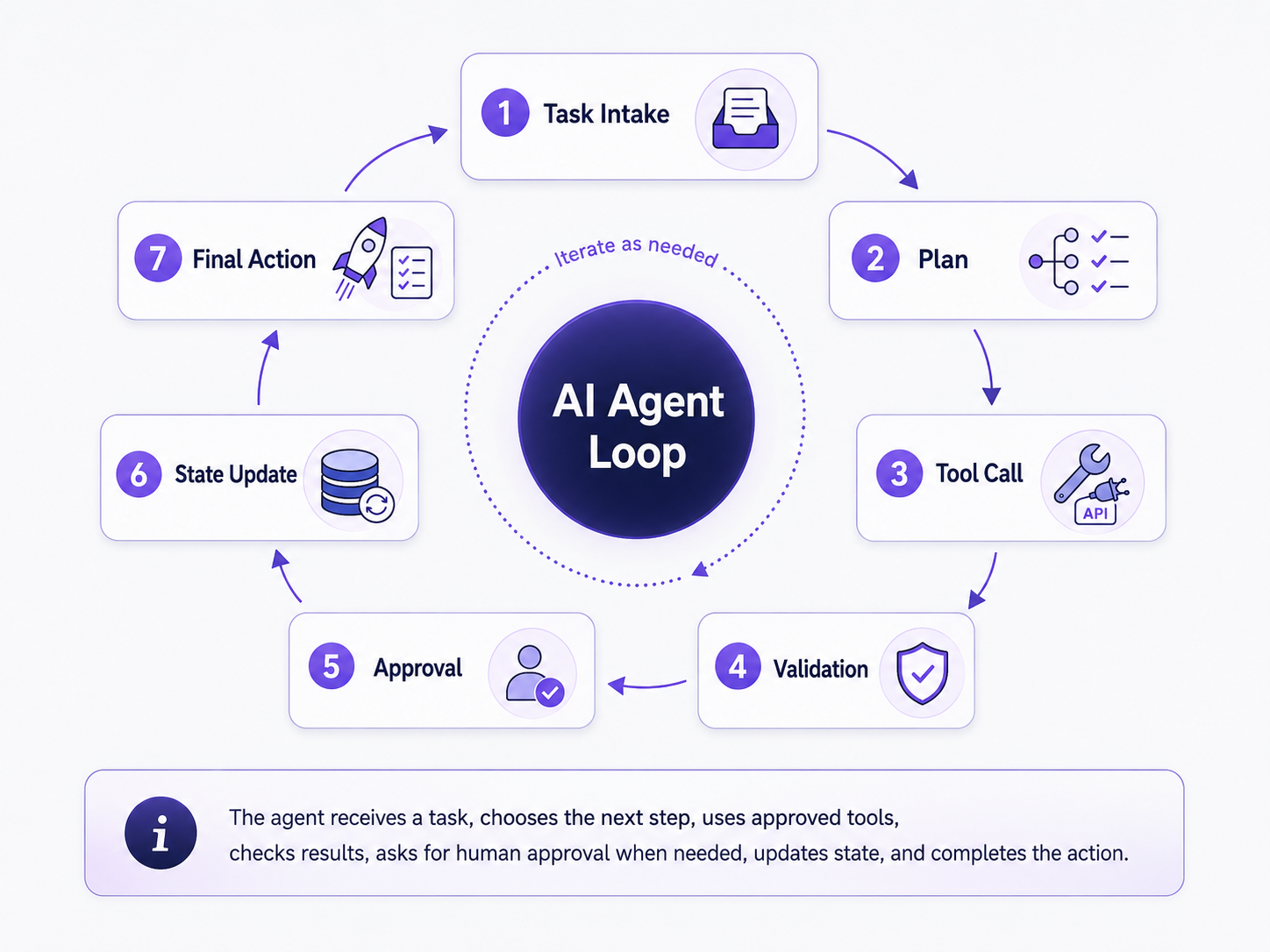
Here is the simple flow:
- A user request or business event starts the workflow.
- The system classifies the task and gathers context.
- The agent chooses a plan or next step.
- The agent calls approved tools or APIs.
- The system validates the result.
- The workflow asks for human approval when needed.
- The system writes state, memory, or audit logs.
- The final result appears in the product interface or connected system.
Practical model: the model decides what should happen next, but the software decides what is allowed.
Agentic workflow vs traditional automation
Traditional automation works well when the process is stable and predictable. Deterministic workflows should still handle billing rules, tax calculations, invoice numbering, access control, password resets, and other tasks where every branch is known.
Rule-based automation maps conditions to actions. RPA bots mimic human clicks in existing screens. LLM-only assistants generate text, but they often cannot act. Agentic systems sit between these categories. They can read messy inputs, make bounded choices, call tools, ask for clarification, and continue across several steps.
That does not mean every workflow should become agentic. If a function can solve the task with clear logic, use a function. If a static workflow already works, keep it. Agentic workflows make sense when tasks need context, language understanding, judgment, tool use, and controlled flexibility.
Types of agentic AI workflow patterns
Common patterns include:
- Single-agent workflow: one agent owns the task and tool set. Use it for narrow workflows such as ticket triage. Watch for tool overload as scope grows.
- Multi-agent workflow: several agents split work by role. Use it when sales research, legal review, and CRM updates need different instructions. Watch for handoff confusion.
- Planner-executor workflow: one controller plans, another part acts. Use it for longer tasks. Watch for plans that look good but fail in real systems.
- Router workflow: the system chooses the right path or specialist. Use it for intake across support, billing, and technical queues. Watch for misrouting.
- Research-and-synthesis workflow: one stage gathers facts, another writes the output. Use it for briefs, reports, and sourcing. Watch for weak source quality.
- Tool-using workflow: the agent chooses from approved APIs. Use it when data lookup and record updates matter. Watch for broad tool access.
- Human-in-the-loop workflow: the agent pauses before sensitive actions. Use it for refunds, medical admin, legal text, HR actions, and public content. Watch for slow approval queues.
- Event-triggered workflow: an email, ticket, webhook, or scheduled job starts the agent. Use it for operations monitoring. Watch for noisy triggers.
- Long-running workflow: the task pauses and resumes over hours or days. Use it for claims, new account setup, procurement, or sales follow-ups. Watch for lost state.
- Memory-based workflow: the system stores selected preferences or task facts. Use it when future runs need continuity. Watch for stale or poisoned memory.
Practical use cases for agentic AI workflows
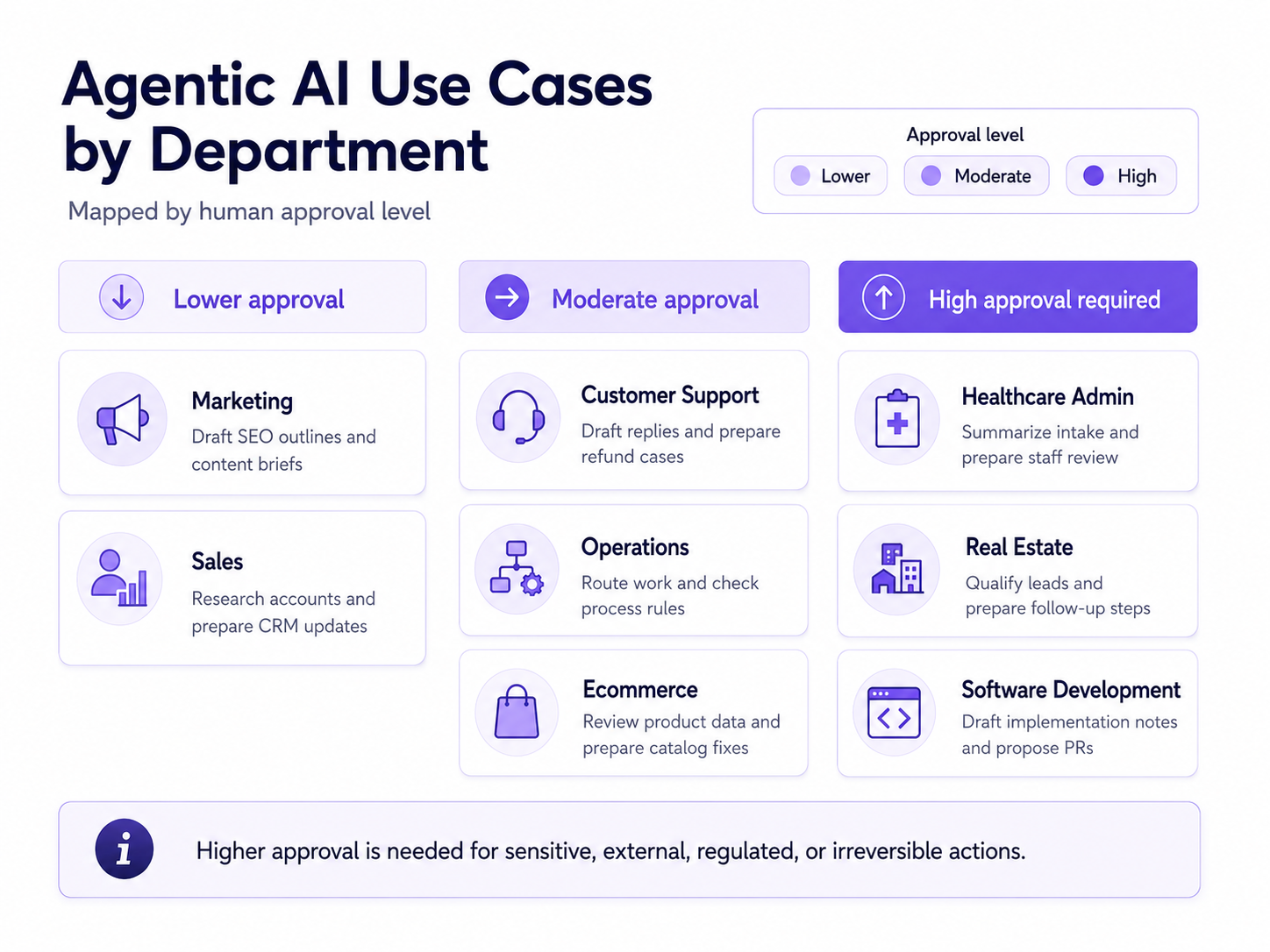
Each use case needs clear tool limits and human control.
Customer support: checks policy and order history, drafts a reply, and escalates refund decisions. Tools: help center search, order API, ticketing, refund request. Human control: refunds above a threshold, account closures, exceptions.
Sales: researches accounts, prepares outreach, updates CRM fields, and creates follow-up tasks. Tools: CRM, email draft, calendar, website search, lead database. Human control: external messages and deal-stage changes.
Operations: monitors tickets, checks rules, routes work, and asks before changing records. Tools: ticketing, incident tools, internal docs, workflow queue. Human control: live record changes and customer-facing status.
Healthcare admin: summarizes intake forms, checks missing information, and prepares staff review. Tools: forms, EHR-facing views, scheduling, policy retrieval. Human control: care, diagnosis, billing, and eligibility decisions.
Ecommerce: reviews product data, detects missing attributes, drafts fixes, and prepares catalog updates. Tools: catalog API, image metadata, search data, merchant rules. Human control: bulk changes, pricing, legal claims, regulated product text.
Real estate: qualifies leads, schedules follow-ups, and updates CRM notes. Tools: CRM, calendar, property database, email, SMS. Human control: offers, legal language, financing claims, sensitive communications.
Marketing: reviews SEO briefs, checks source coverage, drafts outlines, and routes content. Tools: document search, search research, CMS drafts, brand rules. Human control: final copy, claims, publishing.
Software development: reads issues, checks repositories, drafts implementation notes, and opens a pull request only after approval. Tools: issue tracker, repo read access, test logs, code tools. Human control: code changes, secrets, dependencies, merges.
How to build an agentic AI workflow step by step
- Pick one narrow workflow with measurable business value. Start with “classify and route support tickets” rather than “automate support.”
- Map the current human process. Capture screens, tools, decision points, edge cases, and handoffs.
- Separate decisions, data lookups, and actions. Decisions need criteria. Lookups need sources. Actions need permissions.
- Define what the agent can do without approval. Safe actions may include summarizing, tagging, drafting, or checking missing fields.
- Define what always requires human approval. External messages, refunds, record deletion, legal text, medical admin decisions, and financial actions usually need review.
- Choose the model and tool-calling approach. Match model strength to task difficulty, response time, and cost.
- Design the tool registry and API contracts. Each tool needs a clear name, input schema, output schema, allowed scope, error format, and owner.
- Add retrieval and business context. Index only approved knowledge, keep source dates, and show source snippets to reviewers.
- Decide what state and memory the workflow needs. Store task progress, not the whole conversation by default.
- Add orchestration for multi-step tasks. Use a graph, queue, workflow engine, or custom controller for retries, waits, and handoffs.
- Add logging, evaluation, and failure handling. Record tool calls, approvals, errors, outputs, and final results.
- Test with real historical cases. Include easy cases, edge cases, malicious prompts, missing data, stale policies, and tool failures.
- Add user-facing controls. Give reviewers approve, reject, edit, retry, assign, and stop controls.
- Deploy behind limited access. Start with a small group, narrow permissions, and clear fallback paths.
- Improve based on monitored results. Tune prompts, tools, retrieval, schemas, and approval thresholds using evidence from real runs.
What data, tools, and permissions an agentic workflow needs
Production agentic systems depend on the surrounding software environment. The agent may need internal APIs, CRM systems, ERP systems, ticketing systems, calendars, email, databases, document repositories, vector search, authentication, role-based permissions, audit logs, admin controls, approval queues, and rollback paths.
The agent should never receive more access than the workflow requires. A catalog-cleanup agent does not need payment access. A sales research agent does not need contract deletion rights. A support drafting agent does not need direct refund execution unless the approval flow allows it.
Tool scopes should map to workflow scope. Read tools, draft tools, and execute tools should be separate.
Memory, state, and context in agentic workflows
Chat history is the conversation. State is the current task record, such as step, owner, pending approval, or retry count. Memory is selected information kept across sessions. Retrieval is the act of pulling relevant knowledge into the current run.
Memory is useful when a future workflow needs continuity. It creates risk when the system stores too much, stores unverified claims, or lets untrusted content shape later actions. State helps long-running workflows resume after a delay, failure, or human review. Retrieval brings policies, product data, contracts, or internal docs into the model’s context without copying everything into the prompt.
Store selected facts or task state rather than everything by default. Add retention rules, deletion paths, source labels, and user scope.
Conceptual example:
- A customer says they prefer email communication.
- The system extracts that as a preference.
- The preference is stored with customer scope and a source timestamp.
- A later workflow recalls it before contacting the customer.
- The system uses the preference only when policy allows it.
Human-in-the-loop controls
Human review matters because many business actions carry risk outside the model. The strongest production workflows mix autonomous steps with controlled checkpoints.
Use approval before external actions, financial decisions, medical, legal, HR, or compliance-sensitive actions, and public content changes. Review generated content before publishing. Escalate when confidence is low, required data is missing, the workflow reaches policy limits, or a tool returns an unexpected result.
A good approval system shows the proposed action, source context, tool outputs, risk reason, and edit options. It should also write audit trails and give admins dashboards for pending approvals, rejected runs, and repeated failure modes.
Security, privacy, and reliability risks
Agentic workflows expand the attack surface because they connect language models to tools and data.
- Prompt injection: treat user input, web pages, emails, and retrieved docs as untrusted. Add input checks, source separation, and tool limits.
- Tool misuse: use strict schemas, allowlists, dry-run modes, rate limits, and approval gates for sensitive tools.
- Excessive permissions: use least privilege, workflow-specific scopes, short-lived tokens, and per-user auth where needed.
- Data leakage: redact secrets, keep sensitive fields out of prompts, and avoid logging private data by default.
- Unsafe external actions: separate “propose” from “execute,” require approval, cap amounts, and keep rollback paths.
- Memory poisoning: verify facts before storing memory, mark the source, scope memory by user or account, and allow deletion.
- Stale context: keep source dates, expire old knowledge, and alert when policies conflict.
- Hallucinated tool outputs: validate tool results with deterministic checks and typed responses.
- Incorrect retrieval: show source snippets, rank by permissions and freshness, and test retrieval against known cases.
- Silent failures: add alerts, dead-letter queues, retries, idempotency, and clear fallback owners.
- Cost spikes: set budgets, max turns, model routing, caching, and loop guards.
- Vendor lock-in: keep tool schemas, state records, and business rules outside one model provider where possible.
- Incomplete monitoring: store traces, compare runs against test sets, and review live results.
Build, buy, or adapt a framework?
Use an existing framework when your workflow matches common patterns such as routing, tool use, memory, human review, or multi-agent handoffs. LangGraph, LlamaIndex workflows, CrewAI, Temporal, and vendor SDKs can reduce custom orchestration work.
Use vendor-native tooling when your team already runs on AWS, Google Cloud, or Azure and needs managed agent hosting, identity, retrieval, tool catalogs, monitoring, or policy controls.
Build a custom workflow layer when the workflow depends on business-specific approvals, internal permissions, custom screens, mobile access, audit rules, or complex backend connections. Many production systems combine a framework for graph execution with custom business logic for permissions, data access, and product flows.
Avoid agentic architecture when the task is deterministic, low-variance, and easy to express as code. A plain function is often safer and cheaper than an agent.
Evaluate the decision by workflow length, risk level, number of systems involved, human approval needs, memory needs, custom frontend needs, mobile access, audit logs, admin tools, developer time, regulated data rules, and long-term maintenance.
Minimal example of an agentic workflow
Customer support scenario:
- Trigger: a customer submits a ticket asking for a refund.
- Context retrieval: the system reads the order record, refund policy, delivery status, and prior ticket history.
- Reasoning step: the agent classifies the case as “refund request with damaged item claim.”
- Tool call: the agent calls an order API and a policy search tool.
- Validation: deterministic code checks order age, refund threshold, and missing evidence.
- Human approval: the workflow pauses because the refund exceeds the agent’s allowed amount.
- Final action: a support lead approves, edits the drafted reply, and sends it.
- Logging: the system records the request, sources, tool outputs, approval, final message, and case result.
This is the difference between a chatbot and a workflow. The agent does not only say, “You may qualify for a refund.” It prepares the work, checks the rules, asks for approval, and records what happened.
Partnering with Lexogrine
Lexogrine is an AI agent development company for teams that need custom systems. We build the agent logic, backend services, data connections, approval flows, admin panels, customer portals, internal tools, and mobile apps needed to run the workflow end to end.
Lexogrine ships web and mobile products with React, React Native, Node.js, AWS, and Google Cloud Platform, so the agent can sit inside real business software rather than a detached chatbot.