This guide covers leading AI agent solutions for customer support in 2026, with a focus on what often holds up in production and where tools tend to break after the demo.
Support leaders asked for chatbots for a decade. In 2026, the ask sounds different: “Can the system solve the issue, not just chat about it?”
That shift matters. It changes how you evaluate tools, how you price them, and how they fail.
Here is what this article does:
- Define what an AI agent for support is, in plain terms.
- Map the problems support teams actually need to solve.
- Give you criteria that hold up in the real world.
- Analyzes eight widely used customer support AI agents with strengths, weaknesses, pricing models, and recurring review themes.
- Share a selection checklist you can run in 30 minutes.
- Call out when custom build beats buying.
Let’s break it down.
Disclosure: We are not affiliated with the vendors listed in this article, unless explicitly stated.
Data and accuracy note (as of March 2026): This article is for general informational purposes and does not constitute legal, tax, or procurement advice. Vendor pricing, packaging, and review counts change over time. We verified the links and figures referenced here in March 2026. Some prices vary by region, channel, usage, and add-ons, so confirm current terms on vendor sites before you decide.
Commercial note: This article includes a “Partner with Lexogrine” section describing Lexogrine services. The product shortlist and evaluation guidance are editorial and based on publicly available vendor documentation and third-party review platforms.
What is an AI agent for customer support
An AI agent for customer support is software that can understand a customer request, pull the right knowledge, and complete a support task with guardrails. It can answer, draft, route, or take actions like updating a record or triggering a workflow.
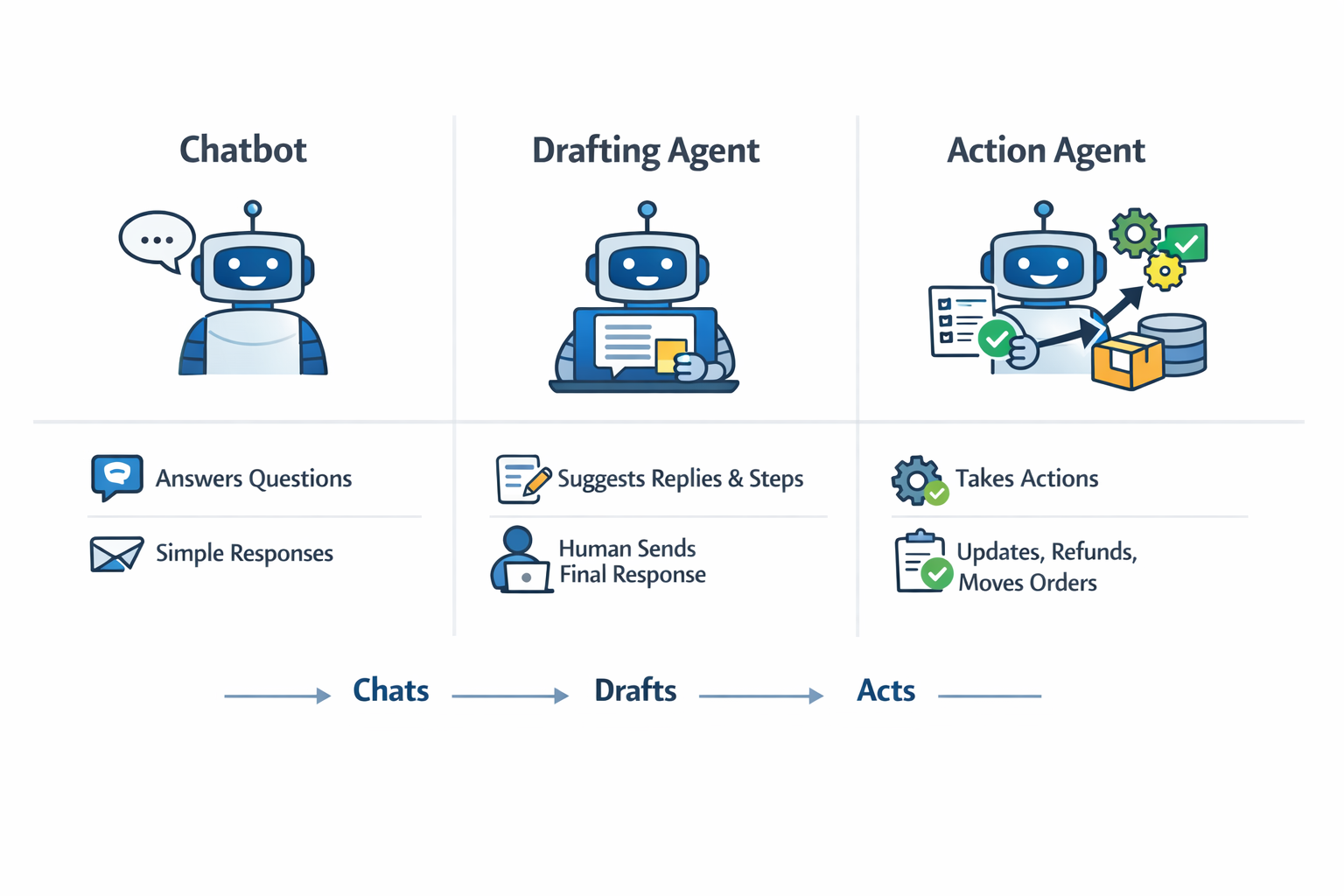
A chatbot answers questions in a conversation. An agent goes further: it can decide what to do next and execute steps across systems.
There are two common agent modes:
- Drafting agent: suggests replies, summaries, tags, and next steps, while a human sends the final message.
- Action agent: takes actions such as refund initiation, account updates, order status checks, or case creation, then reports back.
What an AI customer support agent does not solve:
- A broken product experience.
- Missing policies, missing refund rules, or missing escalation rules.
- A messy knowledge base with outdated content and unclear ownership.
If you start with those gaps, the agent will look smart in demos and break on day three.
The real problems support teams want to solve
Most teams do not buy customer support AI agents because they want “AI”. They buy them because the queue hurts. They want AI customer support automation that reduces support ticket automation busywork without annoying customers.
Common goals that show up in almost every evaluation:
- Lower ticket volume through safe self-serve answers.
- Faster first response for email and chat.
- Better triage: route to the right team with the right context.
- Reduce backlog spikes during launches, incidents, and seasonal peaks.
- Consistent tone and policy adherence across agents.
- Multilingual coverage without doubling headcount.
- Faster wrap-up work: summaries, tags, and CRM updates.
Where automation usually fails:
- Bad data and stale knowledge. If the agent pulls outdated policies, it will produce wrong answers with high confidence.
- Unclear ownership. Nobody owns the knowledge base, prompts, and test set, so quality drifts.
- Weak escalation design. The bot keeps talking when it should hand off, or it hands off too early and kills deflection.
- Over-automation. Customers get stuck in loops, then churn or flood you through a second channel.
- No audit trail. You cannot explain why the agent answered a certain way, so trust drops fast.
What “good” looks like in measurable terms:
- Deflection that does not increase repeat contacts.
- Faster first reply without lower quality.
- A stable handoff rate that rises on risky intents and falls on safe intents.
- Clear cost per resolved issue that finance can forecast.
- A weekly review loop where the team fixes the top failure clusters.
Next steps: treat the agent as part of your support system, not as a widget you “turn on”.
Evaluation criteria that actually matter
A lot of vendor demos focus on the chat window. In production, support teams live and die by what connects behind it.
Use this set of criteria to evaluate any AI agent platform option.
1) Channels and entry points
Ask which channels the agent can serve and where it can assist humans:
- Web chat and in-app chat
- Email drafting and ticket replies
- Voice (either full voice agent or agent assist)
- Social and messaging apps
- Internal agent assist surfaces (the agent screen, work chat, Teams)
2) App connections
Ask what the tool connects to on day one:
- Zendesk, Intercom, Salesforce, Freshdesk
- Jira, Linear, GitHub issues
- Microsoft Teams
- Data sources like Confluence, Notion, Google Workspace files, SharePoint
Then ask the hard part: can it write back to these systems, or only read?
3) Knowledge connection and permissions
Most “smart” support agents run on retrieval plus generation. You will hear terms like RAG, grounding, and knowledge sync.
What you should check instead:
- Can it index multiple knowledge sources?
- Can it respect permissions per user, per team, and per customer segment?
- Can you scope answers to a product, plan, region, or language?
- Does it keep links to sources for internal review, even if the customer does not see them?
4) Guardrails and human handoff
Ask how the system avoids risky behavior:
- Confidence checks and fallback behavior
- Safe refusal patterns for policy or security questions
- Tool access controls for action agents
- A clear “handoff now” path with context and transcript
5) Analytics and quality review workflow
If you cannot see failure patterns, you cannot fix them.
Look for:
- Conversation and ticket-level reporting
- Audit logs for agent actions
- A way to label “bad answers” and feed them into fixes
- A test set or simulator that lets you run changes before rollout
6) Setup time and maintainability
Many teams underestimate ongoing work:
- New product launches change policies and FAQs.
- Promotions change pricing and refund rules.
- Bugs and outages create sudden new intents.
Ask how you update knowledge, prompts, and action workflows without breaking production.
7) Pricing approach and cost drivers
In 2026, pricing often ties to outcomes or usage:
- Per agent seat plus add-ons
- Per resolution (outcome pricing)
- Per conversation or message
- Usage credits or token-style billing
- Add-on charges for channels like voice
Do not ask “What does it cost?” first. Ask “What makes the bill go up?” first.
The shortlist, with reviews
Below are eight customer support AI agents and platforms that show up often in buyer shortlists. Review notes summarize common themes from public review platforms and customer feedback. Individual experiences vary, and we do not claim that any single review reflects typical results.
Each section follows the same format, so you can compare quickly.
Zendesk AI Agents

Zendesk positions AI Agents as its bot and automation layer for customer service, tied to Zendesk’s ticketing and messaging stack. Zendesk also sells Copilot-style assistance for human agents and highlights AI features across chat, email, and voice.
Best for
Teams already on Zendesk that want a single vendor path from self-serve to agent assist.
Top strengths
- Outcome pricing model (automated resolutions) matches spend to solved issues, not just seats.
- Works well when your help center and macros are already clean and consistent.
- Natural fit for Zendesk-native messaging, ticketing, and reporting.
Top weaknesses
- Outcome pricing can surprise teams if you do not control what counts as an automated resolution.
- The agent inherits every weakness of your knowledge base and your macro library.
- Mixed channel journeys can still need careful design, especially when chat and email live in different flows.
Pricing model
Zendesk moved AI Agents pricing from monthly active users to “automated resolutions” as the usage unit. The Zendesk help center describes automated resolutions as the measure used to calculate AI agent usage.
Notes from reviews
On G2 and Capterra, Zendesk users often praise the platform breadth and general ticket handling. Common negatives include pricing concerns and a learning curve when teams push deeper customization or more advanced workflows.
These are recurring themes from review platforms, not a comprehensive assessment of every deployment.
Rollout notes (what teams often get wrong)
- They turn on too many intents at once. Start with 10 to 20 high-volume, low-risk intents.
- They do not define “successful automated resolution” in business terms. Write a rule: what the agent must do, what it must cite internally, and when it must hand off.
- They skip a test set. Build a small set of real tickets, then replay them after each change.
Intercom Fin
Fin is Intercom’s AI agent product that answers customer questions and resolves conversations. Intercom markets Fin as an agent that can work with Intercom’s own inbox and also connect to other helpdesk tools.
Best for
Product-led SaaS teams that run chat-first support and already use Intercom.
Top strengths
- Clear outcome pricing. Intercom lists a per resolution price for Fin.
- Strong for chat-based deflection when your public docs are complete and well written.
- Tight fit with Intercom’s messaging and inbox workflow.
Top weaknesses
- The “answering” layer can look great in demos and still fail on edge cases like plan exceptions, account-specific rules, and regional policy differences.
- Cost rises with resolved conversations, so you need strong routing and safe handoff rules.
- Less compelling if your main volume is email tickets with long, complex threads.
Pricing model
Intercom lists Fin as priced per resolution at $0.99 per resolution.
Notes from reviews
On G2, Fin reviewers often highlight time savings and faster replies when knowledge content is solid. Capterra feedback on Intercom often points to a strong chat product, with critiques around pricing and how features sit across plans.
These observations reflect common review themes and may differ by plan, region, and support volume.
Rollout notes
- Teams connect Fin to a messy doc set. Then Fin confidently answers with outdated policy text.
- Teams fail to set “no answer” patterns. You need deliberate refusal and handoff for billing exceptions, disputes, and security topics.
- Teams ignore multilingual quality. Test the top intents in each language you serve.
Salesforce Agentforce
Salesforce positions Agentforce as an agent layer for customer-facing and internal workflows on top of the Salesforce platform. In support, it sits alongside Service Cloud and can assist with case work, knowledge, and workflow steps.
Best for
Enterprises that already run support on Salesforce Service Cloud and want agents that can act inside the Salesforce data model.
Top strengths
- Strong fit when cases, customers, entitlements, and knowledge already live in Salesforce.
- Good option for action agents because workflows can run within Salesforce objects and permissions.
- Works well for agent assist use cases like summaries, suggested replies, and next steps.
Top weaknesses
- Setup effort can be heavy if your Service Cloud instance has years of custom fields and inconsistent case data.
- Cost can be high once you add platform licenses plus agent add-ons.
- You still need careful tool access rules to avoid “agent did the wrong thing” risks.
Pricing model
Salesforce publicly lists Agentforce add-ons starting at $125 per user per month, and also offers consumption-based models (for example, via Flex Credits) depending on the SKU and use case. Verify the exact pricing structure with Salesforce for your edition and deployment.
Notes from reviews
On G2 and Capterra, Service Cloud reviewers often praise breadth, reporting, and enterprise features. Common complaints include cost and admin overhead, especially when teams rely on heavy customization.
Rollout notes
- Teams skip data hygiene. Agents depend on clean case categories, clear product mapping, and consistent entitlements.
- Teams treat “agent actions” as a UI feature. You still need proper auth, audit logs, and approval paths for risky actions.
- Teams do not map ownership across support ops, admins, and security early enough.
Freshdesk with Freddy AI

Freshworks sells Freddy AI as an add-on set for Freshdesk and related tools, covering agent assist and automation features. Freshworks documents Freddy features across tiers and add-ons.
Best for
SMB to mid-market teams that want a helpdesk AI agent path without the cost profile of enterprise suites.
Top strengths
- Clear add-on packaging for agent assist and support automation features.
- Works well when Freshdesk already serves as the system of record for tickets.
- Good choice when you want fast setup and a practical feature set, not a huge platform rebuild.
Top weaknesses
- Advanced automation depth varies by plan and add-on, which can confuse buyers.
- Some teams hit limits once they want cross-system action workflows beyond the helpdesk.
- As with other helpdesk-native tools, answer quality depends on your help center content and internal macros.
Pricing model
Freshworks separates costs by role. Freddy Copilot is a standard add-on ($29/agent/mo). However, customer-facing Freddy AI Agents are priced on consumption, now typically $49 per 100 sessions for new customers.
Notes from reviews
On G2 and Capterra, Freshdesk users often praise ease of use and quick setup. Common negatives include reporting depth for some teams and limits when workflows get hard.
Rollout notes
- Teams treat Freddy as “set and forget”. You still need a weekly review of top intents, escalations, and wrong answers.
- Teams skip tagging discipline. If agents do not tag tickets well, you cannot triage or measure deflection cleanly.
- Teams do not define what “handoff” looks like in Freshdesk. Create a clear path: ownership, status, and internal notes.
ServiceNow Now Assist for Customer Service Management

ServiceNow positions Now Assist as its generative AI layer across products, including Customer Service Management. ServiceNow’s documentation for Now Assist in CSM describes features and notes that model provider availability can vary by SKU.
Best for
Large enterprises already invested in ServiceNow CSM that want agent assist and workflow support inside ServiceNow.
Top strengths
- Strong fit when support involves back-office work orders and cross-department tasks tracked in ServiceNow.
- Enterprise controls and role-based access fit teams with strict data access needs.
- Good for summaries, suggested replies, and knowledge suggestions that stay inside the ServiceNow environment.
Top weaknesses
- Pricing is usually a custom quote, which makes forecasting harder before a serious sales cycle.
- Teams often need specialist admin support to configure and maintain the platform.
- Model provider limits can matter for certain data residency SKUs, based on ServiceNow documentation.
Pricing model
ServiceNow’s pricing page for CSM points buyers to a custom quote. Gartner Peer Insights also describes pricing as subscription-based, often tied to users and modules.
Notes from reviews
On G2, reviewers often praise organization and automation, with complaints about a steep learning curve and setup effort. On Gartner Peer Insights, review sentiment shows a split: some praise enterprise breadth, while others call out gaps and heavy customization needs for certain channels.
Rollout notes
- Teams do not budget enough admin time. ServiceNow can demand real platform work, not just a few settings.
- Teams miss email channel needs. Some reviews mention email as an area that can need extra work.
- Teams skip role scoping for the agent. Define what the assistant can read, what it can write, and what it must never touch.
Microsoft Copilot Studio and Copilot for Service
Microsoft Copilot Studio is a low-code environment for building agents and copilots, priced through credit packs or pay-as-you-go. Microsoft also positions Copilot for Service as a role-focused assistant for support reps that can surface answers and summaries inside tools like Teams and Outlook.
Best for
Teams that already run on Microsoft 365, Teams, and Azure, and want to build a helpdesk AI agent or agent assist inside that stack.
Top strengths
- Flexible build surface: low-code plus connectors for Microsoft systems.
- Pricing supports both prepaid capacity packs and pay-as-you-go, which can match pilots and staged rollouts.
- Copilot for Service targets agent assist use cases, including summaries and content from knowledge sources.
Top weaknesses
- Credit-based billing can confuse teams. You need a meter model before finance signs off.
- Reviews mention setup and cost challenges when workflows get specific.
- Complex action agents still need careful design and engineering time.
Pricing model
Copilot Studio uses a capacity model sold as Copilot Credits packs (for example, $200 per month for a 25,000 Copilot Credits pack), with pay-as-you-go options available in some setups. Copilot for Service packaging and pricing can vary by agreement and may change over time. Treat per-seat pricing as contract-dependent and verify current licensing for your tenant and region.
Notes from reviews
On G2 and Capterra, Copilot Studio users often praise ease of building and Microsoft ecosystem fit. They also mention setup effort, licensing, and cost as common friction points.
Rollout notes
- Teams build too many topics without a real ticket taxonomy. Start from the top 20 ticket reasons, not from a whiteboard.
- Teams forget environment separation. Run dev, staging, and prod as separate environments with clear release steps.
- Teams under-plan for auth. If the agent can do actions, you need least-privilege access and clear audit trails.
Google Customer Engagement Suite, Conversational Agents, and Dialogflow
Google positions Customer Engagement Suite as an end-to-end package that combines conversational products with contact center as a service functionality. Google also offers Conversational Agents pricing through Google Cloud billing, with free trial credits listed for new users. Dialogflow remains a common choice for teams building chat and voice agents on Google Cloud.
Best for
Teams that need voice and chat at contact center scale and have engineering teams ready to own a build.
Top strengths
- Strong fit for voice and multi-channel contact center use cases when you want a Google Cloud stack.
- Flexible for custom flows, routing, and tool calls when you have engineers who can own it.
- Reviews commonly praise natural language understanding and fast bot prototyping for simple use cases.
Top weaknesses
- Complex use cases can demand more technical skill and custom work, based on review feedback.
- Costs can climb with high traffic, as reviewers on G2 note.
- Teams can ship a bot that “talks well” but lacks safe action controls and good handoff logic.
Pricing model
Google lists free trial credits for Conversational Agents ($600 for Flows and $1000 for Playbooks) and points to cloud billing and the pricing calculator for ongoing charges. Many teams treat this as usage-based billing tied to cloud usage.
Notes from reviews
On G2, Dialogflow reviewers often praise ease of use and NLU while warning that pricing can rise with traffic. TrustRadius reviews also describe positives around setup for simple use and note that some advanced scenarios can feel rough.
Rollout notes
- Teams skip conversation testing at scale. You need a test set plus load testing for peak periods.
- Teams do not plan knowledge ownership. If docs sit in five places, the agent will answer inconsistently.
- Teams launch voice without a safe fallback. Always add a “transfer to human” path and clear consent and identity checks.
Ada

Ada sells an AI customer support agent platform focused on automated resolutions across channels and languages. Ada’s pricing page describes usage-based pricing and packages that include automated resolution capabilities.
Best for
Enterprises that want deflection across many intents and languages, with a vendor-led path.
Top strengths
- Strong focus on automated resolutions and enterprise self-serve.
- Reviews often praise ease of use and vendor support.
- Good for fast rollout across common support intents when knowledge content is available.
Top weaknesses
- Some users want deeper reporting and analysis, based on G2 feedback.
- As with other self-serve agents, over-deflection can frustrate customers if handoff rules are weak.
- Action workflows beyond standard support flows can still need custom work.
Pricing model
Ada describes pricing as usage-based.
Notes from reviews
On G2, reviewers often praise ease of use and support responsiveness while calling out reporting depth as a gap. Capterra reviews also highlight positive experiences with support and the platform.
Rollout notes
- Teams set deflection targets before they define safe “no answer” patterns.
- Teams do not keep a “human escape” path visible. Customers need a way out.
- Teams treat the agent as a replacement for the help center. It should sit on top of it, not replace it.
Common failure modes and how to reduce risk
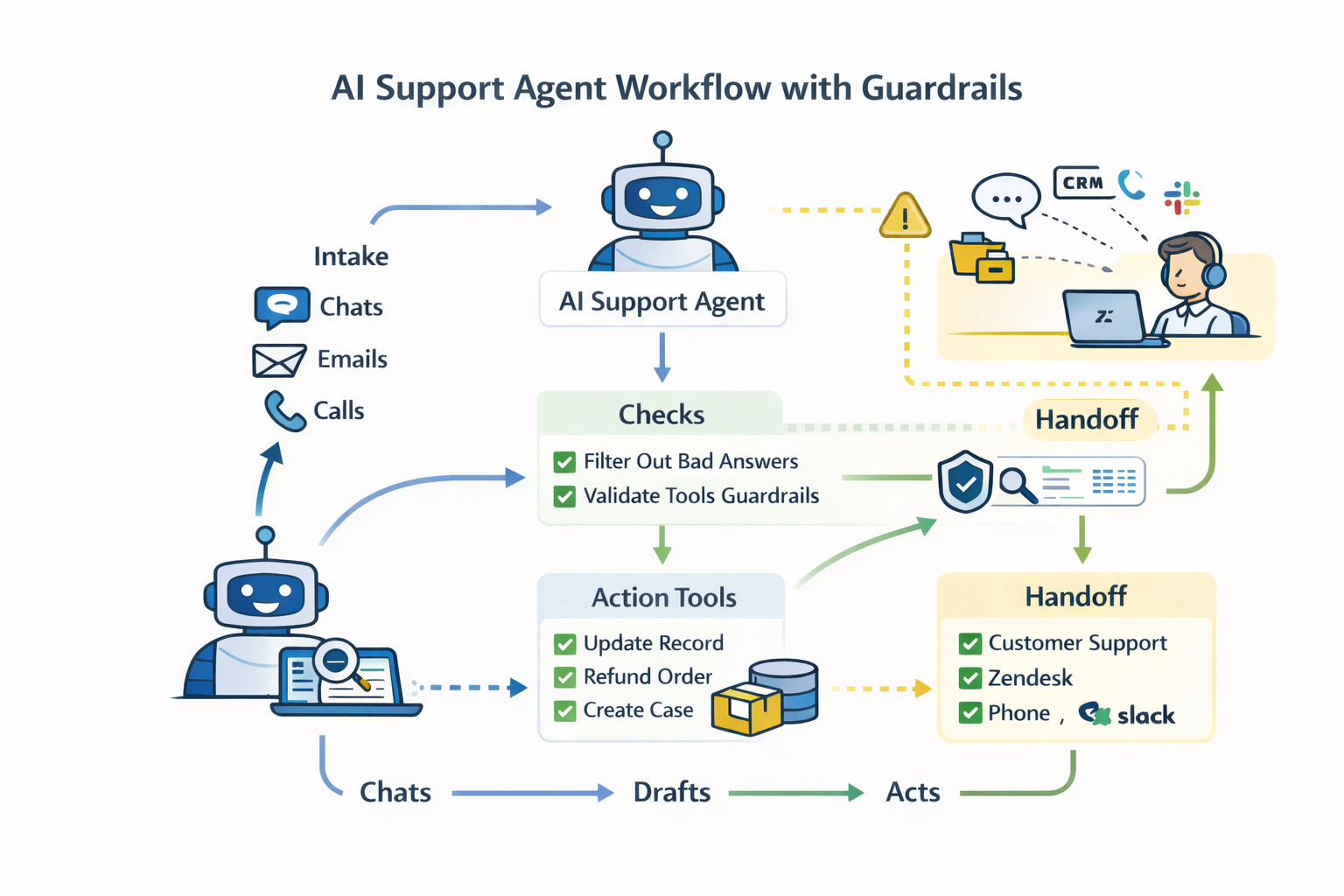
Most failures come from three sources: bad knowledge, weak handoff, and unsafe tool access.
Here is how to reduce the risk.
Knowledge quality and ownership
Failure mode: the agent answers with stale or wrong policy text.
Reduce risk:
- Assign an owner for each knowledge area: billing, refunds, security, product, outages.
- Add versioned policy pages and link them from internal macros.
- Build a test set from real tickets. Track pass rate by intent.
Escalation design
Failure mode: the agent keeps talking when the customer needs a human.
Reduce risk:
- Add explicit handoff triggers: refund requests, chargebacks, account access, security, legal threats.
- Add a “no answer” path that asks a short clarifying question once, then hands off.
- Pass context: summary, intent guess, and extracted fields.
Prompt injection and unsafe content
Failure mode: a customer message tries to override system rules, steal data, or trigger unsafe actions.
OWASP lists prompt injection as a top risk for LLM apps, and Microsoft has written about indirect prompt injection.
If you want a structured risk review, start from the NIST AI Risk Management Framework and the NIST Generative AI Profile. Use them to map risks, controls, and monitoring steps.
Reduce risk:
- Treat customer text as untrusted input.
- Restrict tool calls with allowlists and strict schemas.
- Separate retrieval from action. The agent can read docs, but only call tools after it passes checks.
- Log actions with who, what, and why.
PII handling and access control
Failure mode: the agent reveals private data or writes data to the wrong case.
Reduce risk:
- Use least-privilege access for any tool that reads customer data.
- Mask sensitive fields in logs.
- Keep separate environments for testing.
Over-deflection and customer frustration
Failure mode: your deflection rate rises, but repeat contacts and escalations also rise.
Reduce risk:
- Track repeat contact rate by intent.
- Watch transfer sentiment cues like “agent is useless” or “human please”.
- Add a visible escape hatch.
Monitoring and regular tuning
Failure mode: the agent drifts as products and policies change.
Reduce risk:
- Review the top 20 failure cases each week.
- Fix the root cause: knowledge gaps, routing, or tool permissions.
- Ship small changes with clear release notes and rollback steps.
A 30-minute selection checklist
Use this checklist with any vendor demo.
- Which support tasks can the agent complete end-to-end today?
- Does it draft only, or can it take actions?
- Which channels does it cover: chat, email, voice, social?
- Which systems can it connect to and write back to?
- How does it ingest knowledge, and how does it respect permissions?
- What are the default handoff rules, and can you change them?
- Can you see why the agent answered a certain way?
- What is the audit trail for actions and data access?
- What makes the bill go up: resolutions, credits, seats, messages?
- Can you cap usage or set alerts?
- What does testing look like before rollout?
- Who owns ongoing updates: support ops, product, engineering?
- How fast can you ship a change and roll it back?
- What happens when the agent is unsure?
When you should build custom instead of buying
Buying is the right move when the agent mostly reads knowledge and routes or drafts inside a single helpdesk.
Build custom when you need control across systems and a tighter fit to your product. If your team plans to build custom AI support agent workflows, treat it as a software product with owners, tests, and releases.
Triggers that point to a custom build:
- Complex workflows that span many systems (billing, CRM, product, identity, shipping).
- Strict compliance needs, data residency needs, or a requirement to run inside your own environment.
- Multiple products with separate knowledge bases and different policies.
- A need for a branded, custom customer portal experience, not just a chat widget.
- A cost curve where per resolution or credit billing becomes hard to justify at your volume.
- A need for advanced analytics, test harnesses, and internal tooling for support ops.
- A need for custom action tools with approvals, risk scoring, and human sign-off.
A custom build does not mean “start from zero”. It means you choose the model, retrieval layer, and tool surface that match your risks and workflows.
Partnering with Lexogrine
If you need a custom AI customer support agent that can safely take actions across your systems, Lexogrine can help. We work as an AI agent development company and a full-stack web and mobile partner. We ship the agent, the internal support tools, and the customer-facing apps, plus the connectors to your helpdesk and back office. That includes customer support software development work that ties your product, data, and support tools together. Our delivery stack includes React, React Native, Node.js, and AWS.