
Frontend vs Backend: What's the Difference? Real Examples from Modern Web Applications
Whether someone opens Netflix, shops online, logs into a banking app, books a hotel, or orders food, every modern web application has two essential parts working together.
One part is the interface people touch: pages, buttons, forms, menus, charts, search bars, video players, checkout screens, dashboards, and settings.
The other part is the controlled system behind that interface: servers, databases, permissions, payments, business rules, integrations, and APIs.
These two layers are known as frontend and backend. A useful answer to what is frontend and backend should go further than “frontend is visible and backend is hidden.” That definition is true, but too shallow for product planning.
At a high level, the frontend is the user-facing part of an application, while the backend includes the data, logic, integrations, and infrastructure that make the application work. AWS describes the frontend as the part users see and interact with, and the backend as the data and infrastructure that store and process application data.
For founders, CTOs, product managers, and operations leaders, understanding the difference between frontend and backend helps with estimating development work, assigning responsibilities, scoping MVPs, reviewing technical proposals, and knowing when a feature is mainly a design challenge, a data challenge, a security challenge, or all three.
A login screen, for example, looks simple. The frontend displays the form and handles the user interaction. The backend checks the credentials, validates access, creates a session, records security events, and returns the right user data. Both sides matter.
What Is Frontend?
Frontend is the part of a web application that runs in or near the user’s browser and shapes the user experience. In a browser-based product, it includes the interface and the code users interact with in the browser, but modern frameworks can also render parts of the UI on the server before they are sent to the browser. Frontend work includes layout, navigation, forms, buttons, responsive behavior, accessibility, loading states, animations, and the logic that decides what changes on the screen after a user action.
In practical terms, frontend web development answers questions like:
- Can users understand what to do next?
- Does the application work well on mobile, tablet, and desktop?
- Are forms clear and forgiving when users make mistakes?
- Does the product feel fast while data is loading?
- Can people using assistive technologies complete the same tasks?
- Does the interface show the right data at the right time?
A frontend developer might build a pricing page, a customer dashboard, a hotel search form, a shopping cart, an analytics chart, or a complex admin panel. In a React frontend, these screens are often built from reusable components such as buttons, cards, modals, filters, tables, and navigation elements. React’s own documentation describes this component model as a way to build user interfaces from individual pieces that can be combined into full screens and apps.
Modern frontend work also includes API communication. When a user clicks “Load more products,” the frontend may send a request to the backend, receive product data, and update the page without a full reload. Browser APIs such as Fetch are commonly used to request resources across the network.
Frameworks such as Next.js can blur the old client side vs server side line because some UI can be rendered on the server while interactive parts still run in the browser. Next.js documentation explains that layouts and pages can be Server Components by default, while Client Components handle interactivity and browser APIs.
For business teams, the frontend determines how easily users can complete valuable actions: sign up, subscribe, buy, book, approve, search, report, upload, or manage information.
What Is Backend?
Backend is the part of a web application users do not directly see but depend on every time they use the product. It handles servers, business logic, authentication, databases, permissions, APIs, notifications, integrations, file processing, payment processing, and data validation.
Backend web development answers different questions:
- Who is allowed to access this data?
- Is the payment valid?
- Is the product still in stock?
- Which courier should receive this order?
- Has this user exceeded a usage limit?
- Should this account require extra verification?
- What data should be saved, updated, archived, or deleted?
- Which third-party system needs to be notified?
A backend developer might build the API for a mobile app, connect a payment provider, design a database schema, implement role-based permissions, process uploaded documents, create scheduled reports, or build the logic behind AI-powered features.
A Node.js backend is common in modern web application architecture, especially when teams want to use JavaScript or TypeScript across the frontend and backend. Node.js is designed around an event loop, and its official documentation describes HTTP as a first-class part of the runtime, with streaming and low-latency network work in mind. Strictly speaking, Node.js is a runtime, not a backend framework. Production Node.js backends are usually built with frameworks and libraries such as Express, NestJS, Fastify, database clients, ORMs, queues, and cloud services.
The frontend can make a product feel usable. The backend decides whether the product behaves correctly, securely, and consistently when real users, payments, permissions, integrations, and data volume enter the picture.
Frontend vs Backend: Key Differences
The frontend vs backend distinction is easiest to understand as a division of responsibility. Neither side is “better” or “more important.” They solve different problems and meet in the middle through APIs, shared requirements, and product behavior.
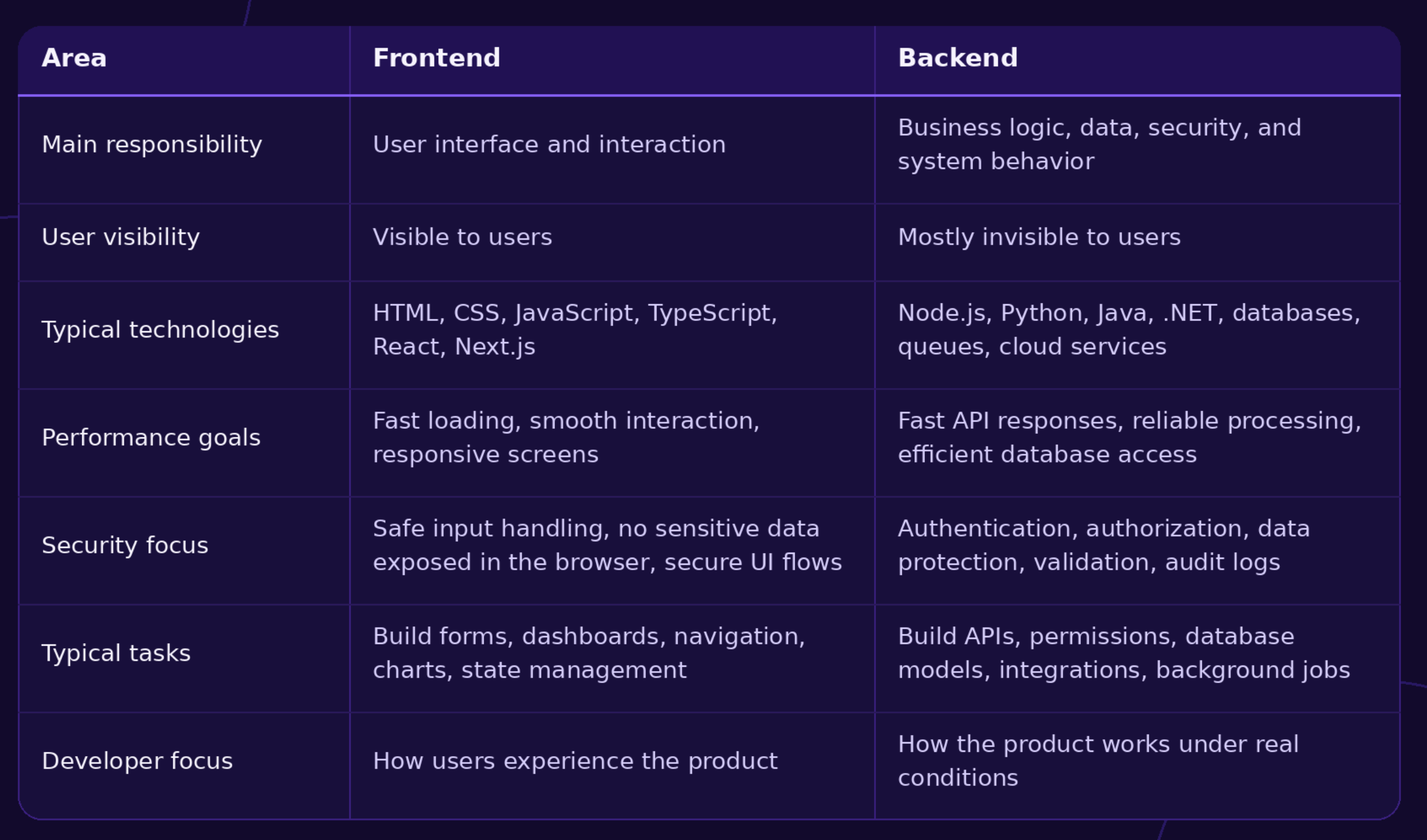
A useful architectural insight: frontend and backend boundaries affect delivery planning. A “simple button” can require backend work if it changes account status, triggers payment, updates inventory, sends notifications, or affects permissions.
How Frontend and Backend Work Together
A login flow shows how frontend and backend cooperate in a normal product.
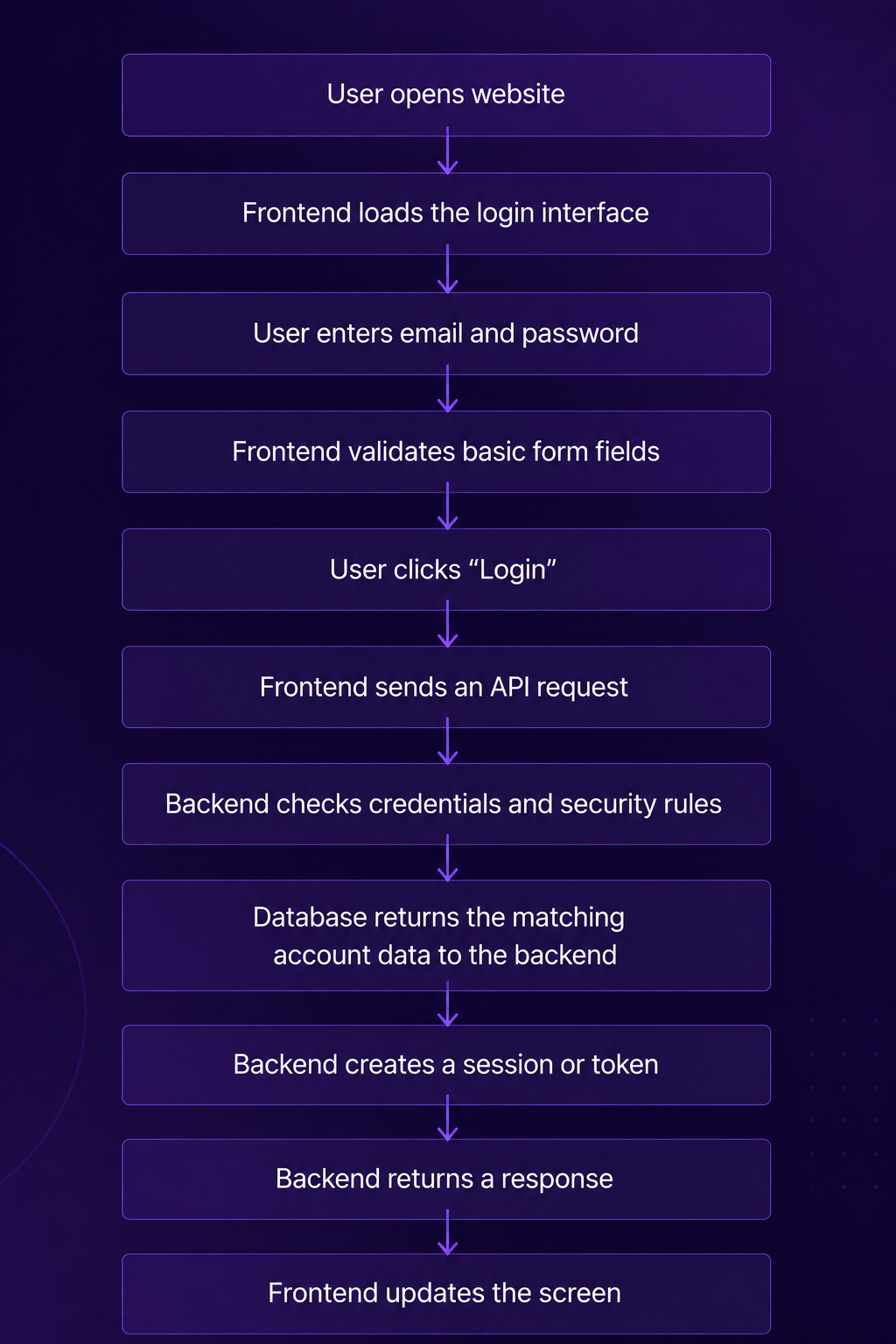
Each step has a purpose.
The frontend helps the user complete the action. It shows the form, prevents obvious mistakes, displays loading feedback, and reacts to errors such as “incorrect password” or “missing email.”
The backend makes the decision. It checks whether the account exists, whether the password is correct, whether the account is locked, whether multi-factor authentication is required, and what data the user can access.
The database stores the truth. It contains user records, password hashes, roles, account status, subscription data, and other information the backend needs to make the correct decision.
The API is the contract between the two sides. It defines what the frontend may request and what the backend will return.
This is why frontend and backend work should not be scoped in isolation. A feature estimate should include the screen, the API, the data model, the permissions, the edge cases, and the tests.
Frontend vs Backend: Real Examples from Modern Applications
The following frontend examples and backend examples show how the boundary works inside products people already understand.
Example 1: Online Stores
In an online store, the frontend includes the homepage, product listing pages, product detail pages, search, filters, images, reviews, cart, checkout interface, address form, discount field, and order confirmation screen.
The backend handles inventory, pricing rules, promotions, customer accounts, payment authorization, tax calculation, shipping options, stock updates, order creation, fraud checks, email confirmations, and warehouse or fulfillment integrations.
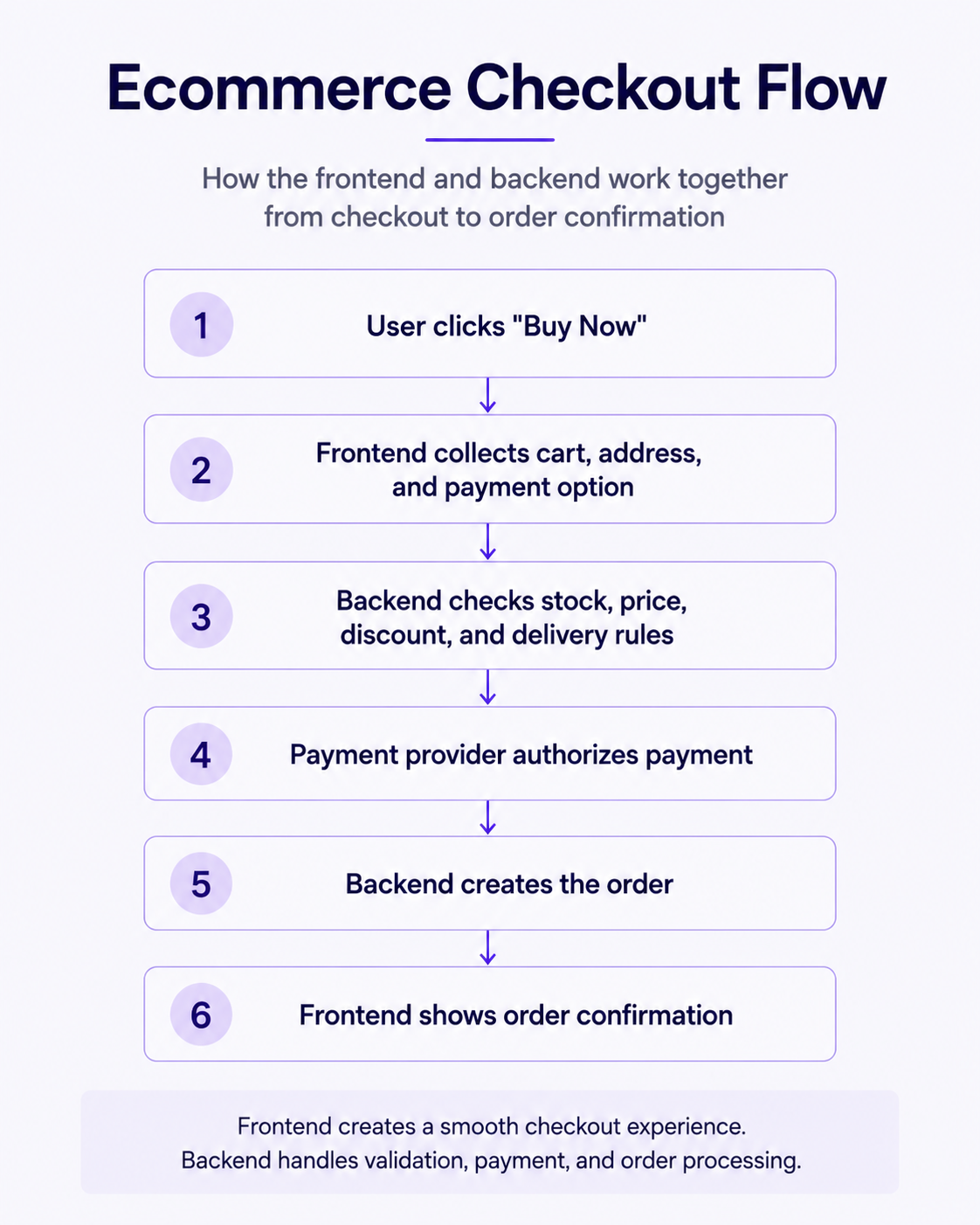
After a user clicks “Buy Now,” the frontend does not simply “place the order.” It collects the selected product, quantity, address, payment option, and user session. It sends that information to the backend through an API.
The backend then checks whether the item is still available, whether the promotion is valid, whether the payment can be authorized, whether the address can be served, and whether an order record should be created. Only after those checks should the frontend show a successful purchase.
This matters because ecommerce failures often happen at the boundary. A cart might show an item that became unavailable seconds earlier. A promotion code might appear valid on the screen but fail backend validation. A payment may be approved by the provider but fail during order creation. Good architecture plans for those uncomfortable cases.
Example 2: Streaming Platforms
In a streaming product such as Netflix, the frontend includes browsing screens, category rows, search, account switching, recommendations display, movie details, the video player, subtitles, playback controls, and profile settings.
The backend handles user profiles, subscriptions, watch history, content availability, personalization logic, streaming authorization, device limits, billing status, and content metadata.
When a user opens the app, the frontend displays rows of titles and makes the browsing experience feel immediate. The backend decides what rows should appear, which titles are available in that region, what the user has already watched, and whether the account is allowed to play the selected content.
When the user presses play, the video player is frontend. The decision to allow playback, the selection of stream quality, the user’s watch history update, and subscription validation are backend concerns.
The important product lesson: the frontend creates the entertainment experience, but the backend governs access, personalization, continuity, and commercial rules.
Example 3: Banking Applications
In a banking application, the frontend includes the dashboard, account balances, transfer form, transaction history, card controls, statements, alerts, and confirmation screens.
The backend handles authentication, account validation, transaction processing, fraud detection, permissions, audit logs, compliance rules, notifications, and integration with banking infrastructure.
A transfer screen may look like a few form fields: recipient, amount, title, and confirmation button. Behind that screen, the backend must check account ownership, available funds, transfer limits, suspicious activity, recipient validity, currency rules, and whether extra authentication is needed.
Backend security matters because frontend code runs in an environment the user controls. A browser can be inspected. Requests can be modified. Buttons can be disabled visually and still be bypassed. Because of that, the backend must never trust a frontend request simply because the interface looked correct. This is why security-sensitive checks belong on the server. OWASP guidance recommends server-side input validation and robust authorization logic that fits the application’s business context.
Example 4: Food Delivery Platforms
In a food delivery platform such as Uber Eats or DoorDash, the frontend includes restaurant listings, menus, item customization, cart, address selection, checkout, order status, courier map, ratings, and support screens.
The backend handles restaurant availability, menu data, courier assignment, location updates, pricing, delivery fees, promotions, payments, refunds, restaurant tablets or dashboards, push notifications, and estimated delivery times.
When a customer places an order, the frontend sends the order details. The backend checks whether the restaurant is open, whether the items are available, whether the delivery address is in range, how much the order should cost, which courier may accept it, and which notifications should be sent.
Live tracking is also split. The frontend draws the map and updates the courier position. The backend receives GPS data, processes delivery status, stores events, and sends updates to the customer, courier, and restaurant.
This kind of product is difficult because it connects multiple users at once. The customer, courier, restaurant, support team, and payment provider all need a consistent version of the same order.
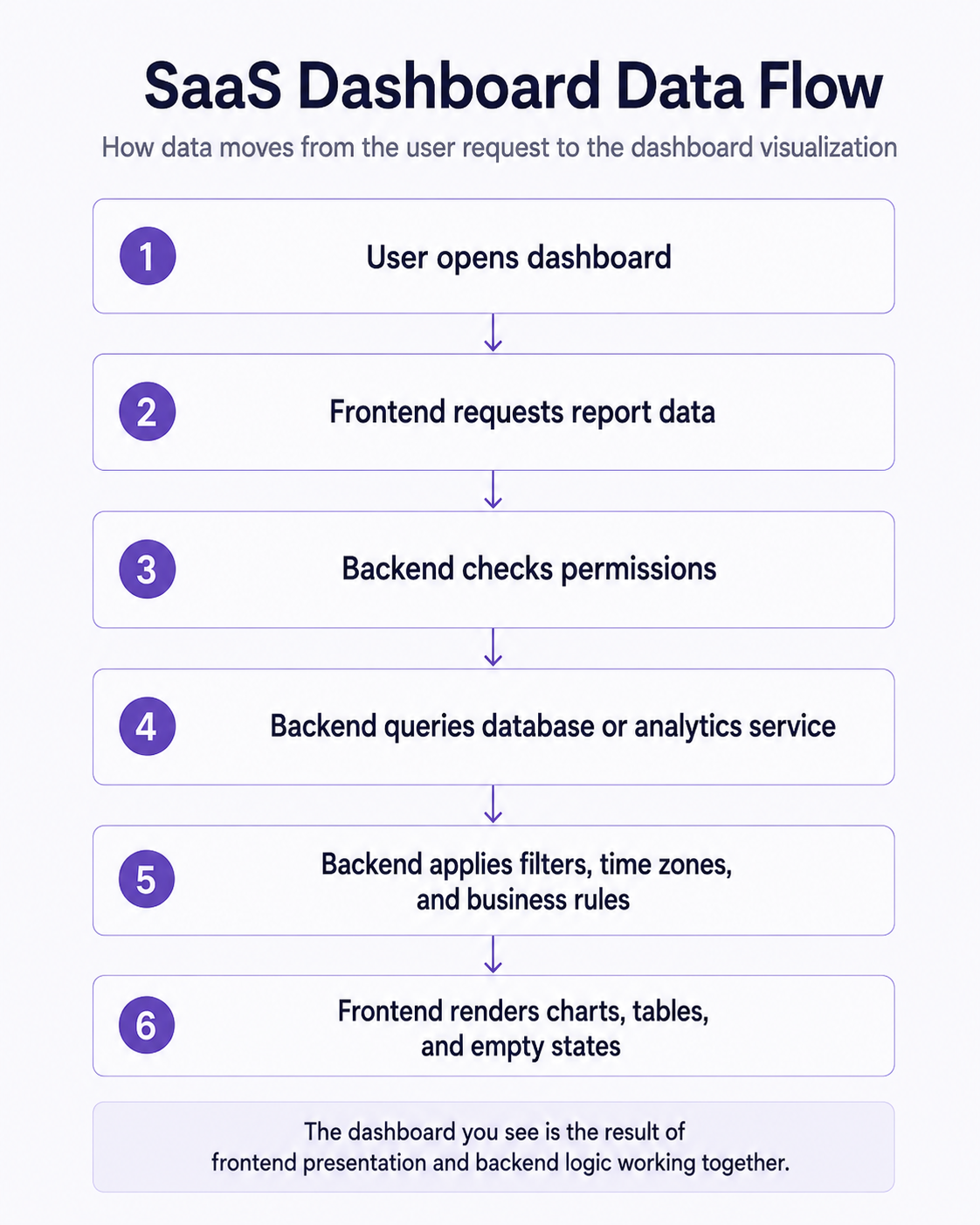
Example 5: SaaS Dashboards
In a SaaS dashboard, the frontend includes analytics views, reports, charts, tables, filters, settings, billing screens, user management, onboarding flows, and admin panels.
The backend handles report generation, scheduled jobs, permissions, APIs, database queries, integrations with CRMs or accounting tools, usage limits, billing events, notifications, and data exports.
A product manager may describe a feature as “show a weekly revenue chart.” The frontend work includes the chart design, filters, date picker, empty states, loading behavior, and responsive layout. The backend work may include defining revenue logic, querying large datasets, caching results, handling time zones, applying permissions, and generating downloadable reports.
This example closely matches many custom web applications, AI-powered products, internal tools, and modernization projects. Teams building with React and Node.js often need both a clean interface and a backend that can support permissions, workflows, integrations, and data-heavy operations.
The architectural lesson: dashboards are not only visual. The hard part is often deciding what the numbers mean, who can see them, and how fresh they need to be.
Frontend Developer vs Backend Developer
The frontend developer vs backend developer comparison is less about seniority and more about focus. Both roles require engineering judgment. Both write code. Both need to understand the product.
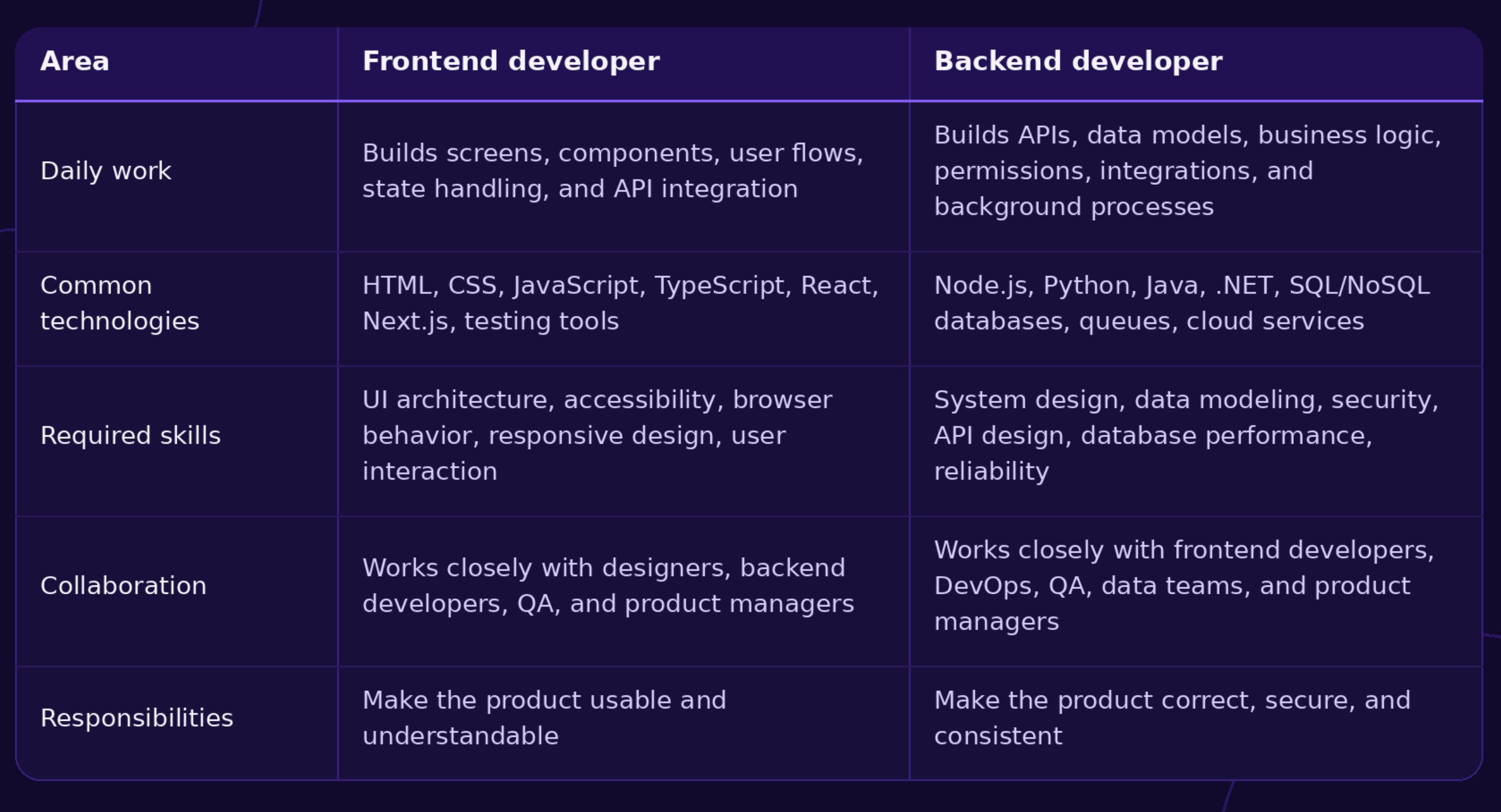
A frontend and backend developer often work on the same feature from different angles. For example, in a booking system, the frontend developer builds the calendar, guest selector, room cards, and checkout flow. The backend developer builds availability checks, pricing rules, booking creation, payment confirmation, and cancellation logic.
Most commercial applications require both roles because users expect a polished interface, while the business requires correct data, secure access, and dependable processing.
Where APIs Fit Into the Picture
APIs are the communication layer connecting frontend and backend.
When someone logs in, the frontend sends credentials to an authentication API. When someone makes a payment, the backend may call a payment provider API. When a weather app displays a forecast, the frontend may request forecast data through an API. When an AI feature summarizes support tickets, the backend may call an AI model API and then return the result to the interface.
The important point is not the definition of API. The important point is control.
APIs define what the frontend can ask for, what the backend accepts, and what response the frontend should expect. A well-designed API prevents confusion between teams. A poorly designed API creates rework: missing fields, unclear errors, inconsistent naming, slow responses, and security gaps.
In product planning, APIs are often where frontend and backend estimates meet. A screen may be ready, but it cannot work until the API exists. An API may exist, but users cannot benefit from it until the interface makes it usable.
Can One Developer Build Both?
Yes. This is called full-stack development.
A full-stack developer can work across frontend and backend, which can be useful for prototypes, MVPs, internal tools, proof-of-concepts, small SaaS products, and early product discovery. One person can move quickly when the product is small, the architecture is simple, and the risk is manageable.
Specialists become valuable when the product grows in complexity. A fintech product needs deep backend security and compliance thinking. A complex analytics platform may need careful database design and frontend performance work. A public ecommerce platform may need frontend conversion expertise, backend payment reliability, and cloud infrastructure planning.
Full-stack development is not automatically better than specialist teams. It is a staffing model. The right choice depends on product risk, timeline, existing team capability, codebase maturity, and how many systems the product touches.
For team augmentation, this distinction matters. A company may need one senior full-stack developer to extend an existing product, or it may need separate React, Node.js, QA, and cloud support when the backlog spans multiple layers. To understand when this model makes sense, read our post about software development team augmentation.
Common Misconceptions
“Frontend is only HTML and CSS.”
HTML and CSS matter, but modern frontend development also includes JavaScript or TypeScript, state management, API communication, accessibility, testing, performance, build tooling, authentication flows, and complex product logic.
“Backend is just a database.”
A database stores information. The backend decides how that information is created, validated, protected, changed, and exposed through APIs. It also manages integrations, permissions, background jobs, and business rules.
“Frontend is easier.”
Frontend work can become difficult when the interface has complex state, real-time updates, accessibility requirements, animations, large datasets, or many user roles. A simple-looking dashboard can hide weeks of frontend decisions.
“Backend is more important.”
Backend quality is essential, especially for security and data integrity, but users judge the product through the frontend. A correct system with a confusing interface still fails the user.
“Full-stack means one developer should do everything.”
Full-stack means a developer can work across layers. It does not mean one person should own every architecture, security, UX, data, DevOps, and QA decision in a serious commercial product.
“Frontend developers don’t write JavaScript.”
Modern frontend developers often write significant JavaScript or TypeScript. They manage application state, connect with APIs, handle errors, validate forms for usability, and structure reusable UI logic. In React, components are JavaScript functions that can combine rendering logic, markup, and interaction.
When Businesses Need Both Frontend and Backend Development
Most commercial software combines frontend and backend development rather than choosing one.
A SaaS product needs dashboards, billing screens, reports, accounts, permissions, background jobs, and integrations. A marketplace needs listings, search, checkout, seller tools, payments, moderation, and dispute workflows. A booking system needs calendars, availability logic, pricing, confirmation messages, cancellations, and admin controls.
Customer portals need secure login, document access, account data, notifications, and support features. AI products need interfaces for prompts, review, approval, and feedback, plus backend orchestration, model calls, data retrieval, logging, and permission controls. Logistics software needs dashboards, GPS updates, route data, driver tools, customer views, and operational workflows.
Internal business systems also need both sides. Even when the audience is employees, the product still needs usable screens and dependable backend logic. A warehouse tool, CRM extension, reporting panel, or operations dashboard can break business processes if either side is weak.
This is why early architecture discussions matter. Before writing code, product and engineering teams should clarify which screens are needed, what data they depend on, where that data comes from, who can access it, which integrations are involved, and what happens when something fails.
Final Thoughts
The frontend vs backend distinction is useful because it helps teams see a web application as a working system, not a collection of screens.
The frontend shapes how people experience the product. The backend controls the rules, data, security, and processes behind that experience. The difference between frontend and backend becomes clear when you trace a real action: logging in, buying a product, streaming a movie, transferring money, ordering food, or viewing a SaaS report.
Strong product planning connects both sides early. A beautiful checkout screen still needs inventory, payment, tax, fraud, and order logic. A well-designed API still needs a clear interface. A useful AI feature still needs review screens, permissions, data boundaries, and backend orchestration.
Companies planning custom applications usually begin with architecture and technical scope before implementation. That conversation helps decide what belongs in frontend, what belongs in backend, which APIs are needed, and what type of team should build the product.
Partnering with Lexogrine
If you are planning a custom web application, internal platform, SaaS dashboard, AI-powered workflow, or product modernization project, Lexogrine can help you define what belongs in the frontend, backend, APIs, cloud architecture, and delivery roadmap.
Our team works across React, React Native, Node.js, cloud, AI agents, and product engineering, so we can support both early technical scoping and production development. The goal is not just to build screens, but to build a reliable product system behind them.