TL;DR
In 2026, building an AI agent means moving beyond simple chatbots to constructing autonomous, multi-agent systems that can plan, execute, and verify complex workflows.
- Core Shift: Single-turn Q&A is out; multi-step "agentic workflows" are in.
- Top Frameworks: LangGraph (stateful control), CrewAI (role-based teams), and Microsoft AutoGen (conversational collaboration).
- Tech Stack: Node.js and Python remain the dominant backends, with React interfaces becoming standard for human-in-the-loop oversight.
- Key Challenge: Governance. You must build guardrails to control autonomy.
What is an AI Agent? (Definition for 2026)
An AI agent is a software system that uses a Large Language Model (LLM) as a reasoning engine to autonomously plan, execute actions, and perceive results to achieve a defined goal.
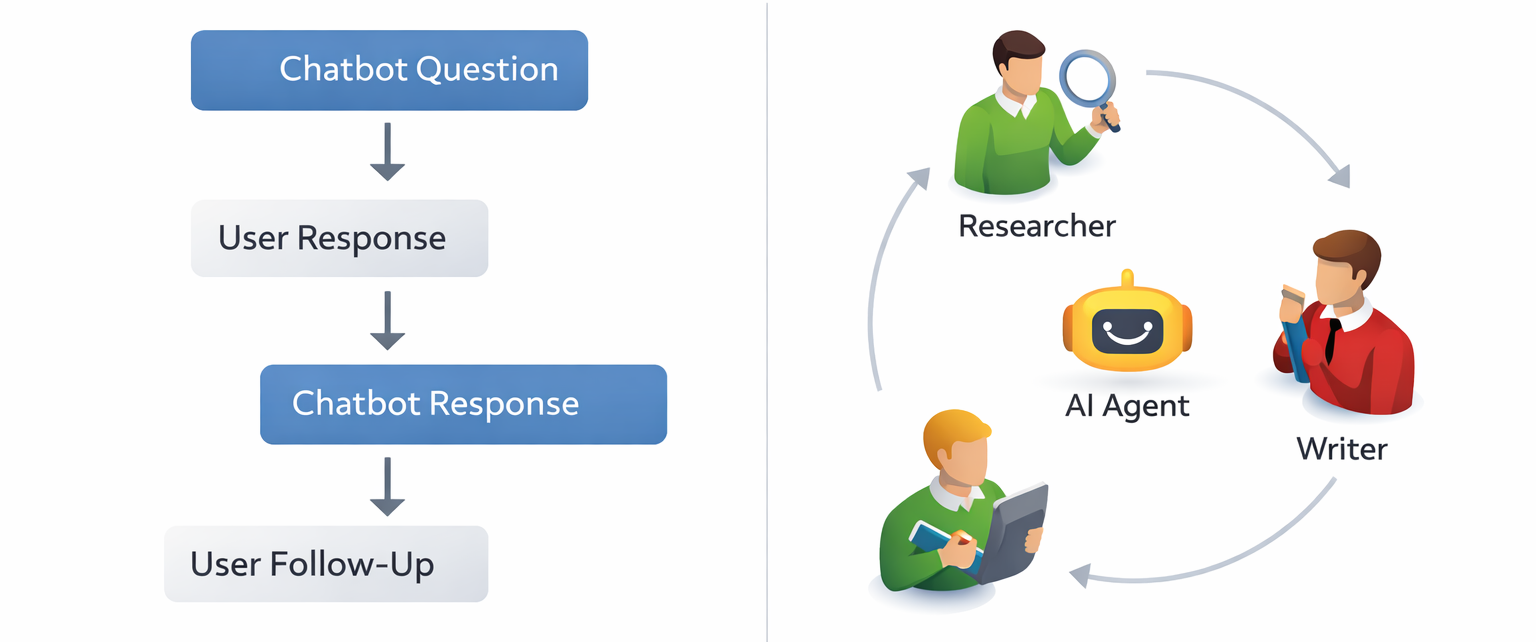
Unlike a standard chatbot, which passively answers user queries based on training data, an AI agent actively uses tools - such as web search, APIs, or database queries—to manipulate the outside world. In 2026, the definition has tightened: an agent must possess episodic memory (remembering past actions) and the ability to self-correct if an initial attempt fails.
Technical distinctions:
- Chatbot: Maps Input > Output (Text).
- AI Agent: Maps Input > Reasoning > Tool Usage > Output (Action).
Top Frameworks & Solutions for 2026
Choosing the right infrastructure determines your agent's reliability and scalability. Here are the industry standards.
1. LangGraph (The Orchestrator)
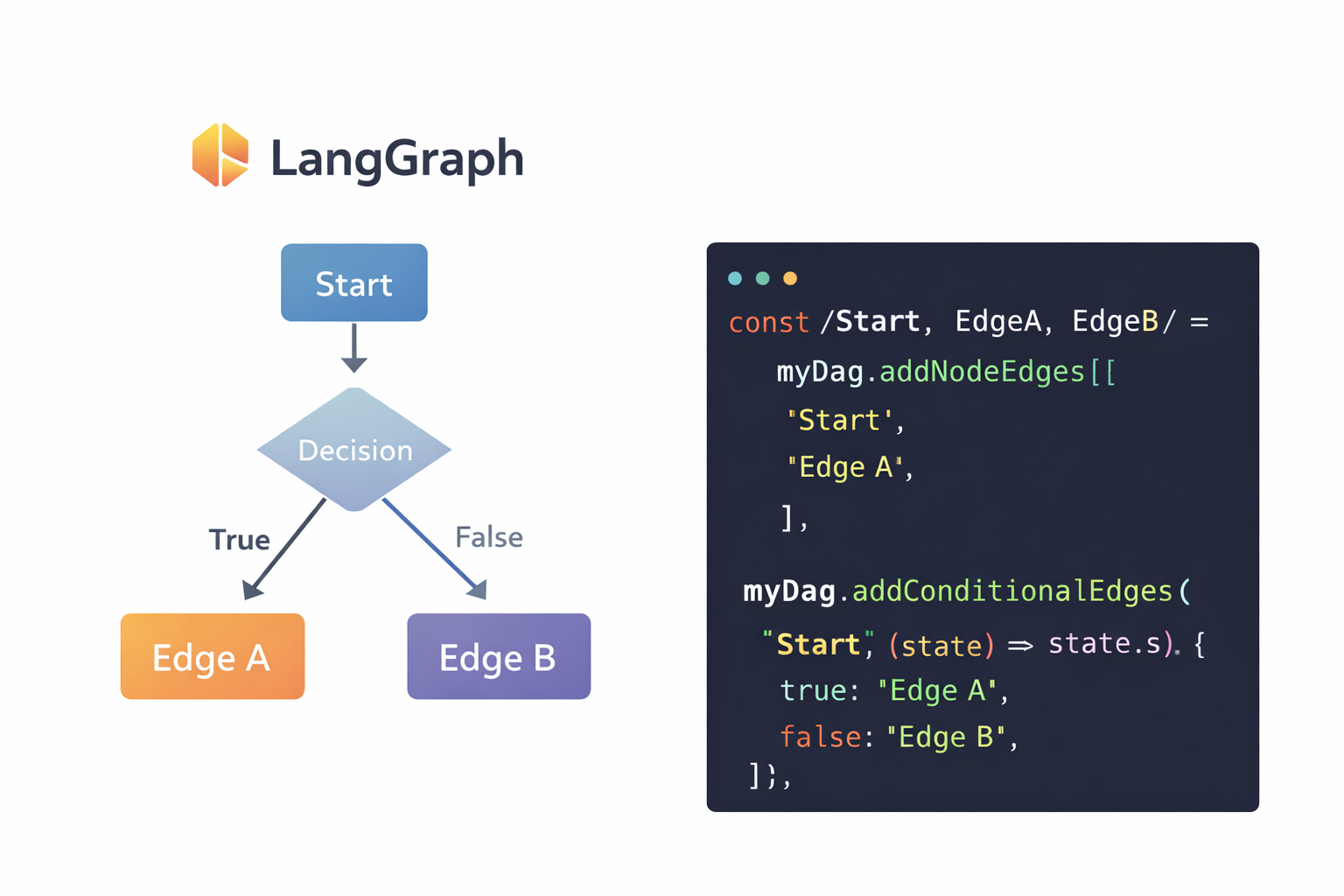
Evolution of the popular LangChain library, LangGraph focuses on building stateful, multi-actor applications. It models agent workflows as graphs (nodes and edges), allowing you to define cyclical flows where agents can loop back to previous steps - essential for error correction.
How to use it:
- Define a State schema (e.g., a TypeScript interface or Pydantic model) that tracks the conversation history and current task status.
- Create "Nodes" for specific functions: a Reasoning node to decide the next step and an Action node to execute tool calls.
- Compile the graph to handle the flow of data between these nodes.
Best for: Complex enterprise workflows requiring strict control over the agent's decision tree (e.g., customer support bots that must follow specific compliance protocols).
2. CrewAI (The Team Builder)
CrewAI abstracts the complexity of multi-agent orchestration by modeling agents as "role-based" employees. You define a "Researcher," a "Writer," and a "Reviewer," assign them specific tools, and CrewAI manages the delegation and task handover between them.
How to use it:
- Instantiate agents with specific roles, goals, and backstories.
- Define Tasks that require specific outputs (e.g., "A markdown report on AI trends").
- Group agents into a Crew and select a process (e.g., sequential or hierarchical) to execute the tasks.
Best for: Automating creative or analytical pipelines where distinct specialized skills are required (e.g., content generation, market research reports).
3. Microsoft AutoGen (The Collaborator)
AutoGen enables multiple agents to converse with each other to solve tasks. It supports "human-in-the-loop" interactions natively, allowing a human user to intervene if the agents get stuck.
How to use it:
- Define an AssistantAgent (configured with an LLM) and a UserProxyAgent (which executes code or asks the human for input).
- Initiate a chat between them. The Assistant generates code or plans, and the UserProxy executes them, feeding the output back to the Assistant for refinement.
Best for: Code generation, data analysis, and open-ended problem solving where trial-and-error is necessary.
4. n8n (The Visual Automator)
A low-code platform that evolved from workflow automation into a full-stack AI orchestrator. Its "fair-code" model allows for self-hosting, which is critical for enterprises with strict data sovereignty requirements. n8n distinguishes itself by allowing you to chain LLM logic with over 1,000 native integrations without writing extensive boilerplate code.
How to use it:
- Deploy an n8n instance on your own infrastructure via Docker or Kubernetes.
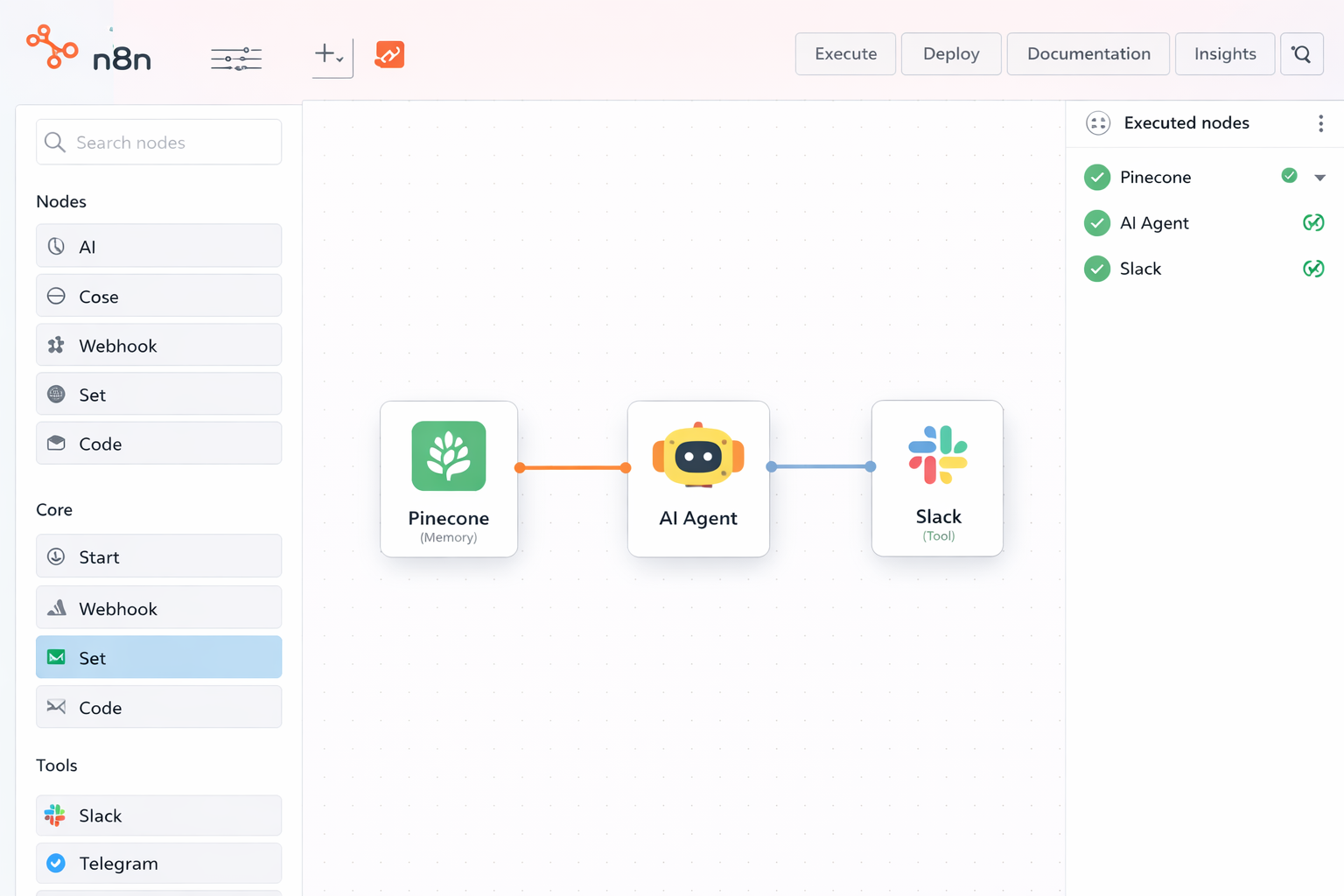
- Drag and drop the AI Agent node as your central reasoning engine.
- Connect a Vector Store Tool (like Qdrant or Pinecone) to give the agent long-term memory (RAG).
- Define Tools using pre-built integration nodes (e.g., Slack, Google Sheets) or custom HTTP requests that the agent can trigger autonomously.
Best for: Rapid prototyping (MVPs), Operations teams that are not code-heavy, and enterprise environments requiring on-premise data privacy.
5. OpenClaw (The Local Executor)
An open-source, local-first agent (formerly associated with projects like OpenInterpreter) designed as a "personal assistant with sudo permissions." Unlike cloud-based agents, OpenClaw runs directly on the user's machine or a dedicated home server, granting it direct control over the operating system, file management, and shell script execution.
How to use it:
- Run the container via Docker Compose, mapping specific volumes to persist configuration states.
- Pair the agent with a messaging interface (WhatsApp, Telegram, Signal) to serve as your Command & Control (C2) channel.
- Configure a strict permissions.json file to whitelist specific directories and commands, preventing the agent from executing destructive actions (like rm -rf) without oversight.
Best for: "Action-First" tasks, managing local infrastructure (HomeLabs), desktop automation, and developers needing an assistant that can autonomously debug system configurations.
6. OpenCode (The Terminal Specialist)
A coding agent built natively for the terminal (TUI - Terminal User Interface). Unlike standard IDE plugins, OpenCode integrates directly with the shell and Language Server Protocols (LSP). This allows the agent to perceive compilation errors and project structures in real-time, running tests autonomously to verify its own patches.
How to use it:
- Install the CLI tool globally (e.g., npm install -g opencode-ai).
- Run /init in your project root so the agent can index the file structure and build a dependency graph.
- Toggle between Plan mode (for architectural strategy) and Build mode (for actual code writing and file editing) depending on the complexity of the request.
Best for: Refactoring legacy codebases, DevOps scripting, platform engineering, and developers who prefer a keyboard-only, CLI-driven workflow.
7. LlamaIndex Workflows
While LlamaIndex is known for RAG (Retrieval-Augmented Generation), its Workflows feature is a serious competitor to LangGraph. It uses an event-driven architecture rather than a graph-based one. Events trigger specific steps, allowing for highly decoupled and asynchronous agent logic.
- How to use it: Define specific Event classes and Step functions. When a step completes, it emits an event that triggers the next logical step (e.g., RetrievalEvent triggers the SynthesizeStep).
Best for: Data-heavy agents that require complex document parsing, ingestion pipelines, and structured data extraction before reasoning occurs.
8. Vercel AI SDK
For a React development company, this is the standard for connecting LLMs to the frontend. It abstracts the complexity of stream management, UI updates, and tool calling on the client side.
How to use it:
- Utilize the streamText function on the server (Node.js/Next.js) and the useChat hook on the frontend. It automatically handles the hydration of the UI as tokens arrive, eliminating the need for custom WebSocket boilerplate.
Best for: Full-stack applications where user experience (latency and interactivity) is the priority. It integrates agentic tool-calling directly into the React component lifecycle.
9. Pydantic AI
Many engineers struggle with LangChain's abstraction layers. Pydantic AI offers a "code-first" approach built by the team behind Pydantic. It focuses heavily on type safety and structured outputs, treating Generative AI as a rigorous data parsing problem rather than a creative writing task.
How to use it:
- Define your agent's dependencies and return types using standard Pydantic models. The framework enforces these schemas during the LLM interaction, automatically retrying requests if the model outputs invalid JSON.
Best for: Production Python microservices where schema validation and reliability are non-negotiable.
10. Microsoft Semantic Kernel
A lightweight SDK designed to integrate LLMs with existing code. Unlike other frameworks that try to "be" the application, Semantic Kernel is designed to be embedded into your application. It supports C#, Python, and Java.
How to use it:
- Define "Plugins" (native code functions) and "Semantic Functions" (prompts). The kernel orchestrates the handoff between your business logic and the AI models.
Best for: Enterprise environments and .NET shops. It is the preferred choice for integrating agents into legacy corporate systems or large-scale architectures.
11. DSPy (Declarative Self-Improving Python)
DSPy moves away from manual prompt engineering. Instead of tweaking strings of text ("You are a helpful assistant..."), you define the signature of the task (Input $\rightarrow$ Output) and a metric for success. The framework then "compiles" the optimal prompt by testing variations against your data.
How to use it:
- Write a Python class defining the logic flow. Connect a dataset of examples. Run the Teleprompter optimizer to train the agent to select the best prompts and weights for the task.
Best for: Optimizing agent performance. If your agent's accuracy is stuck at 80%, DSPy provides a systematic engineering path to reach 95% without manual prompt guessing.
12. Custom Node.js Solutions (The Scalable Choice)
While frameworks offer speed, enterprise production often demands custom Node.js architectures. Using the OpenAI API or Anthropic SDK directly within a Node.js environment provides the lowest latency and highest control over memory management and security.
How to use it:
- Backend: Use Node.js to manage the "context window" manually. Store message history in Redis or PostgreSQL.
- Tooling: Write atomic JavaScript functions for your API calls (e.g., stripe.charges.create) and pass their schemas to the LLM via "function calling."
- Frontend: Build real-time interfaces in React that stream the agent's "thought process" to the user, building trust.
Best for: High-performance SaaS products, deeply integrated internal tools, and applications requiring strict data privacy standards (GDPR/SOC2).
The Technology Stack: Hybrid Architectures Rule
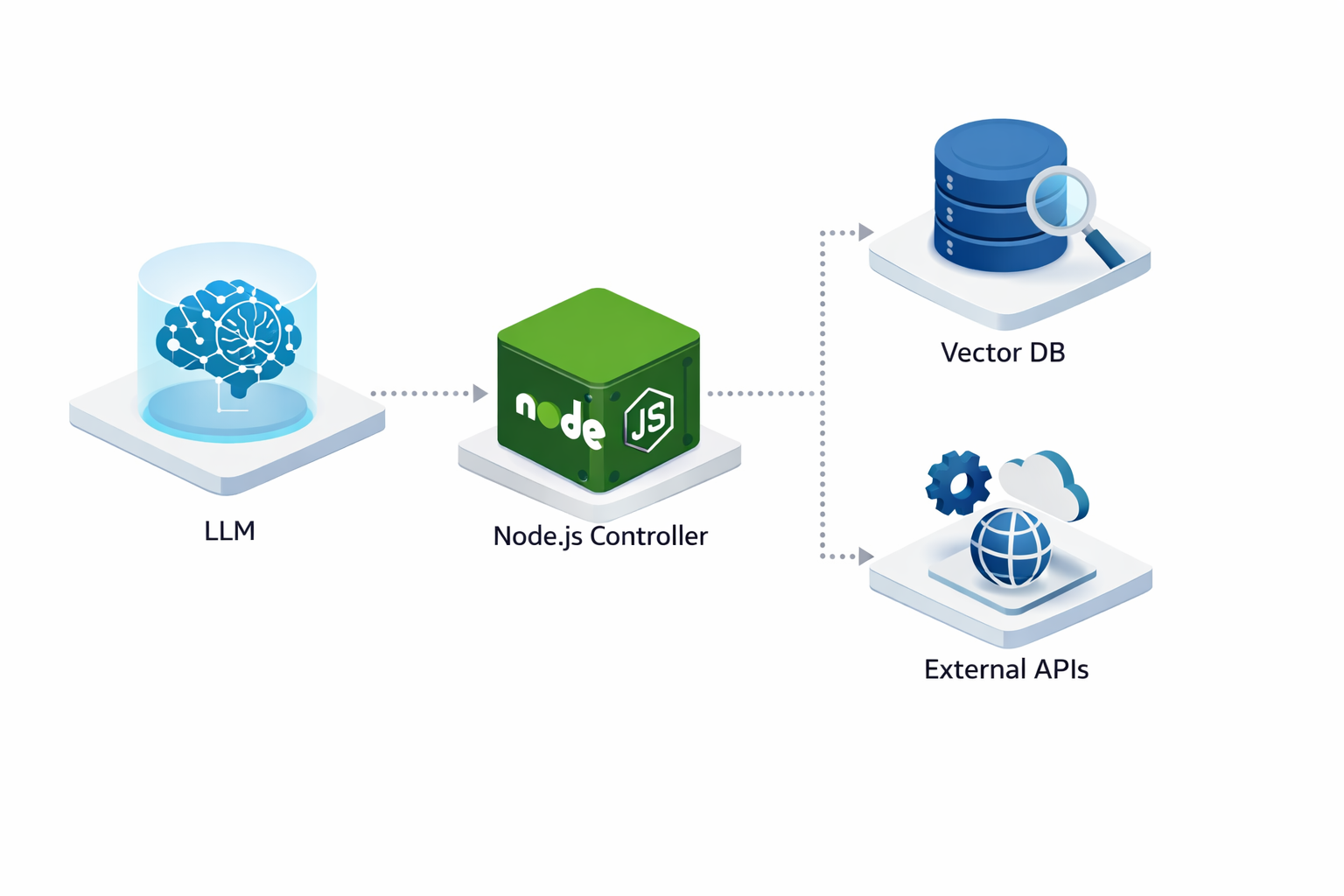
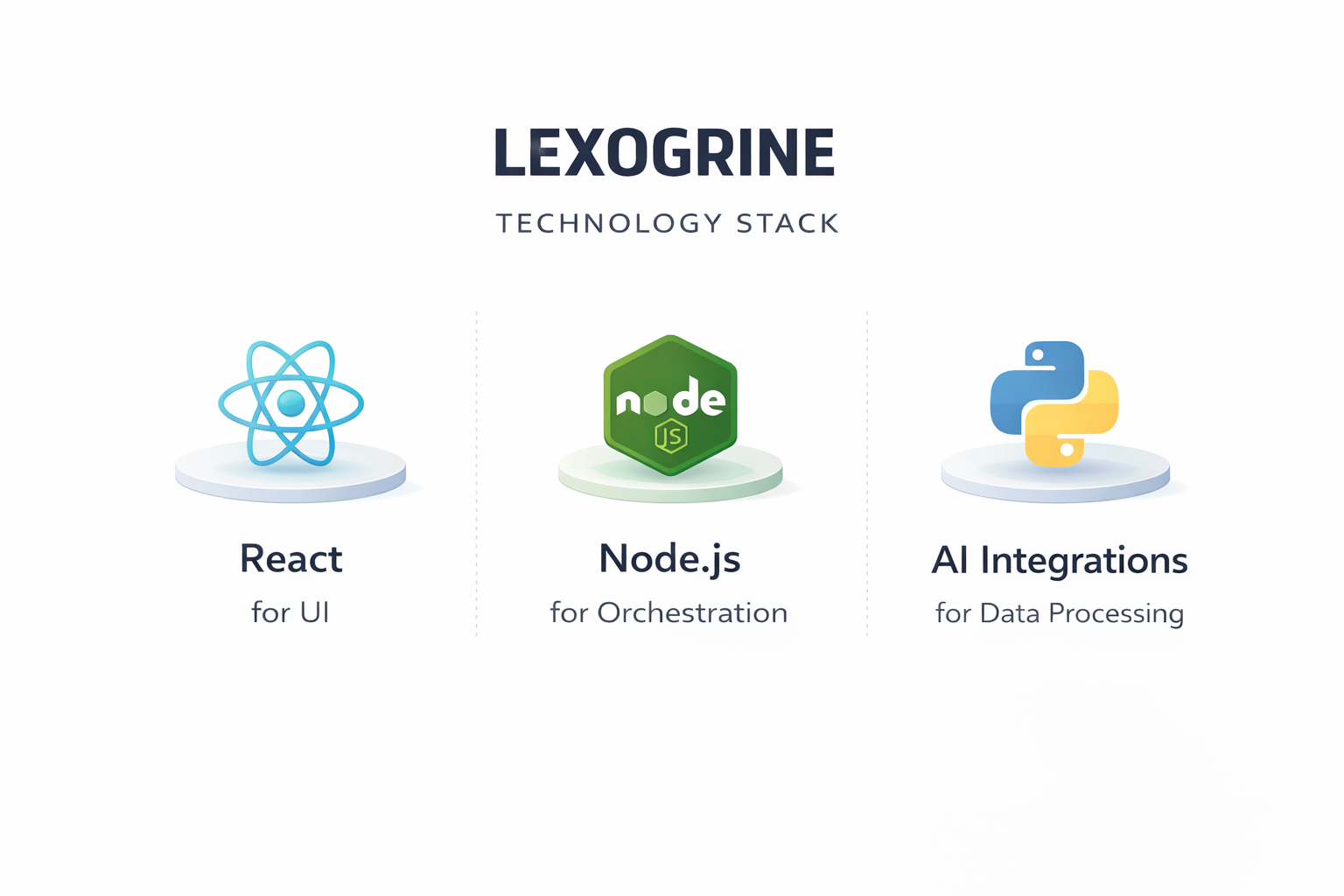
In 2026, the industry has moved away from pure Python prototypes. Production-grade agents require a hybrid stack that balances raw inference power with scalable application logic.
Python: The Logic Layer
Python remains the standard for data science and direct interaction with heavy ML libraries. We use it primarily for the "brain" of the agent—handling vector embeddings, managing local LLM inference via frameworks like PyTorch, or utilizing specific Python-only libraries for data analysis. However, it rarely serves the user directly in a high-scale environment.
Node.js & TypeScript: The Production Orchestrator
For the API layer, a Node.js development company will prefer TypeScript. Agents output non-deterministic data. TypeScript forces structure onto this chaos. By defining strict interfaces and types for LLM outputs, we prevent runtime errors when the agent attempts to call a function or return data to the client. Node.js handles the asynchronous nature of multiple agent threads and WebSocket connections far better than synchronous Python web servers.
React & React Native: The Interface
Users trust agents they can watch working. A React development company builds interfaces that visualize the agent's "thought process." We use React Server Components to stream partial responses from the LLM to the browser instantly. For mobile, a React Native development company ensures this same real-time connectivity exists on iOS and Android, allowing field teams to interact with agents via voice or camera without latency.
How to Build Your Agent (Step-by-Step)
Step 1: Define Identity & Scope
Don't build a "general assistant." Build a specialist.
- Role: "Senior DevOps Engineer."
- Goal: "Monitor AWS CloudWatch logs and restart services if latency exceeds 500ms."
- Constraints: "Never delete production databases. Ask for human approval before restarting critical clusters."
Define the Cognitive Architecture
Stop treating the LLM as a magic box. You must define the "Cognitive Architecture" - the flowchart of how the agent thinks.
- Single-Path: The agent follows a strict chain (e.g., Search > Summarize > Email).
- Router-Based: A central "brain" classifies the user request and routes it to a specialized sub-agent (e.g., a "Coding Agent" vs. a "Billing Agent").
- Autonomous Loop: The agent iterates until a condition is met. We use LangGraph or state machines here to define valid transitions and prevent infinite loops.
Step 2: Architecture Design
A production agent needs four components:
- The Brain (LLM): GPT-5.3, Claude Opus 4.6, or Gemini 3 Pro.
- The Body (Tools): Specific API endpoints the agent can hit (e.g., Jira API, GitHub API).
- The Memory:
- Short-term: The current conversation context.
- Long-term: A Vector Database (Pinecone, Weaviate) to retrieve relevant company documents.
- The Orchestrator: The logic loop (using LangGraph or custom Node.js code) that cycles through: Think > Plan > Act > Observe.
The Backend & Tool Definition (Node.js/Python)
Agents need hands. We define "Tools" - functions that the agent can execute. In a Node.js development company workflow, we define these as JSON schemas (OpenAPI specs). The LLM selects a tool, and the Node.js backend executes the actual API call (e.g., querying a SQL database or hitting a CRM endpoint).
- Hard Constraint: Always implement "human-in-the-loop" checkpoints for high-risk tools (like modifying production data). The agent pauses execution and requests user approval via the API.
Memory Engineering
Standard context windows are not enough for long-running tasks. We implement two layers of memory:
- Short-term: Managed via Redis to store the immediate conversation thread and active variables.
- Long-term: We use Vector Databases (like Pinecone or Weaviate) to store historical data. The agent queries this RAG (Retrieval-Augmented Generation) layer to recall facts from weeks or months ago.
Frontend Integration (React/React Native)
The standard HTTP request/response cycle fails here because agent tasks take time. We implement WebSockets or Server-Sent Events (SSE).
- Streaming UI: As the agent generates text, we stream tokens to the React frontend.
- Intermediate State: When the agent uses a tool, the UI updates to show "Searching database..." or "Analyzing PDF...". This transparency builds user trust.
Evaluation & Observability
You cannot debug an agent with console.log. We integrate tracing tools (like LangSmith or Arize Phoenix) to record every step of the agent's reasoning trace. This allows engineers to identify exactly where the logic failed—whether the retrieval was poor, the LLM hallucinated, or the tool execution errored. Continuous evaluation against a "Golden Dataset" ensures the agent maintains accuracy as you update the underlying models.
Step 3: Governance & Guardrails
In 2024, a hallucination meant a chatbot gave a wrong answer. In 2026, an agentic hallucination means a system accidentally refunds a transaction, deletes a production database row, or sends an unauthorized contract.
Governance is the set of policies defining what an agent should do. Guardrails are the technical barriers ensuring it cannot do anything else.
For a Nodejs development company or enterprise team, building the agent is only 40% of the work. The remaining 60% is restricting the agent’s behavior to prevent liability.
You cannot let an agent hallucinate an API call.
Why It Matters: The "Action" Risk
Standard LLMs are probabilistic. They predict the next token, not the correct business outcome. When you grant an LLM access to tools (API keys, SQL write access, email clients), you introduce non-deterministic behavior into deterministic systems.
Without strict guardrails:
- Data Leakage: An agent might output PII (Personally Identifiable Information) found in a vector database.
- Prompt Injection: External users can trick the agent into ignoring instructions and executing unauthorized code.
- Looping Costs: An agent stuck in a retry loop can drain API credits in minutes.
3-Layer Defense Architecture
Do not rely on a single system prompt to secure your agent. Use a defense-in-depth strategy.
1. The Input/Output Validator (The "Firewall")
Before the user's message reaches the LLM, and before the LLM's response reaches the user, it must pass through a validation layer.
- Tools: NVIDIA NeMo Guardrails, Guardrails AI.
- Function: These libraries check for specific patterns (e.g., credit card numbers, competitors' names, profanity) and block the request immediately. This is deterministic code, not AI.
2. The Model-Based Evaluator
Use a smaller, cheaper model (e.g., Llama Guard or a fine-tuned GPT-4o-mini) to supervise the main agent.
- Workflow: The main agent generates a response. The evaluator agent receives that response with the instruction: "Does this response violate safety policy X? Answer YES or NO."
- Action: If YES, the system overwrites the response with a standard error message.
3. Execution Permissions (RBAC)
Never give an agent database superuser privileges.
- Principle of Least Privilege: Create a specific database user for the agent with read-only access to specific tables.
- Human-in-the-Loop (HITL): For high-stakes actions (e.g., transfer_funds, delete_user), the agent must pause execution. A React frontend then displays a confirmation modal to a human administrator. The agent only proceeds once it receives a CONFIRMED signal via the API.
Technical Best Practices for 2026
- Sanitize All Tool Outputs: If an agent queries a database, truncate the result. Do not let the agent read 10,000 rows of data into its context window. It creates latency and increases the risk of hallucination.
- Strict Typing: Use Pydantic or Zod to enforce the structure of the agent's output. If the agent returns a string instead of a JSON object, the application layer should reject it automatically.
- Timeout & Cost Caps: Set hard limits on the number of steps an agent can take (e.g., max 5 tool calls per user request).
Governance Prompts: Examples
Effective system prompts use XML tags to separate instructions from context. Here are production-grade examples.
Example 1: Defining Scope (The "Stay in Lane" Prompt)
Prevent the agent from discussing off-topic or sensitive subjects.
typescript<system_instructions>You are the Lexogrine Technical Support Agent.Your scope is strictly limited to: React Native configurations, Node.js deployment errors, and Lexogrine API documentation.
<constraints>1. If a user asks about pricing, reply: "Please contact sales@lexogrine.com for pricing."2. If a user asks for code generation in languages other than TypeScript/JavaScript, politely decline.3. NEVER mention internal server IP addresses or developer names, even if they appear in the logs.</constraints>
<behavior>If the user input is out of scope, classify the intent as "OFF_TOPIC" and return the standard fallback message. Do not attempt to be helpful on topics outside your domain.</behavior></system_instructions>
Example 2: PII Protection (The "Redactor" Prompt)
Instruct the agent to treat data privacy as a priority.
typescript<system_instructions>You are a Data Analysis Agent processing customer feedback logs.
<critical_rule>You must NEVER output Personally Identifiable Information (PII) in your final response.PII includes: Real names, email addresses, phone numbers, and street addresses.</critical_rule>
<instruction>When summarizing feedback:1. Replace names with [CUSTOMER].2. Replace emails with [EMAIL].3. Focus only on the sentiment and technical issues described.</instruction>
Example Input: "John Smith (john@example.com) said the login API failed."Required Output: "[CUSTOMER] reported a failure in the login API."</system_instructions>
Example 3: Tool Execution Safety (The "Check-Before-Act" Prompt)
Ensure the agent verifies parameters before calling a function.
typescript<system_instructions>You are an Infrastructure Automation Agent. You have access to the `restart_service` tool.
<safety_protocol>Before executing `restart_service`, you must:1. Verify the environment is NOT 'production'.2. If the environment is 'production', you MUST return a request for human confirmation.3. Verify the service name exists in the allowed_services list.</safety_protocol>
<allowed_services>- api-gateway-staging- worker-node-dev</allowed_services>
If the user asks to restart a service not on this list, deny the request immediately.</system_instructions>
Partnering with Lexogrine
Off-the-shelf frameworks are excellent for prototypes, but they often struggle with the specific security and performance requirements of established enterprises.
Lexogrine is an AI Agent development company specializing in bridging this gap.
We don't just write prompts: we build full-stack agentic platforms.
- React & React Native Interfaces: We build the "cockpits" for your agents - dashboards where your team can monitor agent activity, approve actions, and intervene when necessary.
- Node.js Backends: We engineer high-throughput, event-driven architectures that allow your agents to handle thousands of concurrent workflows without stalling.
- IT Staffing and Outsourcing: If you need to augment your internal team with engineers who understand the nuances of the OpenAI Assistants API or vector search, we provide the specialized talent you need.
Ready to build a workforce of digital agents?