iPhone vs Android Users: What Are the Main Differences?
iPhone vs Android users in one minute
iPhone and Android users can differ by country, income, spending behavior, device choice, privacy expectations, and app habits. These are patterns, not rules. A fintech app in Japan, a delivery app in India, and a B2B tool in Poland may each need a different platform plan.
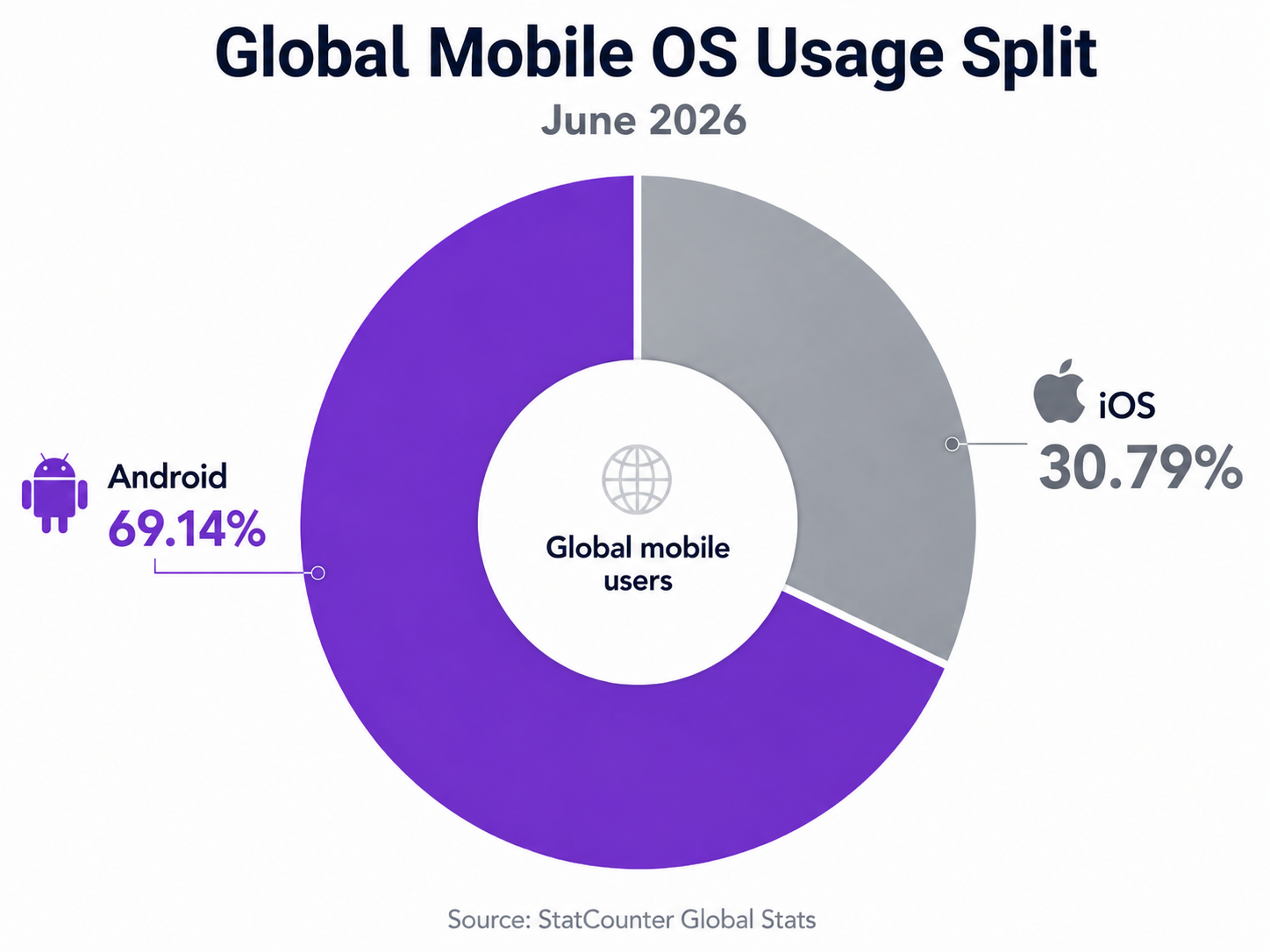
Android reaches more people worldwide because it runs on phones from many makers, price bands, and form factors. Current StatCounter data places Android at about two thirds of global mobile OS usage, while iOS is close to one third.
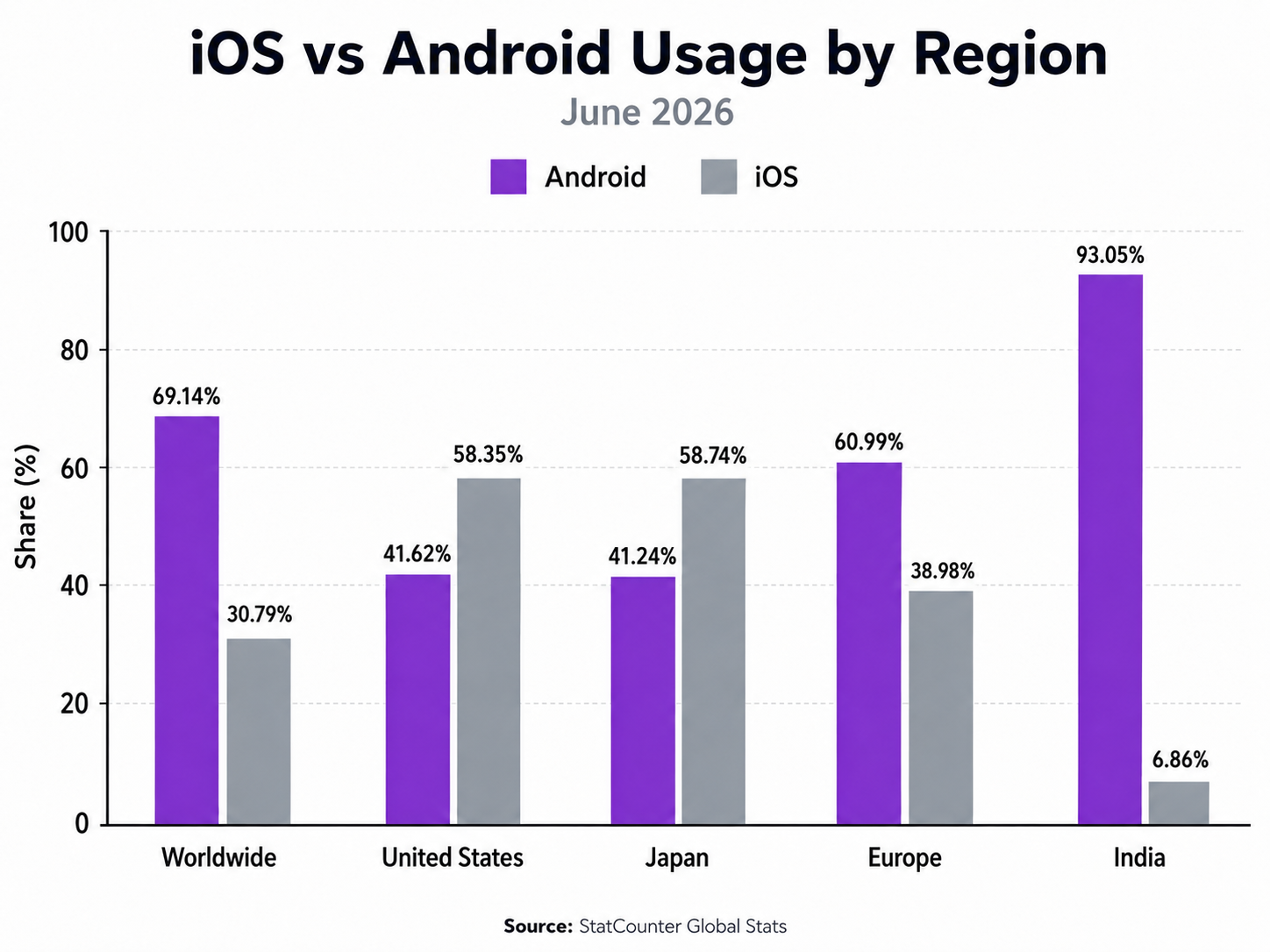
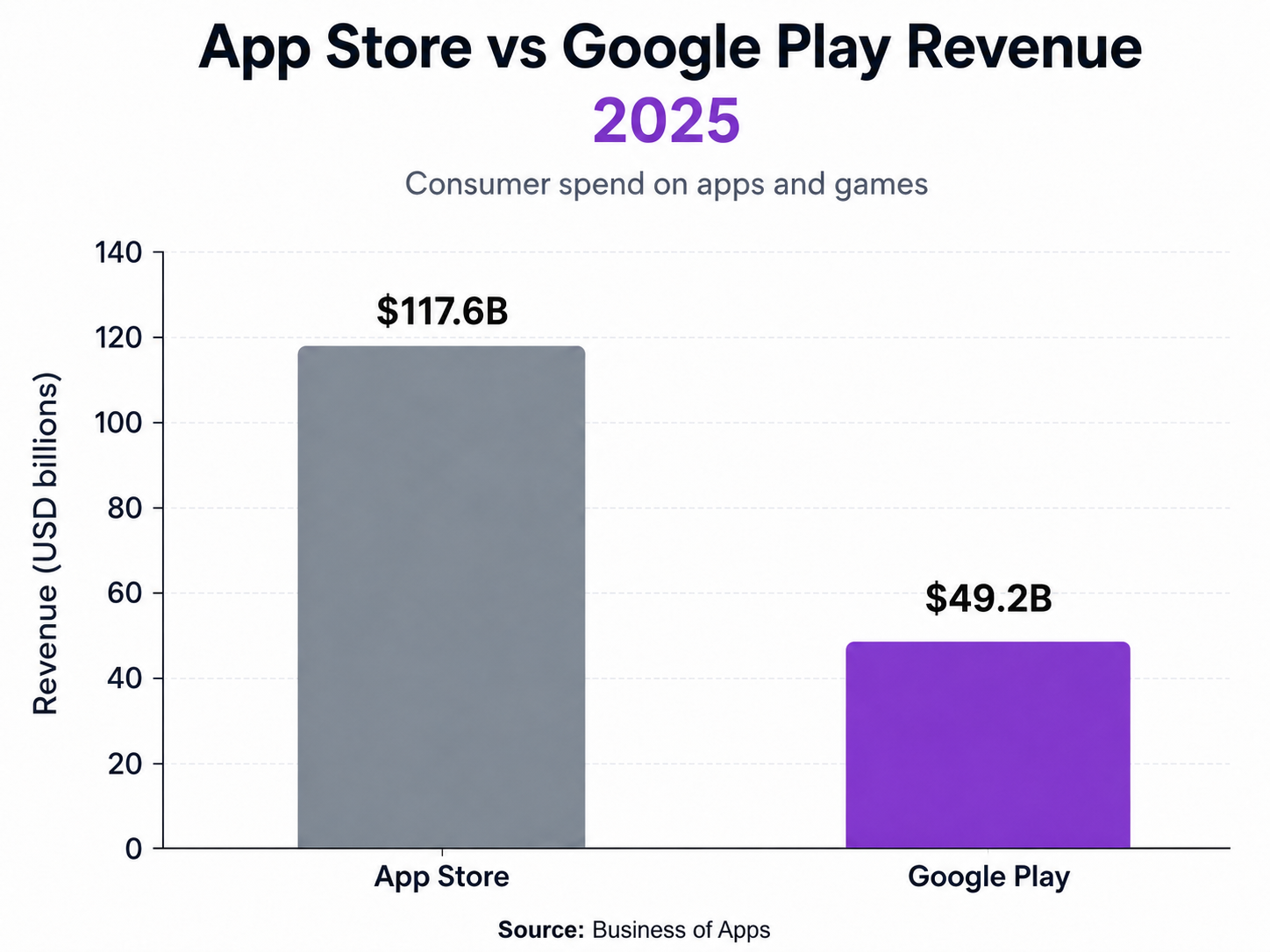
iPhone performs better in selected premium markets. iOS leads in the United States and Japan, and the App Store still brings in far more app and game revenue than Google Play.
For app owners, the question is not which phone is better. The better question is which audience to reach first, then how platform choice changes discovery, UX design, monetization, QA, app store review, and launch timing.
Why this comparison matters for mobile app strategy
A platform choice affects more than engineering cost. It shapes who can use the app, how quickly your team can test the first version, how you price it, and what store rules you must meet.
During the product discovery, teams should check target countries, device data, payment habits, and OS split before they write production code. See why the product discovery phase is important before building digital products. A subscription app may start with iOS because paid conversion is often stronger there. A field service app may start with Android because crews already use lower-cost Android phones. A marketplace may need both from day one, because buyers and sellers cannot meet if one side is missing.
These choices affect:
- product research
- platform priority
- UX patterns
- pricing and subscription tests
- permission timing for notifications
- QA device coverage
- store assets and review notes
- paid acquisition costs
- retention measurement
Use separate data for iOS and Android. Mixed analytics hide the facts that decide your next release.
iOS and Android serve different market positions
iOS runs only on Apple hardware. Apple controls the device, OS, App Store, payment paths, and many parts of the ecosystem. That gives iPhone users a consistent product model across iPhone, Apple Watch, iPad, Mac, iCloud, Face ID, and Apple Pay.
Android runs across Samsung, Google Pixel, Xiaomi, Oppo, Motorola, and many other brands. It covers low-cost phones, premium phones, foldables, tablets, rugged devices, and custom enterprise hardware.
Google has described Android as a platform with more than 3 billion active monthly devices. That reach explains why Android planning often includes more brands, more screen sizes, more form factors, and more price points.
Android allows more hardware choice, more price choice, more default app control, more store and distribution variation in some regions, and deeper links with Google services.
Neither model is better for every product. The point is to match the model to the audience and business model.
Global reach: Android leads worldwide, iPhone leads in selected premium markets
The global split favors Android. In June 2026, StatCounter showed Android at about 69% of mobile OS usage worldwide, compared with about 31% for iOS. That global number can mislead teams if they treat every country the same.
The US and Japan tell a different story. In both, iOS leads current mobile OS usage. Europe tilts toward Android, while India is Android-heavy, with iOS under 10% in current StatCounter data.
What this means for your app:
- Android first can fit products that need broad reach, lower device price points, emerging-market access, field use, education, logistics, or utility workflows.
- iOS first can fit premium consumer apps, subscriptions, fintech, wellness, productivity, and markets where Apple has strong reach.
- Both platforms can fit marketplaces, social apps, delivery apps, mobility products, and any product where network coverage matters.
A startup should check target-market data before it picks a platform. Country, city, industry, device type, and payment method can change the answer.
Demographics: age, income, and geography
Demographics are useful, but they can become lazy stereotypes. Do not assume every iPhone owner is wealthy or every Android owner is price-sensitive.
In many premium markets, iPhone usage skews toward higher-income consumers. The reasons are practical: Apple devices cost more, hold resale value, and tie into paid services and accessories. Android covers a wider income range because Android phones sell at entry, midrange, and premium prices.
Age also varies by country. US teen surveys from Piper Sandler have shown very high iPhone ownership, with the Fall 2025 survey reporting 87% of surveyed teens owned an iPhone. That does not mean every youth app should be iOS first. It means US youth products should test platform assumptions with audience data.
Pew’s US smartphone data also shows smartphones are now near-universal across many groups, so the more useful questions are which phone people use, how often they upgrade, what payment methods they trust, and which services already sit in their daily routine.
Loyalty also affects launch planning. Recent US survey data from SellCell points to high iPhone and Android brand retention, with iPhone respondents more likely to stay. CIRP also reported 89% iPhone loyalty for the year ending June 2025. For app teams, this means you should not count on users switching devices to reach your app. Build where they already are.
For B2B apps, ask what devices the company gives employees. For consumer apps, ask where paid users live, not only where all downloads come from.
Spending behavior: iPhone users often spend more in apps
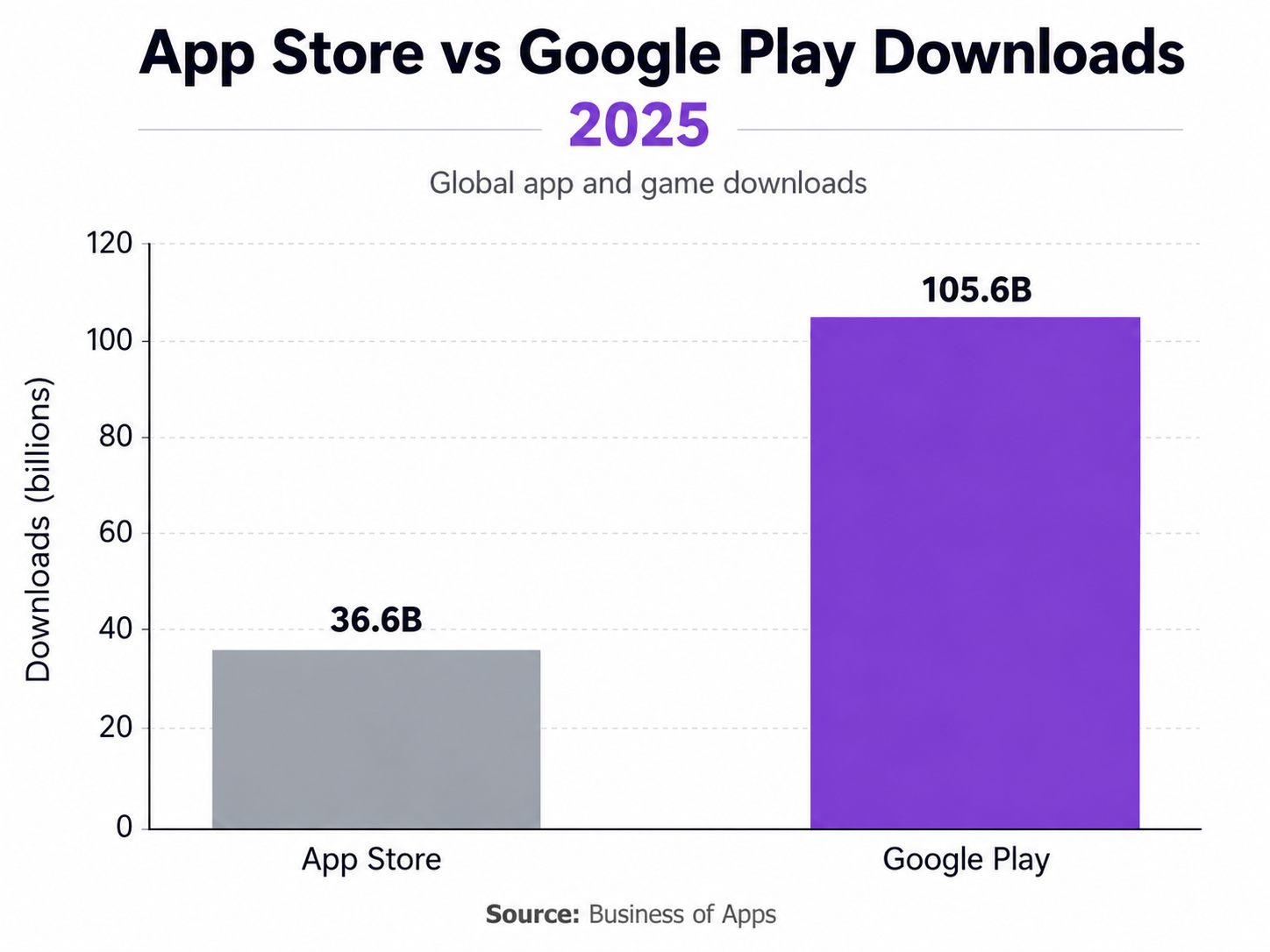
App monetization is one of the clearest differences between the platforms. Google Play often wins on download volume because Android has greater reach. The App Store often wins on revenue because iPhone users spend more on paid apps, in-app purchases, and subscriptions.
Business of Apps estimates that the App Store generated about $117.6 billion in app and game revenue in 2025, while Google Play generated about $49.2 billion. Sensor Tower also reported that global consumer spending on in-app purchases reached a new record in 2025, with non-game apps now representing a major part of spend.
What this means:
- Subscription apps often benefit from an iOS-first test when the target market is iPhone-heavy.
- Ecommerce apps should compare payment behavior, average order value, and repeat purchase by platform.
- Marketplaces should model both supply and demand. One-sided platform coverage can slow liquidity.
- Gaming apps should separate paid purchase, ad monetization, and region data.
- Fintech apps should check trust, banking access, device security, and payment habits by country.
- B2B and internal apps should follow the device fleet, not app store revenue averages.
Android can still be the better commercial start when scale, ads, local payments, or emerging-market reach matter more than early paid conversion.
Engagement behavior: notifications, retention, and app habits
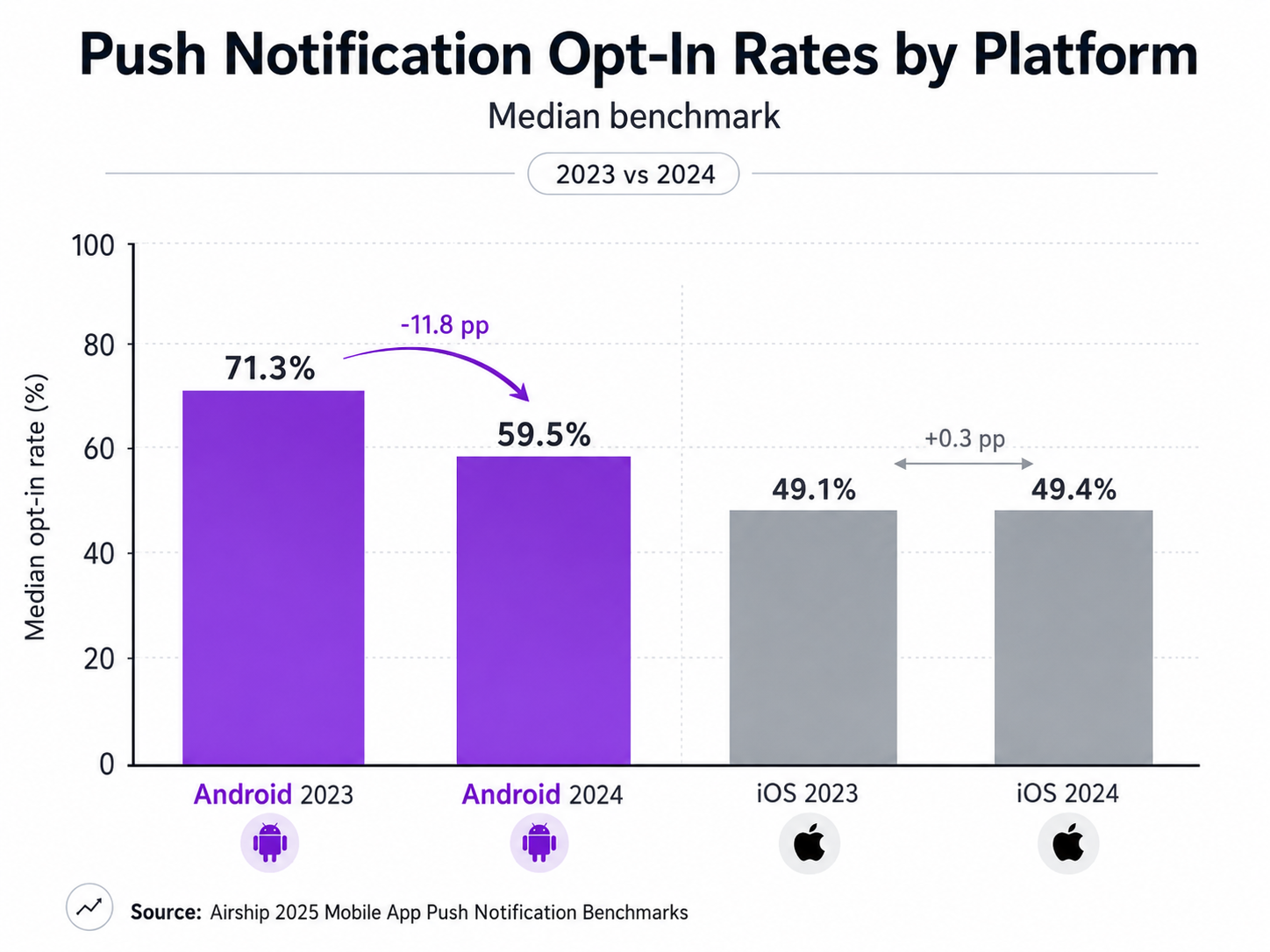
Notification behavior differs by OS and by app category. Historically, Android had less friction for push notifications than iOS. Android 13 and higher added the POST_NOTIFICATIONS runtime permission for non-exempt notifications. For newly installed apps on Android 13+, notifications are off by default until the user grants permission, although eligible existing apps may be pre-granted permission when users upgrade devices.
Airship’s 2025 benchmark report shows iOS opt-in rates stayed stable in 2024, while Android opt-in rates fell after Android’s permission change. The report also shows Android often leads in direct open rates because notification behavior and user controls differ.
Do not copy the same notification plan across platforms. Ask for permission after the user has seen value. Explain what the alerts do. Test the first-run flow separately on iOS and Android.
Track opt-in rate, reaction rate, uninstall rate, retention, and revenue by OS. A push flow that lifts Android return visits may annoy iOS users if the timing feels too early or the message lacks context.
Privacy and trust expectations
Apple has made privacy a central part of the iPhone promise. App Tracking Transparency asks users before an app tracks activity across other companies’ apps and websites. App Store privacy labels also require developers to disclose data collection and use.
Google Play has its own Data safety section, which asks developers to explain what data they collect, how they share it, and how they protect it. Android also gives users many permission controls.
What this means for your app: consent is part of product design. The moment you ask for tracking, location, photos, contacts, health data, or notifications can change conversion.
Product teams should write plain-language permission screens, avoid asking too early, and connect each request to an obvious benefit. Privacy wording should match real data handling, not marketing wish lists.
Customization vs ecosystem consistency
Android users often expect flexibility. They may want to change default apps, use widgets, connect Google services, open files more freely, and run the app on many screen sizes. In some markets, Android users also expect local payment methods and lower data usage.
iPhone users often expect polish, stable patterns, Apple Pay, Face ID, iCloud, AirDrop, Apple Watch, and a product that fits Apple’s system conventions.
Keep the brand the same, but do not force identical screens. Use native navigation, permissions, gestures, payment options, widgets, and accessibility patterns where they help the user complete a task faster.
A good cross-platform app still feels native on each device. That means shared business logic can sit underneath, while platform details remain visible where users expect them.
App discovery and store behavior
The App Store and Google Play both shape how users find, judge, and trust apps. Store listings, screenshots, videos, ratings, reviews, privacy data, and update notes all affect conversion before the first app open.
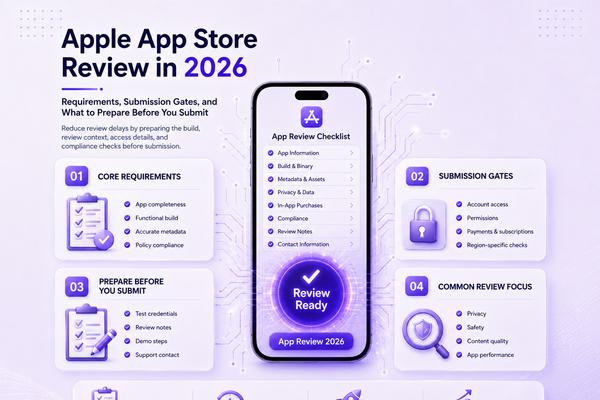
Apple reviews every app and update against App Store Review Guidelines, so teams should understand App Store review requirements before planning a release. Google Play also reviews apps and policies, but release tools differ. Google Play supports staged rollouts, which let teams release an update to a percentage of users and halt it if crash data looks bad. Both stores ask for privacy and data details.
Store rules also change. Google Play sets target API level deadlines, and Apple updates review and privacy rules over time. Treat release planning as a product workstream, not a final upload task.
Plan release work early:
- write app metadata before launch week
- prepare screenshots for each store
- complete privacy labels and Data safety forms
- write review notes for Apple
- use staged rollout options where available
- monitor crashes, ANRs, refunds, ratings, and support tickets after release
What iPhone vs Android differences mean for product decisions
Choose iOS first when:
- your audience is concentrated in iPhone-heavy markets such as the US or Japan
- you sell subscriptions, paid apps, or premium digital products
- you need Apple Pay, Apple Watch, HealthKit, Face ID, or iCloud
- your brand targets higher-income consumer groups
- your first release benefits from a narrower device testing set
Choose Android first when:
- your audience is global or concentrated in Android-heavy countries
- you need broad device reach across many price points
- price sensitivity shapes purchase decisions
- your product depends on Google Maps, Android intents, or Google account flows
- your app supports field teams, operations, logistics, education, or public services
- ad-based monetization or high-volume acquisition matters more than early paid conversion
Choose cross-platform when:
- you need iOS and Android close together
- the app has similar flows on both platforms
- one product team will own the mobile app
- React Native or Flutter can cover most device needs
- native features can be isolated into modules
Native or cross-platform: what should your team build?
Native iOS and Android give the highest platform control. They fit apps with heavy device features, complex animations, advanced camera flows, Bluetooth devices, high-performance gaming, or deep Apple and Android system use.
Cross-platform development can reduce duplicate work for many startup and business apps. React Native often fits products that need both stores, shared logic, and a fast path from design to release.
The trade-off is product detail. Your team still needs native thinking for permissions, payments, accessibility, screen sizes, notifications, and store rules. Cross-platform does not mean one identical app everywhere.
Lexogrine builds iOS, Android, and cross-platform apps with React Native and native technologies. For products that need server logic, payments, admin panels, customer portals, or internal tools, mobile work often connects with a Node.js backend and AWS infrastructure.
The right build path depends on UX, performance, budget, timeline, device features, and long-term maintenance.
A checklist before choosing iOS, Android, or both
Use these questions before you commit to a platform:
- Which countries and cities are we targeting first?
- What devices does the audience already use?
- Are users likely to pay for subscriptions, in-app purchases, or paid downloads?
- Do we need premium UX, broad reach, or both?
- Do we need Apple Pay, Google Pay, HealthKit, widgets, camera, Bluetooth, NFC, or offline mode?
- What QA device set can we afford?
- How much budget can we spend on release, analytics, and post-launch fixes?
- Do push notifications support the product, and when should we ask for permission?
- Do we need App Store and Google Play launch support?
- Can analytics split funnel, retention, and revenue by OS?
- Can React Native meet the first version’s needs, or do we need native builds?
If the answers are unclear, start smaller. Build for the audience with the highest chance of learning, paying, or proving demand, then expand.
Final takeaway
iPhone and Android users differ, but no single stat should decide your mobile strategy. Android gives broader global reach. iPhone often brings stronger premium-market reach and app spending. Both platforms can work well when the product, market, and business model fit.
Use data, not assumptions. Check the target countries, demographics, app category, payment model, store rules, and device needs. Then choose iOS first, Android first, or both with a focused first release and a clear plan for expansion.
Partner with Lexogrine
Lexogrine helps companies choose the right mobile strategy before writing code. We build iOS, Android, and cross-platform mobile apps, from product discovery and UX design to React Native development, native mobile development, Node.js backends, AWS infrastructure, admin panels, customer portals, internal tools, and release support.