
TL;DR: Markdown for Agents (Cloudflare)
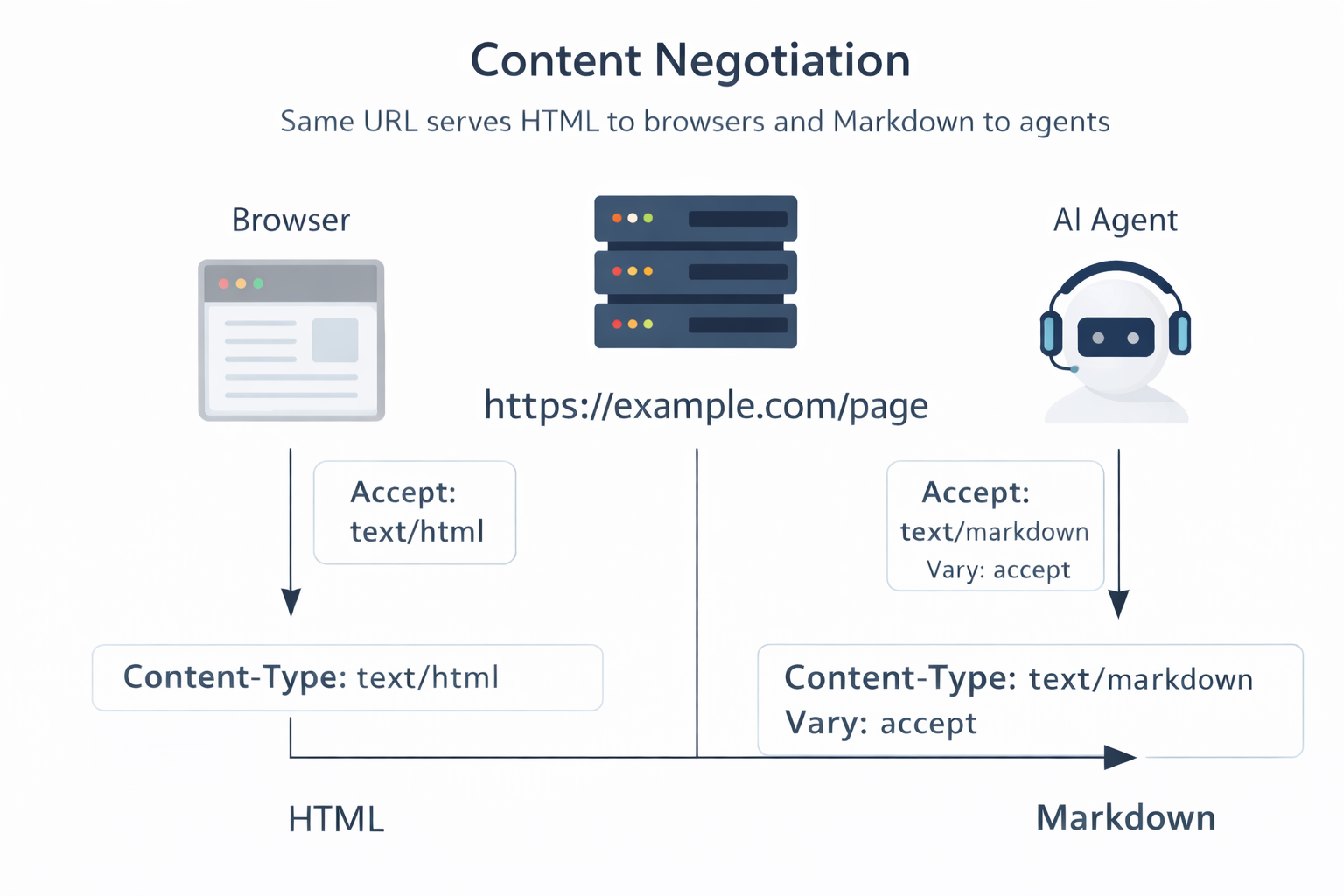
- Two Views, One URL: “Markdown for Agents” lets the same page serve HTML to humans and a cleaner Markdown representation to agents, using HTTP content negotiation (the Accept: text/markdown request header).
- Less Noise, Fewer Tokens: Agents do not skim. They parse nav, UI wrappers, scripts, and repeated blocks. Converting HTML to Markdown trims that noise, so agents spend fewer tokens and finish tasks with less guesswork.
- Edge Conversion Workflow: When the feature is enabled on a Cloudflare zone, Cloudflare fetches your origin HTML, converts it at the edge, then returns Content-Type: text/markdown plus Vary: accept so caches keep HTML and Markdown variants separate.
- Works Best on “Truth Surfaces”: The biggest gains usually show up on docs home pages, pricing, API auth pages, changelogs, and setup guides, where agents need precise constraints, steps, and stable links.
- Pair It With Curation When Needed: Auto-conversion helps, but it will not fix unclear writing or drifting facts. Many teams add a curated agent layer (task cards, constraints, canonical links) and optionally a site map file like llms.txt to guide agents to the right pages first.
- Watch the Failure Modes: Main risks are conflicting statements in the source HTML, stale content, prompt injection attempts inside retrieved text, and accidental over-sharing. Treat agent-facing text as public content, keep one source of truth for numbers and policies, and require user approval for actions that change state.
From HTML Noise to Agent-Readable Markdown
AI agents read the web like a log file, not like a person. They want a clean stream of facts and links they can follow with low guesswork.
If you want AI agents reading websites to succeed, you need a site that is easy to parse, not just nice to look at. That is the new baseline for AI-readable documentation. Google proposed the WebMCP format for AI Agents.
Most product sites serve the opposite. They ship dense HTML, repeated navigation, and client-rendered UI that hides the real content until runtime. Even when an agent can fetch the page, it still has to sort content from noise. That costs tokens, time, and money.
Cloudflare’s “Markdown for Agents” is a pragmatic response. It does not ask you to redesign your site for bots. It adds a second representation of the same URL: Markdown. Agents ask for that representation using an HTTP Accept header, and Cloudflare converts the HTML to Markdown at the edge.
Here is why that matters: you can make your site easier for agents to read while keeping your human experience intact.
Let’s break it down.
What is Markdown for Agents (Featured snippet definition)
Markdown for Agents is a Cloudflare feature that lets clients request an agent-readable markdown version of an HTML page using HTTP content negotiation. When a client sends Accept: text/markdown to a Cloudflare zone with the feature turned on, Cloudflare fetches the original HTML from your origin, converts it to Markdown, and returns Content-Type: text/markdown with Vary: accept.
Plain English for CTOs: you keep your web pages as they are for people, and you add a machine-friendly view for crawlers and agents without creating a second site.
What it targets: content extraction and token waste when agents read web pages. What it does not target: access control, bot blocking, or “ranking” any page in an AI answer system.
The problem it addresses
Why agents struggle with typical web pages
Most product pages are built from layers:
- Layout and navigation wrappers.
- UI components that repeat across the site.
- Scripts, styles, and telemetry.
- Content that only exists after client-side rendering.
- Marketing sections that avoid precise statements.
Humans skim and ignore a lot of this. Agents do not. They have to parse it all, then guess which parts matter.
Next steps: look at your own docs page as raw HTML. Count how many tokens go to headers, footers, cookie banners, “related posts”, and repeated menus. That is context budget you pay for on every call.
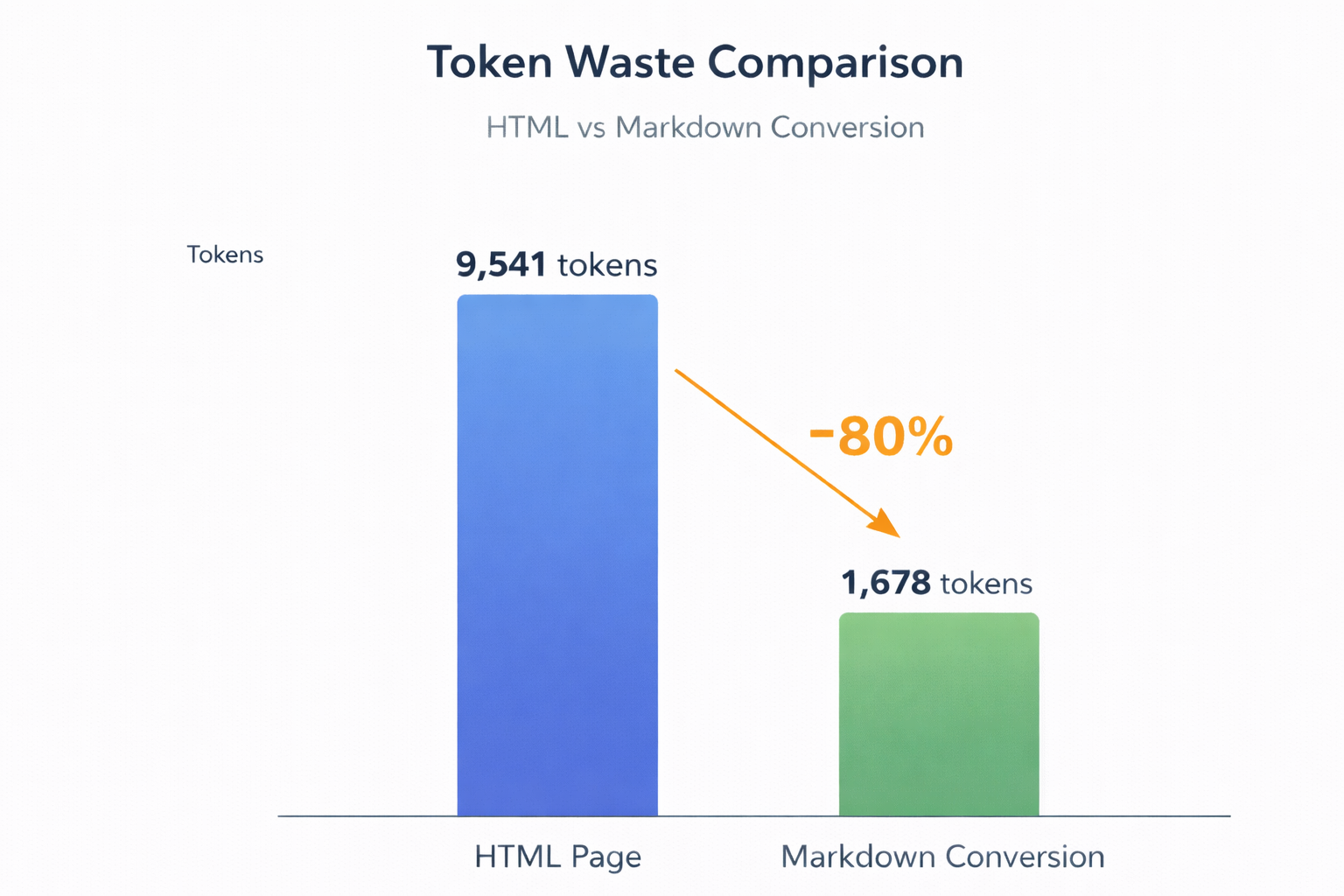
Cloudflare’s own example shows what this looks like in numbers: their docs page converted from 9,541 tokens of HTML to 1,678 tokens of Markdown, an 80% drop in tokens for that request. That is not a silver bullet, but it is a direct cost cut for any agent that reads your site at scale.
A second issue shows up with client-rendered pages. A plain fetch does not “run” your UI. Cloudflare even offers a Browser Rendering /markdown API for cases where a page needs real browser rendering before conversion, which signals a real gap between “I can fetch it” and “I can read it”.
What “agent-readable” means on real sites
When teams say “agent-readable”, they usually mean a few concrete properties:
- Deterministic: the same request yields the same text (or a small, explainable diff).
- Scannable: headings and lists carry structure.
- Low ambiguity: numbers, constraints, and requirements appear as plain statements.
- Linkable: the document points to deeper pages in a stable way.
Markdown is not magic, but it supports all four: headings, lists, code fences, and links map to common agent parsing steps.
Where teams lose time today
When the “truth” of a product sits across a site, teams pay for it repeatedly:
- Support: agents cannot answer, so tickets bounce to humans.
- Sales: buyers ask the same clarifying questions, and reps hunt for the right doc section.
- New-user ramp-up: people and internal assistants struggle to find the right setup steps.
- Internal tooling: teams build private “knowledge bases” from scraped pages, then fight drift.
Markdown for Agents does not fix content drift by itself. It does remove a lot of parsing friction, which is often the first bottleneck.
What Cloudflare proposes
Cloudflare proposes a simple pattern: treat Markdown as an alternate representation of your existing page.
The shape of the proposal
Markdown for Agents lives at the edge, as a zone setting in Cloudflare. When turned on, a client can request Markdown by sending Accept: text/markdown.
Cloudflare then:
- Fetches the HTML page from your origin.
- Converts it to Markdown.
- Returns the Markdown response with Content-Type: text/markdown and Vary: accept.
Cloudflare’s docs show the converted response can include:
- Front matter (YAML) with page metadata like title and description.
- An estimated token count via x-markdown-tokens.
- A Content-Signal header (by default: ai-train=yes, search=yes, ai-input=yes).
Cloudflare’s docs also show a Markdown response can look like this at the HTTP layer:
content-type: text/markdown; charset=utf-8
vary: accept
x-markdown-tokens: 725
content-signal: ai-train=yes, search=yes, ai-input=yes
Cloudflare’s docs also list plan availability: Pro, Business, and Enterprise plans, plus SSL for SaaS customers, at no cost.
How it gets discovered
This approach leans on HTTP behavior, not a new crawler-only endpoint.
HTTP content negotiation lets clients express what media type they want with the Accept request header. Servers can return different representations and declare the cache split with the Vary response header.
This matters because you can keep one canonical URL, serve HTML to browsers, and serve Markdown to agents, without confusing shared caches.
How to turn it on
Cloudflare documents two ways to turn on Markdown for Agents:
- Dashboard: a Quick Actions toggle inside the zone.
- API: a PATCH call to /client/v4/zones/{zone_tag}/settings/content_converter with payload {"value":"on"}.
That API detail matters for teams that want a repeatable rollout across many zones.
Tracking and measurement
Cloudflare links this feature to measurement, too. Their blog post on Markdown for Agents points at Cloudflare Radar updates for tracking Markdown usage, which helps teams see whether agents and crawlers actually request the Markdown representation.
Why Cloudflare chose Markdown
Cloudflare’s docs state that Markdown has become a common format for agents and that its explicit structure reduces token waste.
Markdown also has a mature spec ecosystem. CommonMark exists to remove ambiguity across Markdown parsers by defining a formal spec and a test suite.
How it relates to llms.txt
Markdown for Agents and llms.txt solve different problems, and they can fit together.
- Markdown for Agents: “Give me this page as Markdown.”
- llms.txt: “Here is a map of the site, plus links to the pages that matter most for an LLM at inference time.”
The llms.txt proposal describes a file placed at /llms.txt that uses Markdown conventions (H1 title, a summary, and sections with curated links) to help an LLM or agent find high-value resources.
Put it this way: content negotiation helps the agent read a page. llms.txt helps the agent decide which pages to read.
How it fits with structured content for AI agents
A lot of teams already ship machine-readable docs in other forms. Markdown for Agents does not replace them.
- Structured data (Schema.org / JSON-LD): search engines use structured data to understand a page and render rich results. Google documents structured data markup and policy rules for Search. Structured data helps discovery and display. It does not give an agent a clean full-text brief of your product.
- Sitemaps: the Sitemaps protocol defines an XML format for listing URLs and metadata so crawlers can discover pages. It helps discovery. It does not make a page easier to read.
- robots.txt and crawler directives: the Robots Exclusion Protocol lets site operators express crawler access preferences. It is not a security boundary. Content Signals (below) adds another preference layer.
Markdown for Agents sits next to these tools. It focuses on the reading step.
Quick answers teams ask
Do we need Cloudflare to do this?
No. Content negotiation is part of HTTP. You can serve your own Markdown representation from your origin if you want. Cloudflare’s feature matters because it converts HTML to Markdown for you and serves it from the edge.
Does this replace structured data?
No. Structured data targets search discovery and rich results. Markdown for Agents targets agent reading.
Does this control training or scraping?
No. Content Signals express preferences. Cloudflare says they are not technical controls. Treat them like a policy flag and pair them with bot controls when you need enforcement.
A mental model: human page vs agent layer
You can ship two layers without building two sites.
- Human-facing layer: the page that sells, teaches, and supports people.
- Agent-facing layer: a clean view of the same facts, with structure and low noise.
With Cloudflare’s feature, the agent-facing layer is the Markdown representation of the same URL.
You can also add a curated layer on top (a separate Markdown file or set of files) when you need tighter control than an automated HTML-to-Markdown conversion can give.
Human needs vs Agent needs
Human needsAgent needs
Visual hierarchy, layout, calls-to-action
Headings, lists, stable links
Narrative and persuasion
Direct statements and constraints
Interactive UI (tabs, accordions)
All content present in fetched text
Tolerance for repeated navigation
Low repetition to save tokens
Context from images and UI labels
Text alternatives and explicit labels
Next steps: if your content lives inside tabs, accordions, or hover states, plan an agent layer that exposes the same data as plain text.
What to include in agent-facing Markdown
A good agent layer reads like a short technical brief, not a landing page.
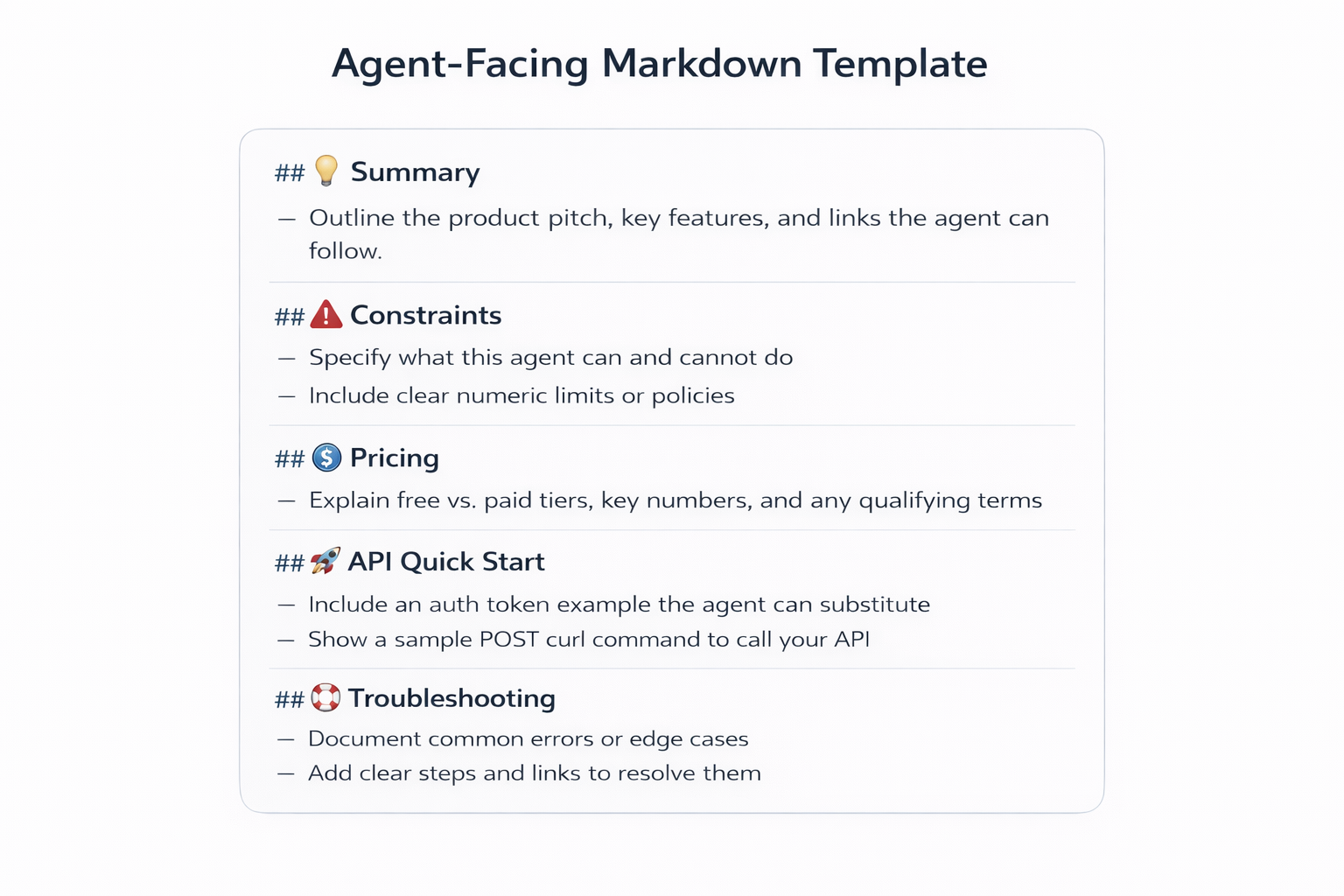
Here is a practical template you can reuse across product surfaces. Treat it as a contract between your site and an agent.
Agent-facing Markdown template
- Product summary
- One paragraph: what it is and who it serves.
- One sentence: what it is not.
- Capabilities
- Bullet list of what the product does.
- Links to deeper docs sections.
- Constraints
- Limits, caveats, and non-goals.
- Hard boundaries (regions, plan limits, supported runtimes).
- Pricing and packaging (public only)
- Plan names.
- Metered units and what they measure.
- Link to the canonical pricing page and terms.
- API quick start
- Base URL.
- Auth method.
- One minimal request and response shape.
- Auth and rate limits
- Token types.
- Scopes.
- Rate limit headers and retry guidance.
- Supported platforms
- OS versions, runtimes, browsers, deployment targets.
- Common tasks
- Task cards with clear inputs and outputs.
- Links to step-by-step docs.
- Troubleshooting
- Top errors and fixes.
- Known gotchas.
- Contact and escalation
- Support channels.
- Security contact.
- Support commitments if public.
What to avoid and why
Avoid:
- Marketing fluff that does not help task completion.
- Ambiguous claims like “fast” or “easy”.
- Duplicated truth that will drift (copy-pasting pricing values in ten places).
Instead, keep one source of truth for numbers and link to it from the agent layer.
Reasoned take: the best agent-facing Markdown does not try to mirror every section of the page. It tries to answer the first 10 questions an agent will ask before it clicks deeper.
What this looks like on real product pages
Here are practical “include” lists by page type. This is how you turn machine-readable docs into agent-ready docs.
Docs home
- A short map: “Start here”, “Concepts”, “Guides”, “API reference”, “Changelog”.
- One line per section that says what the user gets there.
- A link to /llms.txt if you publish it.
Changelog
- One line describing the changelog scope (product, repo, whole platform).
- A stable format for entries: date, change type, affected area, migration note.
- Links to upgrade or migration docs when you change behavior.
Pricing
- Plan names.
- What varies by plan (features, limits).
- What varies by usage (meters).
- A single link to the “pricing source of truth” section where numbers live.
API reference
- Auth section that names token type and where to get one.
- Rate limit behavior and error codes.
- A short endpoint index that maps tasks to endpoints.
Marketplace listing
- A “what it does” list that matches what the product can actually do.
- Setup prerequisites.
- A link to a canonical quick start.
Minimal examples (copyable)
These examples show the shape, not a full system.
Example A: a single Markdown file that summarizes a product page for agents
typescript---title: Lexogrine Agents SDKcanonical: https://example.com/product/agents-sdk---
# Lexogrine Agents SDK
> SDK for building task-based web agents that read your docs and act on them.
## What it does- Runs tool-driven agents with typed actions.- Connects to your existing docs and API specs.- Emits traces for each step.
## Constraints- Public web pages only. No private admin screens.- Requires OAuth 2.0 for user-bound actions.
## Pricing- See: https://example.com/pricing#agents-sdk
## Start here- Quick start: https://example.com/docs/agents-sdk/quick-start- API reference: https://example.com/docs/api- Support: https://example.com/support
Example B: an agent-facing excerpt for API docs (endpoints overview + auth + errors)
typescript# Example API (agent excerpt)
## Base URLhttps://api.example.com/v1
## Auth- Header: Authorization: Bearer <token>- Tokens: user tokens and service tokens- Scopes: read:projects, write:projects
## Endpoints- GET /projects: list projects- POST /projects: create a project- GET /projects/{id}: fetch one project
## Errors- 401: missing or invalid token- 403: scope missing- 429: rate limit hit (retry after Retry-After)
Pairing with your existing site
If you use Cloudflare and turn on Markdown for Agents, a client can request the Markdown representation of an existing page with a single header.
typescriptcurl https://example.com/docs/getting-started \ -H "Accept: text/markdown"You can keep the human URL and still ship an agent-readable view.
Adoption guide for real teams
You do not need a site-wide rewrite. Start where agents and people already struggle.
Step-by-step rollout plan
- Pick 3 pages that cause the most support or sales friction
Good candidates: pricing, API auth, and a “getting started” doc. - Define single source of truth owners
Assign one owner per page surface. That owner approves both the human page and the agent layer. - Write first agent-facing drafts
Start with the template above. Keep it short. Link to the canonical page for numbers and policies. - Add discovery and linking patterns
Pick one or more:
- Turn on Markdown for Agents so the same URL returns Markdown to agents.
- Publish /llms.txt with links to your agent-facing pages.
- Add a “for agents” link in your footer that points to a stable index page.
- Set up a review cadence
Tie review to releases. If you ship pricing changes weekly, review the pricing agent layer weekly. - Monitor outcomes
Track:
- Support deflection: fewer “where is X” tickets.
- New-user ramp-up time: time from signup to first successful call.
- Agent task success: percent of runs that finish without a human handoff.
A 30-minute starter checklist
You can do this in under 30 minutes for one page:
- Choose one high-traffic page (pricing or API auth).
- Write a 10-line Markdown summary: what it is, constraints, links.
- Add one canonical link to the source of truth.
- Test a curl request with Accept: text/markdown.
- Run your agent against the Markdown view and log failures.
- Fix one failure by adding one more explicit bullet.
Keep it small. A thin agent layer beats none.
Constraints, risks, and abuse cases
This is where teams get surprised. Plan for it early.
Stale or conflicting truth
If you publish two representations, you can drift:
- The human page changes.
- The agent layer lags behind.
Cloudflare’s Markdown for Agents reduces this drift risk because it converts from the same HTML source each time. You still can drift in a different way: your HTML can contain multiple conflicting statements, and the conversion will not decide which is true.
Mitigation:
- Keep one canonical place for numbers and policy.
- Prefer links over duplicating exact values in many places.
- Add a short “last updated” line in the agent layer when you author it by hand.
Conversion limits and failure modes
Cloudflare documents a few limits:
- It converts from HTML only.
- It does not support compressed responses from the origin.
- It is a zone-level setting. If you need different behavior for subdomains, you need separate zones.
Mitigation:
- Make sure your origin can serve uncompressed HTML to Cloudflare, even if it uses compression to browsers.
- Test your “weird” pages: tables, tabs, long lists, and code samples.
- If you run separate products under subdomains, plan zone boundaries early.
Prompt injection risks from hosted text
Any agent that reads untrusted web content can face prompt injection. OWASP lists prompt injection as a top risk for LLM apps, and research has shown indirect prompt injection can hijack web agents by embedding adversarial instructions in page content.
Brave also reported prompt injection attacks that hide instructions in content, including through nearly invisible text in images used by “AI browser” features.
Markdown does not remove this risk. It can even lower friction for an attacker if the agent treats the Markdown as “trusted” and follows instructions inside it.
Mitigation:
- Treat your own agent layer as content, not as instructions.
- In your agent runtime, separate “instructions” from “retrieved text”.
- Filter or strip high-risk patterns when the agent ingests content.
- Require user approval for actions that spend money, send data, or change state.
Over-sharing internal details
An agent-friendly doc can expose internal links, admin paths, and incident runbooks if you publish it in the open.
Mitigation:
- Keep public and private agent layers separate.
- Publish public agent layers with only public endpoints and support paths.
- Put internal runbooks behind auth, and do not mirror them into public Markdown.
Scraping and competitor intelligence
A clean Markdown view makes it easier for anyone to extract your facts. That includes competitors.
Mitigation:
- Decide what you are comfortable publishing.
- Use Content Signals to express preferences for search, training, and real-time use.
Cloudflare’s Content Signals Policy defines search, ai-input, and ai-train signals in a robots.txt comment block and lets site operators express preferences via a Content-Signal: directive.
In that policy text:
- search covers building a search index and returning links and short excerpts. It does not cover AI-generated search summaries.
- ai-input covers feeding content into AI models for real-time use (Cloudflare names retrieval augmented generation and grounding as examples).
- ai-train covers training or fine-tuning models.
It also says content signals express preferences, not technical controls, and points to bot controls when you need enforcement.
Also remember: robots.txt is not access authorization. The Robots Exclusion Protocol is a request for crawler behavior, not a lock.
Reasoned take: most teams already leak this information in HTML. Markdown makes the leak cheaper to process, so it forces you to be deliberate.
When Markdown for Agents is worth doing
Here are decision triggers that tend to pay off quickly:
- You run a public API
Agents need base URLs, auth, scopes, and error shapes. - Your pricing has more than one axis
Seat count, usage meters, add-ons, and plan gates confuse both people and bots. - Your docs change often
Agents struggle when pages move and headings shift. - You have a high support load
Ticket deflection becomes real when agents can quote the right page and link. - You sell through a marketplace
Listings compress a lot of product truth into tiny fields. A Markdown layer gives agents a better brief. - You ship compliance-heavy features
Agents need precise statements, not vibes. - You rely on self-serve signup
If agents can guide new users through setup, you reduce first-week churn.
When it is not worth it:
- You have a tiny static site with one page.
- Your product has no self-serve path and no public docs.
- You cannot keep public docs accurate.
Next steps: if you match two triggers above, start with one page this week.
Partnering with Lexogrine
Lexogrine is an AI agent development company. We help product teams ship agent-ready documentation and agent-ready website surfaces that agents can read, trust, and act on. That includes designing agent layers, building the agent runtime, and wiring evaluation so your agents finish tasks with fewer human escalations. Let's talk!