
Building real-time interfaces with React: state, performance, and reliability
TL;DR
- Separate incoming messages, application state, and what the screen needs to display. They do not have to update at the same rate.
- Treat replaceable state differently from events that must be preserved. Optimize rendering without losing information.
- Plan for stale data, interrupted connections, and session changes. Test those conditions alongside normal operation.
A live interface can display the latest numbers and still tell the wrong story. A score might belong to the previous match. A smooth position marker might trail the action. A camera reaction might reveal a result before the broadcast reaches it.
These are useful problems to examine when building real-time interfaces with React. They connect frontend architecture to something tangible: whether people can trust what they see.
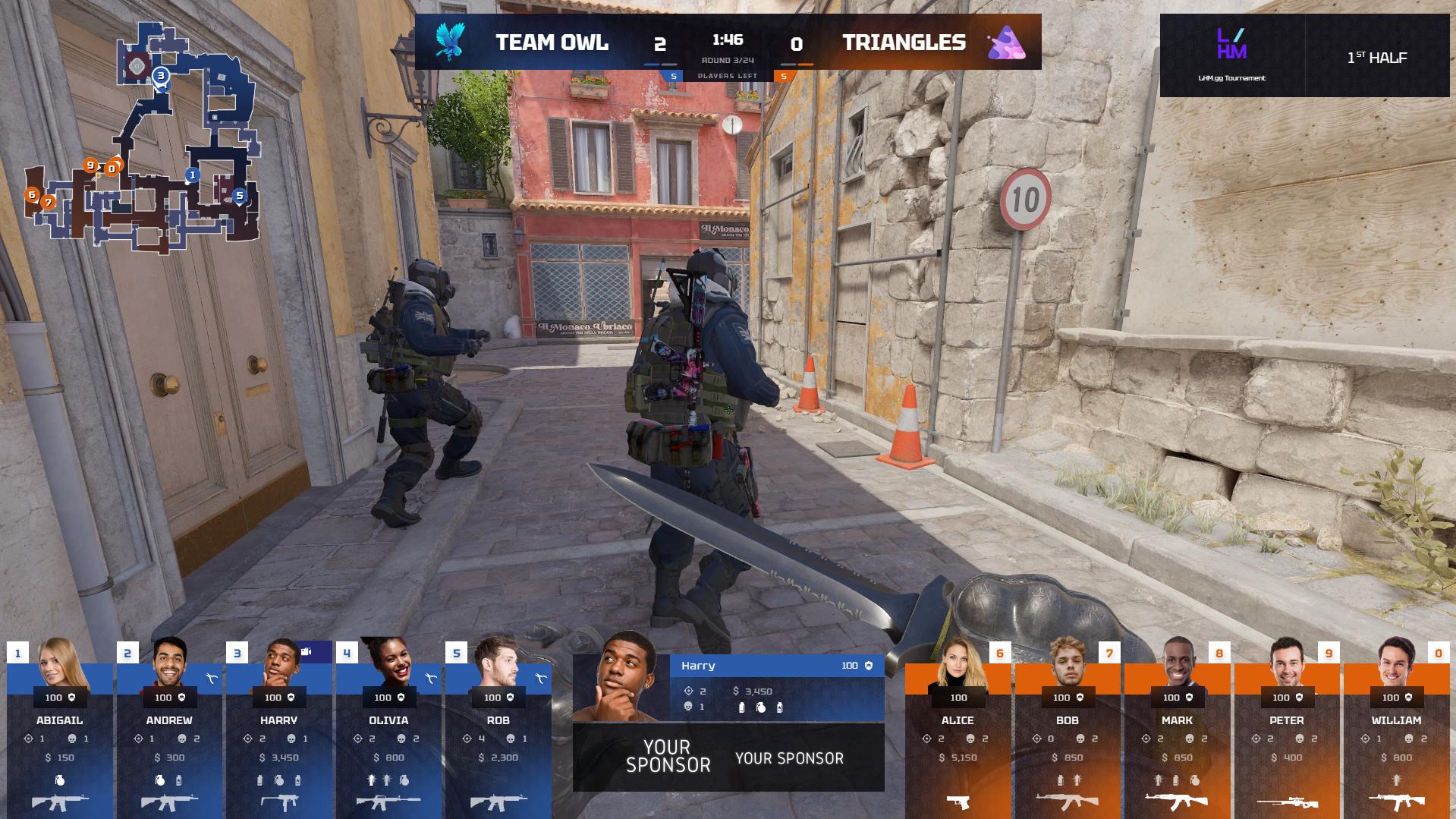
At Lexogrine, one setting for this work is Ultra CS2 HUD, the Counter-Strike 2 broadcast interface we develop within LHM.gg. It brings match information, radar, player cameras, and production graphics into a live broadcast. A HUD, or heads-up display, supplies context while the underlying action remains the focus.
The engineering decisions extend well beyond esports. A team building a monitoring dashboard or a wearable display also needs to decide which updates matter, when to show them, and what to do when the information stops arriving.
Start with what an update means
Before choosing a state-management library, classify the information entering the application.
A player's current position answers “where are they now?” An elimination event answers “what happened?” A branding change answers “how should this be presented?” Applying the same update policy to all three creates avoidable problems.
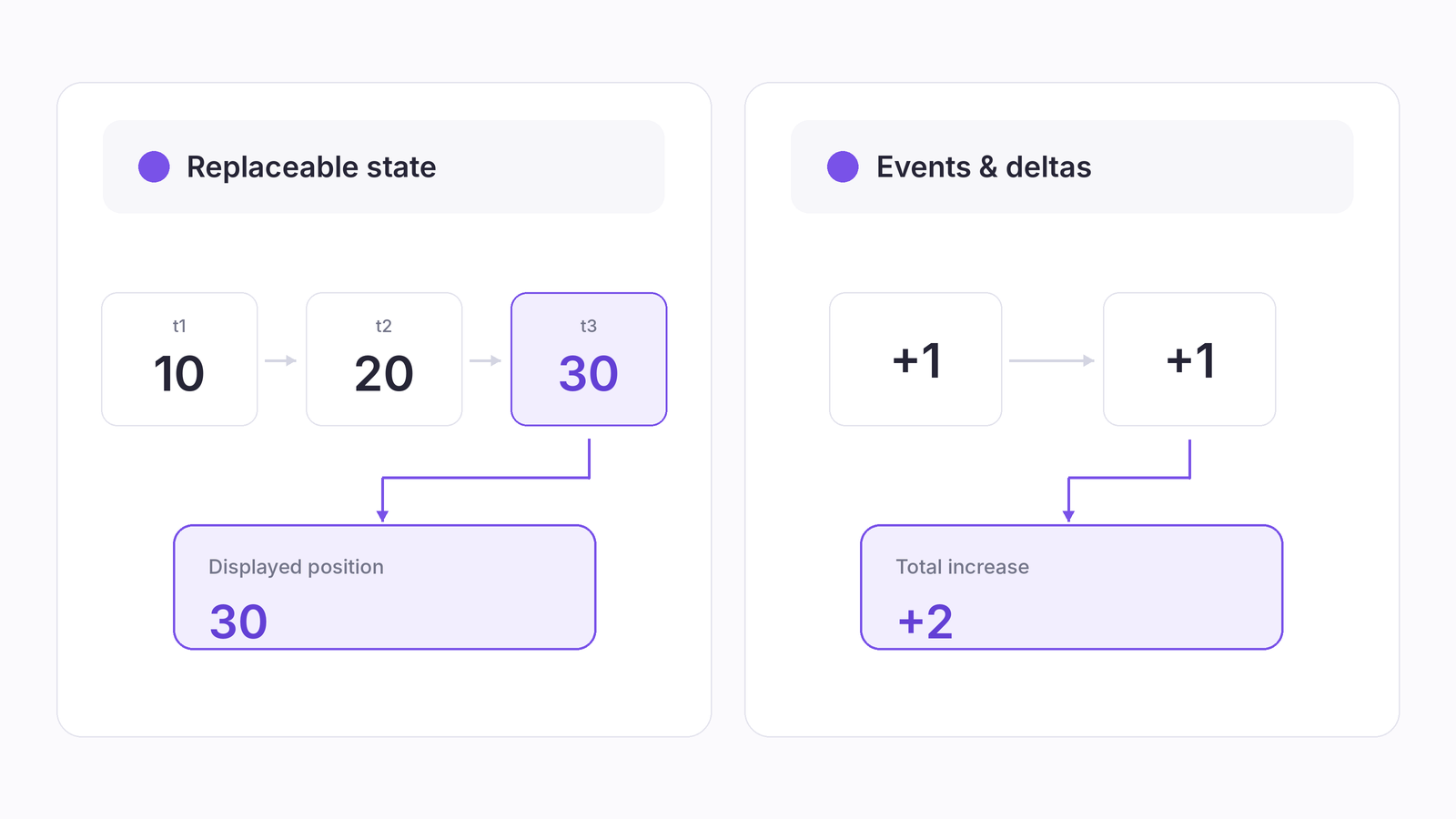
This distinction matters before any throttling is introduced. Keeping only the latest complete position may be reasonable for a marker. Keeping only the latest score increment would lose part of the result. Historical analysis may also require samples that the live view never displays.
Ultra CS2 HUD illustrates the variety of inputs involved: game information over sockets or communication between application processes (IPC), supplementary game data, match updates, player APIs, configuration, operator actions, and side-reversal information associated with map selection. They describe different aspects of the same production.
For an application with those inputs, define which source controls each field. A player profile response should enrich player information, not overwrite current match state. An operator's layout choice should not disappear because the next game update arrived. These rules belong in the data model, where they can be tested.
Give the interface a coherent view of the data
Consider a broadcast layout that swaps teams between the left and right sides. The players have not changed identity; their presentation has changed.
A sensible model keeps player and team identities separate from screen position. Views can then derive the current arrangement rather than maintain separate copies of the same team information. This follows React's state-structure guidance: avoid redundant state and contradictory representations of the same facts.
For a new system, a useful division of responsibilities is to validate incoming messages, update the application's model, and derive the values each view needs. The receiving code understands the source format. The model understands participants, match context, and events. Components consume information that is ready to present.
That boundary also makes configuration easier to reason about. Changing a color scheme should not require rebuilding the live match model. A missing player portrait should not stop valid score information from appearing.
React's useSyncExternalStore is one option when application state lives outside React. It connects components to subscriptions and snapshots. Those snapshots must be immutable and retain the same value while the relevant data has not changed. Returning a newly created object on every read breaks that contract.
An external store is not mandatory. Local state and reducers may be sufficient. The decision should follow the sharing and update requirements, rather than a preference for a particular library.
Keep frequent updates from becoming application-wide work
A radar position can change while a sponsor panel remains identical. The application should not need to recalculate both simply because they share a parent.
Inspect subscriptions and component inputs before adding memoization. Passing one large, frequently replaced object through context makes every consumer dependent on that context's changes. React documents that context consumers re-render when the provided value changes; wrapping them in memo does not block those updates.
A more focused design separates slow-changing configuration from fast-changing values and lets components select the information they need. Keep an operator's open menu or unfinished form local where practical. A game update should not make editing a setting unnecessarily expensive.
Receiving data and presenting it are different jobs
Suppose several valid positions arrive before the browser next draws the screen. The application may need to process them, but a marker cannot usefully show every intermediate position in that single frame. Publishing the latest suitable display state can avoid redundant visual work.
For visual scheduling, requestAnimationFrame runs callbacks before a browser repaint. It can help coordinate presentation work, but does not guarantee that a React update will finish in that frame. It is also commonly paused in background tabs, so it should not be the sole mechanism for processing important events or tracking production time.
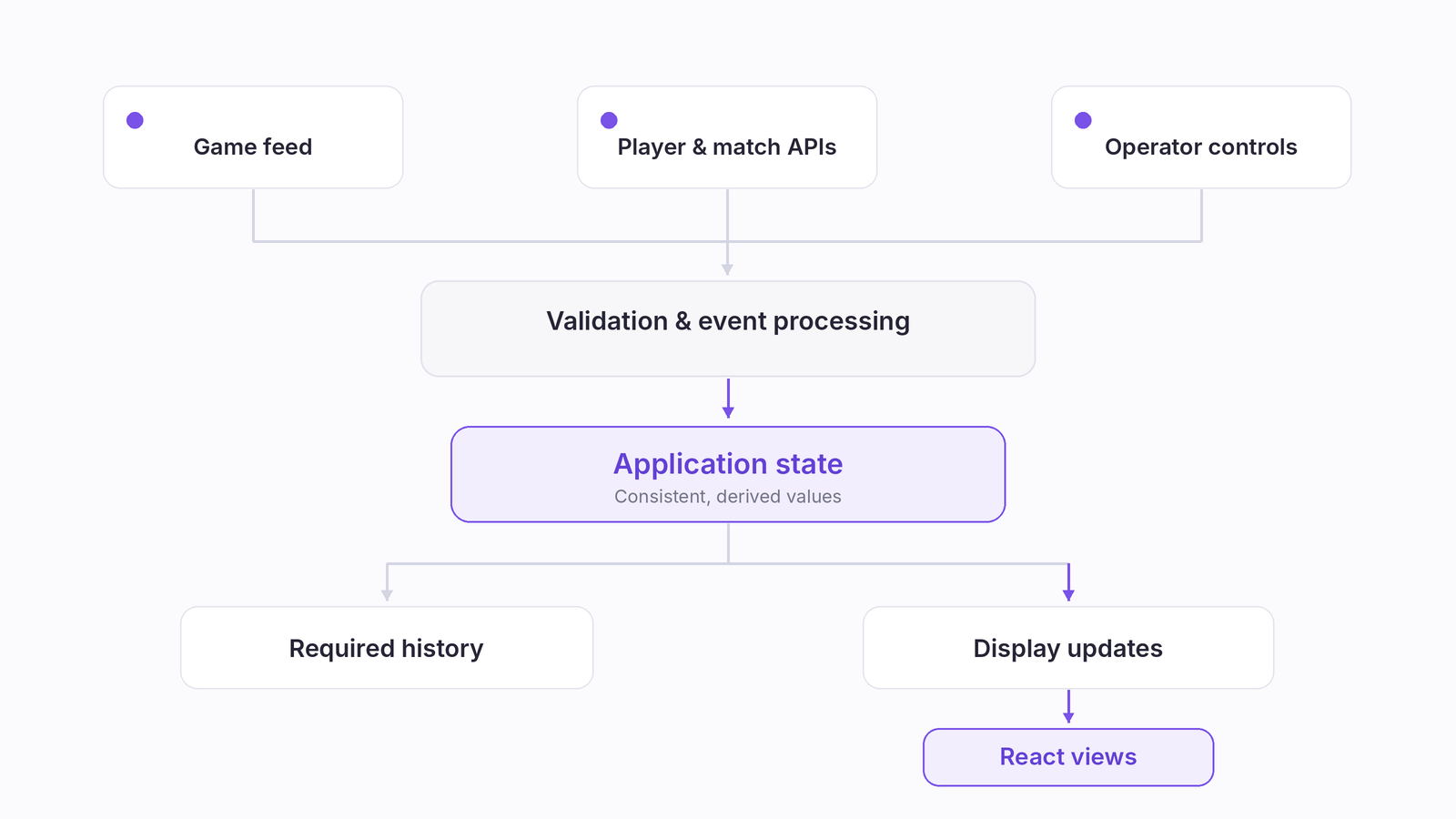
Be precise about where updates are combined. Process required events and deltas first; reduce unnecessary publications to the view afterwards. Do not apply “latest message wins” to an arbitrary incoming stream.
There is also a limit to what frontend scheduling can solve. The browser's standard WebSocket API does not automatically regulate incoming traffic to match processing capacity. When a source sends data faster than the application can process it, reducing React renders may leave the ingestion problem untouched. A design may need upstream rate control, narrower subscriptions, or an explicit overflow and recovery policy.
The latest available data is not always the right data to display. Game events, player cameras, and broadcast footage may reach the production pipeline with different delays. Graphics need to follow the timeline of the footage viewers actually see, rather than simply reacting to the newest incoming event. This requires synchronization across the production pipeline, not just efficient React rendering. Timing should also be tested during transitions between live gameplay, replays, and camera feeds.
Design for attention, not the amount of available data
A broadcast interface competes with the action for attention. Treat screen space as a budget.
Keep persistent context, such as team identity and score, in predictable locations. Reserve temporary emphasis for meaningful events. Show detailed comparisons when they help explain the current situation, rather than displaying every available statistic continuously.
Motion needs the same judgment. Animating every numerical change can make ordinary updates look significant. Reordering panels too often forces the viewer to find information again.
Ultra CS2 HUD's radar provides a small, concrete example: it averages positions using up to five historical samples, trading some responsiveness for steadier motion. Direction handling separately corrects the 0°/360° boundary. Neither technique should be treated as a universal policy for other information.
A smooth marker and an event notification have different jobs. A historical path may benefit from filtering; a newly triggered warning should not be averaged away. Review the interface during abrupt changes and crowded moments, not only while the input moves predictably.
Make stale data and recovery part of the interface
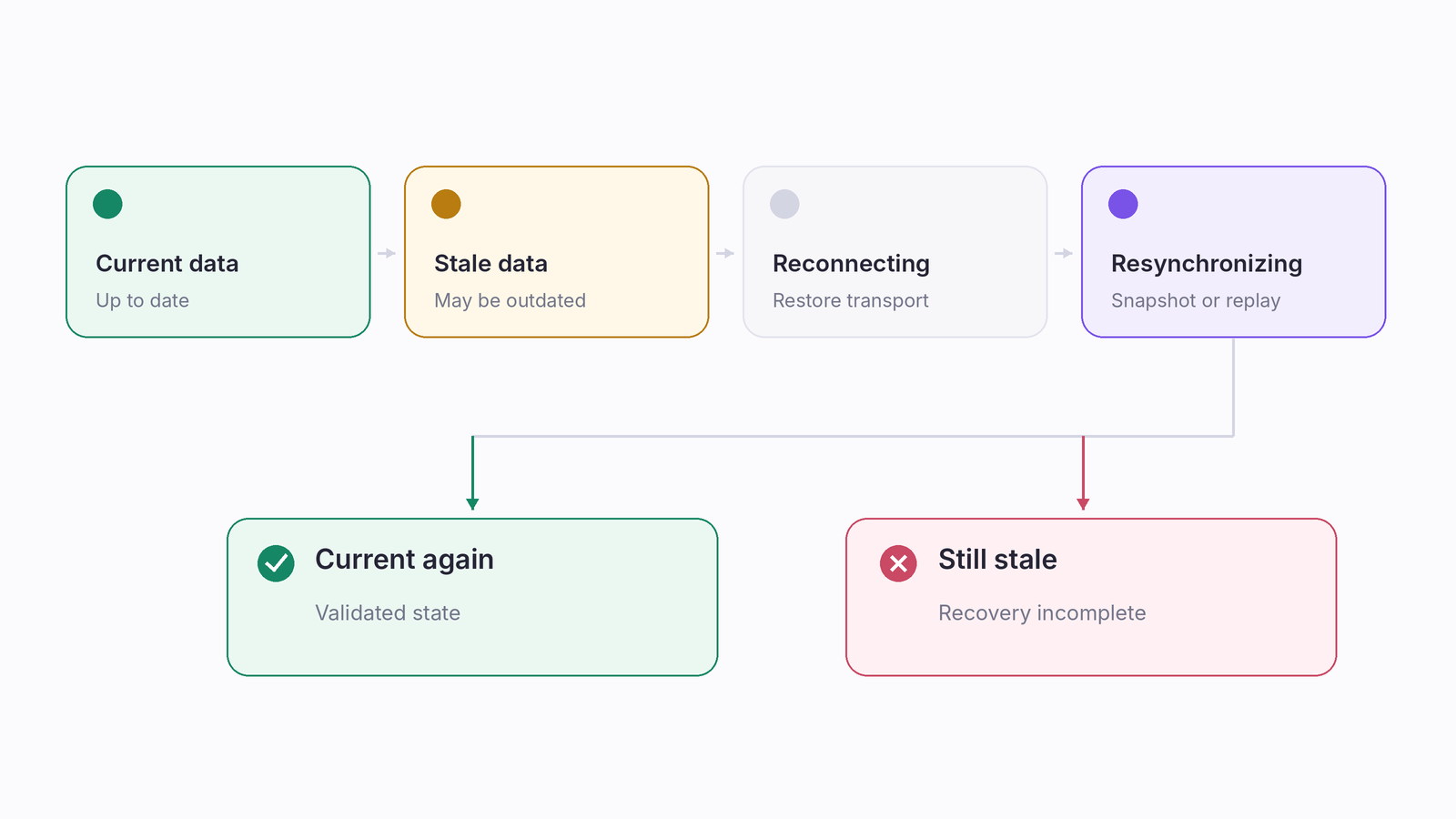
A disconnected interface is easy to recognize when it goes blank. A frozen display that still looks live is more ambiguous.
For a live-data product, specify when information becomes stale and what the user should see. A recent known value might remain useful with an age indicator. Elsewhere, hiding an unreliable value may be safer. An open connection alone should not be treated as proof that a particular data source is current.
Recovery needs its own rules. Where the protocol supports it, request a current snapshot or replay missing events from a known position. Use source-provided sequence identifiers to detect gaps or duplicates. When those guarantees are unavailable, do not imply that reconnecting reconstructs everything that happened during the interruption.
Match or session identity matters too. A late response from an earlier session should not repopulate the current display. Associate asynchronous work with its context and reject results that no longer belong.
Decide these behaviors early. They affect the data contract, operator controls, and visible error states, rather than just the connection code.
Measure the whole path to the screen
A lower render count is useful only if it improves the experience without making information less current.
React's Profiler measures rendering work within a component tree. Browser performance tools expose a wider picture, including JavaScript execution and rendering activity. The browser still needs to perform relevant style, layout, paint, and compositing work after application calculations.
Investigate both. An expensive data transformation can delay an otherwise lightweight component. A cheap React update can still trigger costly layout work. A growing queue can make a smooth display progressively older.
Use representative update bursts while changing layouts, operating controls, and playing media. Track processing time, queue growth, displayed-data age where measurable, and interaction responsiveness. Define where each measurement starts and ends; a React commit timestamp alone does not measure an event's complete journey onto the broadcast.
A practical test suite should also replay recorded or synthetic input sequences. Include a session change with late responses, a missing optional API, a disconnected camera, and a reconnect during activity. Verify outcomes such as correct participant identity, preserved events, and cleanup after a source change. Static screenshots cannot establish those properties.
Build components around responsibilities that survive new screens
Ultra CS2 HUD's scope grew through additional views and camera support in 2023, radar refactoring and map-pool work in 2025, and further radar configuration and a camera-focused view, later called Camera Grid, with an optional scoreboard in 2026.
That history makes maintainability relevant. A new screen should be able to reuse established match information without duplicating source connections or interpretation rules. Presentation components can vary while the underlying identities and event meanings remain consistent.
For a public example of separation, Lexogrine's open-source CS2 React HUD distinguishes API communication from rendering directories. It is a separate customizable HUD, not Ultra CS2 HUD's commercial source code.
This is a useful way to assess React development: examine what happens when the product needs another view, source, or operator control. Components are valuable when they keep those changes understandable, not merely when the project contains many small files.
Where the same decisions matter beyond esports
Smart glasses and AR interfaces
Consider a technician inspecting equipment through display-equipped smart glasses. A measurement, an instruction, and a warning may all be relevant, but they should not receive equal space or attention.
The comparison with a broadcast HUD is useful at this level. Both interfaces place information alongside an activity that should remain the user's focus. Stable placement, selective detail, and clear distinctions between current and stale information are sensible starting points.
Google's design guidance for AI glasses recommends subtle, glanceable visuals that appear when relevant without obstructing the user's view. That supports a restrained approach: show the next useful instruction, make a significant change noticeable, and leave unnecessary detail out of the immediate display.
For smart glasses app development, the question is what the wearer can understand while continuing the task. A dashboard that works well on a monitor should not simply be reduced to fit a smaller viewing area.
The implementation still depends on the device. Android XR distinguishes immersive experiences from lightweight experiences for audio and display glasses. Its development paths involve different tools and interaction models. Browser React, native Android, and WebXR are not interchangeable environments.
What transfers from HUD work is the reasoning about state, timing, context, and attention. Runtime choice, input methods, hardware access, and testing need a separate device-specific assessment.
Sports broadcasting and telemetry
Consider a racing display combining position, timing, penalties, and video. Current position is replaceable state; a penalty is an event. A timing correction should refer to the correct competitor and session.
The same architectural questions apply even though the source systems differ. A useful design separates those meanings, preserves required event history, and decides which graphics belong with the footage currently being shown.
Industrial monitoring
A monitoring screen can also benefit from separating current readings, historical trends, and alarms. A proposed design should make missing or stale readings distinguishable from normal operation, and avoid hiding significant changes behind smoothing.
The analogy has limits. Industrial applications may require safety engineering, audit records, and control-system integration beyond the scope of a broadcast interface. Treat the HUD experience as relevant presentation and software-architecture experience, not evidence of industrial certification or suitability for safety-critical control.
Start with the behavior people need to trust
The first prototype of a live interface should test more than whether data reaches the screen. It should establish what must remain consistent, which changes can wait for the next visual update, and how the product behaves when a source falls behind.
Those decisions give React a clear job: present a coherent view of information whose meaning and lifecycle the application already understands.
For a custom React product involving live data, multimedia, or operational displays, discuss your requirements with Lexogrine.
Disclaimer: Counter-Strike and related trademarks are the property of Valve Corporation. Ultra CS2 HUD is independently developed by Lexogrine and is not affiliated with, sponsored by, or endorsed by Valve Corporation.
Sources
- Ultra CS2 HUD - Professional Counter-Strike 2 Broadcast Overlay - LHM.gg
- Choosing the State Structure - React Documentation
- useSyncExternalStore - React Documentation
- useContext - React Documentation
- Window: requestAnimationFrame() Method - MDN Web Docs
- WebSocket API - MDN Web Docs
- Profiler - React Documentation
- Performance Panel: Analyze Your Website's Performance - Chrome for Developers
- Rendering Performance - web.dev / Google
- CS2 React HUD for LHM.gg - Open-Source Repository - GitHub
- AI Glasses: UI Design - Android Developers / Google
- Android XR Development - Android Developers / Google